Thank you for visiting the AUSTRALIA HP Store
-
Contact Us
CONTACT USCall us
- Sales (Home, Students, Gamers)
- 1300 540 516
- Sales (Small Business Customers)
- 1800 891 209
- Post-Sales
- 13 23 47
- Technical support
- 13 10 47
Exc. public holidays
Chat with us- Our specialist are here to help
- Live Product Demo
- Sales
- 61288061500 (WhatsApp)
-

- Post Sales
- 61288061700(WhatsApp)
- Technical Support
- 61341594000(WhatsApp)
Exc. public holidays
Live product demo
Submit feedback We value your opinion! - My Account

Search
Page 56 - Tech Takes

-
Posted: February 14, 2023
 Read more »
For those who like to use their laptop computers both on the road and at home, it can be a bit of a challenge to transition from one scenario to the other.
Laptops are designed to be portable and used when away from a desktop. However, when you only own a desktop, you’re unable to take your work with you to more easily collaborate with others.
Docking stations for laptops are meant to bridge the gap between portability and having a stationary place to work and play.
With a docking station, you can get the best of both worlds with a system that allows your laptop to work for both purposes.
What features does a docking station include?
The particular docking station you purchase depends on the type of computer you have, the functions you want to use it for, and whether you want extras included.
The docking station itself is usually pretty small and doesn’t take up much space, which can be great if you don’t have much room on your desk. Some of the most basic docking stations provide a power
-
 Read more »There are so many makes and models of laptops out there that choosing the right one can be a real headache. No longer. This full HP Pavilion 15 review will fill you in on the specs for these crowd-pleasing machines along with how they fit into the full HP laptop lineup. It’ll also show you how the 15-inch models stack up against other available models in the HP Pavilion series.
In a nutshell, the perfect user for the HP Pavilion 15 is the student or young professional on a budget who doesn’t want to skimp on specs. If you’re not exactly dripping with cash, but you don’t want to get saddled with a wellspring of frustration, keep scrolling to get the skinny on this thin and light laptop that packs an Intel® Core™ processor and a Full High Definition (FHD) display.
What is the HP Pavilion 15 laptop?
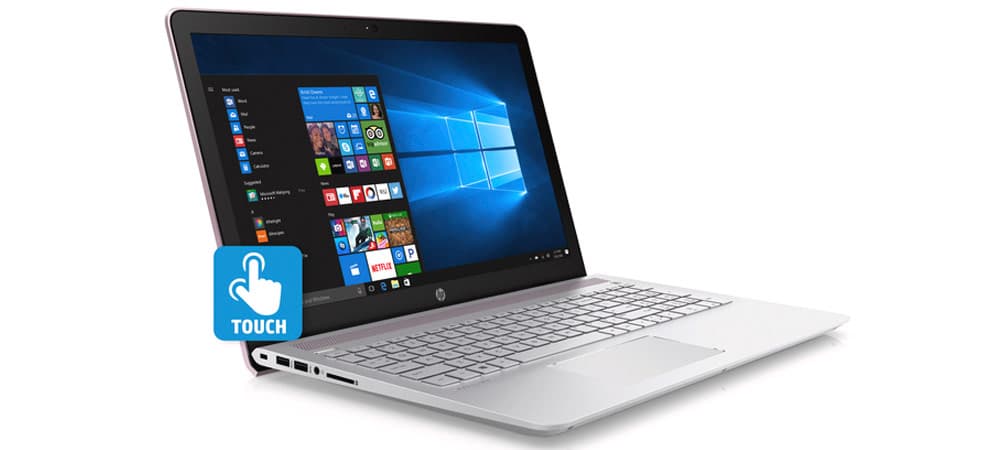 The HP Pavilion 15 is HP’s flagship entry-level laptop. But does entry-level mean you’ll have to suffer with low-end specs and corner-cutting components? Not a chance.
 -
 Read more »Desktop PCs, like the HP Z workstations, have earned a well-deserved reputation for offering powerful business and creative resources. But with more professionals working on the go, only some have a consistent workspace (let alone an actual desk) for their computer.
Luckily, the HP ZBook Fury G8 series makes portable power possible, allowing those in every industry to take their favourite programs and tools with them on the road. Learn more about how the powerful HP ZBook Fury G8 15 mobile workstation and HP ZBook Fury G8 17 mobile workstation are changing how people live and work in our HP ZBook Fury notebook review.
What is the HP ZBook Fury notebook?
The latest entries in the HP ZBook family include the 2 new HP ZBook Fury G8 laptops. These powerful, portable computers have wowed users by being expandable and customizable.
Combined with Windows 10 Pro 64, these sleek, slim notebooks offer desktop-calibre performance capable of the most intense processing tasks, including photo editing, -
Posted: February 13, 2023
 Read more »
Have you heard of the term “screen mirroring?” While it may sound complicated, it’s relatively simple to do and opens up opportunities for device owners to share gaming experiences, presentations, and even movies on other screens. It’s changing the way we view media and makes it more accessible for those with small or outdated devices. Here’s everything you need to know about how to screen mirror your Windows device.
Screen mirroring explained
Mirroring is showing the exact same thing that’s on one screen on a second screen. It allows you to play the game or movie on your mobile phone, for example, and show it on your big-screen TV as well. Why would you want to mirror? It’s an easy way to share your device with others, it can make viewing small text easier, and it gives you the benefit of two screens without worrying about cables.
Different devices have different names for mirroring. Apple uses a technology called AirPlay, and Android devices may use SmartView. Windows 10’s version is
-
Posted: February 10, 2023
 Read more »Laptops are very useful tools to have around, especially when you have work to do or even if you want to just relax playing games or watching movies. And while PCs tend to offer more power than most laptops, many people prefer the convenience of having an easily portable computer. However, laptops can be expensive, potentially leaving people without a workstation or gaming/entertainment platform.
The good news is that budget options still offer all that most people will need despite the low cost. To help you find the right one for you, we’ve created this brief article on the best HP laptops for under $1,000 in Australia.What should you look for from a budget laptop?
You will rarely find any laptops under $1,000 with whistles and bells. After all, the most advanced technology is also usually the most expensive to produce. Having said that, you can still find plenty of laptops under $1,000 that will help you with everyday tasks. And to help you get a better deal for your money, it’s a good -
Posted: February 10, 2023
 Read more »Engineering can be very complex and highly technical, and students will often need to make advanced calculations. Engineering students can also have other tasks to complete, such as designing a new building or product. But there’s good news for engineering students: laptops can help make short work of such tasks, completing them quickly and accurately.
Numerous developers have created engineering software that gives users access to useful tools that help them work faster and better. For example, AutoCAD and similar tools have been developed that help engineers create digital models for a wide range of industries. All that’s needed is a computer powerful enough to run the software.What should engineering students look for?
Engineering students will mostly need a reasonably powerful processor and plenty of RAM to help run sophisticated software. A large storage capacity can also be beneficial and choosing an SSD card will help enhance the computer’s performance.
It's also a good idea to -
Posted: February 10, 2023
 Read more »Laptops can be very powerful tools when it comes to music production, giving artists access to tools that will help them fine-tune their work for the best results. Using laptops for music production will also offer other benefits, such as offering a convenient way to store and share music and other files.
With so many options to choose from, we’re highlighting some of the best laptops for music production from HP in Australia.What should music producers look for in a laptop?
One of the most important aspects to look for in a laptop for music production is the ability to run music production software. As such, this means finding a machine with a reasonably powerful processor and a good amount of RAM. Some people prefer a larger screen, and even having a full keyboard can be important for some people.
If you intend to play music back on your laptop then a good quality soundcard and quality speakers are also essential. The laptop will also need enough memory to store music and other files, -
Posted: February 10, 2023
 Read more »The best laptops for programming feature a spacious screen size for long coding sessions and pack plenty of punch to power through your workflows. While the profession doesn’t demand top-of-the-line hardware, a speedy machine goes a long way towards optimising productivity.
But not everyone can afford state-of-the-art tech. It’s crucial to factor price into the equation, as well as other factors like ports and portability.
This post covers the core requirements and minimum specs for a programming laptop. We’ll then outline the six most suitable options in the HP Australia store.What you need with a coding laptop
Programming isn’t a hardware-intensive profession. Regardless of what language you code in, you don’t need top-of-the-line specs to manage your daily workflows (gaming and web development may present an exception).
However, that doesn’t mean you should cut costs by purchasing a low-end laptop. Better specs let you execute functions and multi-task more effectively, thus improving -
Posted: February 09, 2023
 Read more »The best laptop for work optimises productivity and provides ample battery life to power through a rigorous working day. And as many modern employees are constantly on the move, a good business laptop also comes in a slimline, lightweight design.
But not all businesses have identical requirements. Some require high-speed processors, while others need beefy GPUs to render 3D images on the fly. Therefore, the best work laptop will vary from worker to worker.
In this post, we’re providing a simple work laptop definition, outlining the top shopping considerations, and presenting a shortlist of the best work laptops in the HP Australia store.What is a work laptop?
A work laptop is a portable PC specially designed for work-related tasks. The best laptops for work come with high-end specs to reduce load times and optimise productivity - time is money, after all.
Most work laptops prioritise portability, so you can whisk the device between meetings and workplaces. -
Posted: February 09, 2023Categories: Miscellaneous
 Read more »
Most popular idle games are based on a single interaction: clicking with your mouse. Sometimes called idle clickers and incremental games, idle games incorporate depth and complexity in their own unique ways. Some idle browser games are more about novelty and challenging yourself through successive runs, while others focus on upgrades and management.
Recent Posts





Popular Posts








Products purchased through this store are sold and fulfilled by Ingram Micro Pty Limited

CONTACT US
Call us
- Sales (Home, Students, Gamers)
- 1300 540 516
- Sales (Small Business Customers)
- 1800 891 209
- Post-Sales
- 13 23 47
- Technical support
- 13 10 47
Exc. public holidays
Chat with us
- Our specialist are here to help
- Live Product Demo
- Sales
- 61288061500 (WhatsApp)
-
- Post Sales
- 61288061700(WhatsApp)
- Technical Support
- 61341594000(WhatsApp)
Exc. public holidays
Live product demo
Submit feedback
We value your opinion!