Thank you for visiting the AUSTRALIA HP Store
-
Contact Us
CONTACT USCall us
- Sales (Home, Students, Gamers)
- 1300 540 516
- Sales (Small Business Customers)
- 1800 891 209
- Post-Sales
- 13 23 47
- Technical support
- 13 10 47
Exc. public holidays
Chat with us- Our specialist are here to help
- Live Product Demo
- Sales
- 61288061500 (WhatsApp)
-

- Post Sales
- 61288061700(WhatsApp)
- Technical Support
- 61341594000(WhatsApp)
Exc. public holidays
Live product demo
Submit feedback We value your opinion! - My Account

Search
HP ENVY All-in-One Printers for Home and Office

Posted:
January 09, 2026
Categories:
Printer
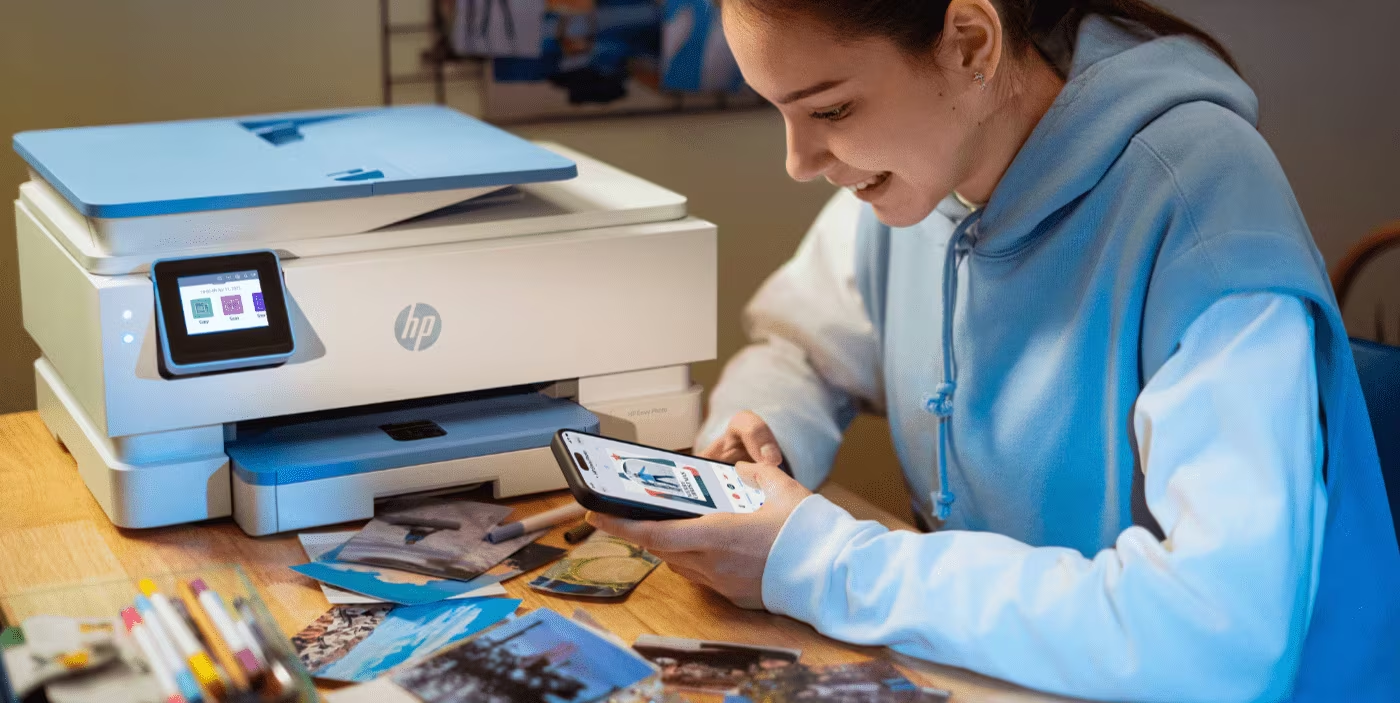
For Australian families and creative individuals who value high-quality photo printing alongside everyday document needs, HP ENVY printers offer an impressive combination of productivity and exceptional photo output. Whether you’re managing a busy household in Sydney’s suburbs, coordinating remote work in Melbourne, or balancing family life across Brisbane, these versatile devices provide a single solution for professional documents and vibrant, true-to-screen photo printing perfectly suited to Australia’s diverse printing requirements.
The HP ENVY printer range represents a perfect balance between performance, convenience and value for Australian households and small offices. With features designed specifically for modern home and office environments, these printers handle everything from school assignments and work presentations to preserving precious family memories in stunning photo quality.
Contents
- Why Choose HP ENVY Printers for Your Australian Home or Office
- Smart Features That Set HP ENVY Apart
- Best HP ENVY Printers for Australian Homes and Offices
- Understanding HP ENVY Printer Capabilities
- Setting Up Your HP ENVY Printer
- Maximising Your HP ENVY Printer’s Potential
- HP ENVY Printers and Environmental Responsibility
- Common Questions About HP ENVY All-in-One Printers
- Choosing the Right HP ENVY Printer for Your Australian Needs
- Making the Most of Your Investment
- Final Thoughts
- Choosing the Right HP Printer for Your Indian Home or Office
- Making the Most of Your HP Printer
- Common Questions About HP All-in-One Printers in India
- Additional Printer Options for Specific Needs
- Final Thoughts
Why Choose HP ENVY Printers for Your Australian Home or Office
HP ENVY printers stand out in the Australian market through their combination of intelligent features and user-friendly design. These all-in-one devices deliver professional-quality output whilst maintaining the simplicity that busy Australian families and small businesses require. In a country where distances can be vast and connectivity sometimes challenging, having a reliable, feature-rich printer at home becomes essential.
Australian homes face unique printing challenges - from managing remote learning requirements during unpredictable weather events to coordinating family schedules across multiple cities. HP ENVY printers address these needs through reliable wireless connectivity, intuitive mobile printing capabilities and smart features that anticipate your requirements before issues arise. The self-healing Wi-Fi technology proves particularly valuable in Australian homes where NBN connections may vary in stability across different regions.
The ENVY series excels at versatility. Whether you’re printing tax documents for EOFY, creating photo albums of your Great Barrier Reef holiday, producing presentation materials for client meetings, or helping children with school projects, these printers handle diverse tasks with consistent quality. The true-to-screen technology ensures your printed materials match exactly what you see on your device, eliminating the frustration of colour mismatches that plague many printing solutions - particularly important when printing vibrant images of Australia’s stunning landscapes and wildlife.
Smart Features That Set HP ENVY Apart
Modern Australian lifestyles demand printing solutions that work seamlessly across multiple devices and locations. HP ENVY all-in-one printers deliver through several innovative features that transform the printing experience for families and small businesses alike.
HP Smart App: This comprehensive application allows you to control your printer directly from your smartphone or tablet. Monitor ink levels whilst out shopping at Coles or Woolworths, initiate print jobs from your mobile device during the school pickup, and troubleshoot any issues with guided assistance. The app integrates seamlessly with both Android and iOS devices, providing complete printer management from anywhere with an internet connection - essential for Australia’s mobile-first lifestyle.
Dual-Band Wi-Fi with Self-Healing: HP ENVY printers feature dual-band wireless connectivity compatible with both 2.4 GHz and 5.0 GHz operations, ensuring optimal performance across different NBN connection types common throughout Australia. Whether you’re on FTTP in metropolitan Sydney, FTTN in suburban Melbourne, or fixed wireless in regional Queensland, the self-healing Wi-Fi automatically detects and fixes connectivity issues. This provides HP’s most reliable wireless technology to experience uninterrupted printing even during network fluctuations that can occur during peak usage times or severe weather events.
Mobile Printing Capability: Print directly from your smartphone, tablet or laptop without complicated setup procedures. Whether you’re working from your home office in Perth, coordinating family activities in Adelaide, or managing a small business in Hobart, mobile printing provides the flexibility Australian lifestyles require. The HP Smart App supports printing from cloud storage services, email attachments and directly from your device’s photo library - perfect for printing permission slips, boarding passes, or last-minute homework assignments.
HP+ and Instant Ink: Enable HP+ at setup to access advanced features including automatic firmware updates keeping your printer secure and running optimally, enhanced security features and extended warranty coverage. The Instant Ink subscription service monitors your ink levels and automatically delivers replacement cartridges before you run out, potentially saving up to 50% on ink supplies. Starting from just $3.49 per month, the service includes free delivery across Australia and recycling of used cartridges, ensuring you never face the frustration of running out of ink at critical moments - particularly important for remote and regional Australian households where accessing printer supplies quickly can be challenging.
Sustainable Printing: HP ENVY models demonstrate strong environmental credentials, particularly important for environmentally conscious Australian consumers. These printers are responsibly crafted with at least 60% recycled plastic in both the printer body and ink cartridges. The packaging utilises moulded fibre cushions containing at least 95% fibre-based materials, significantly reducing plastic waste. Additionally, ENVY printers meet ENERGY STAR® efficiency standards, helping reduce your environmental footprint whilst saving on electricity costs - especially relevant given Australia’s rising energy prices and increasing focus on renewable energy adoption.
True-to-Screen Technology: HP’s innovative true-to-screen technology ensures documents and borderless photos look exactly as they appear on your screen. This eliminates the common frustration of printed colours not matching your expectations, particularly crucial for creative professionals, small business owners and anyone who requires colour accuracy in their printed materials. Whether you’re printing photos of the vibrant Great Ocean Road, documents with corporate branding, or school projects requiring specific colour matching, this technology delivers consistent, reliable results.
Best HP ENVY Printers for Australian Homes and Offices
When selecting an HP ENVY printer for your Australian home or office, understanding the specific capabilities of each model helps ensure you choose the right solution for your needs. The ENVY range offers models suited to different printing volumes and requirements, from basic family printing to more demanding creative and small business applications.
Best HP ENVY Printer for Enhanced Photo Quality
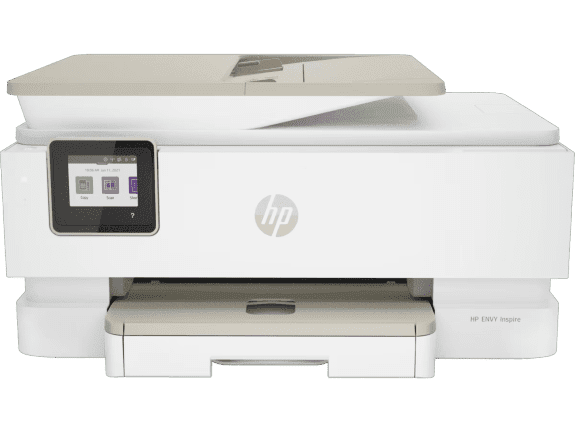
For Australian families and creative individuals who frequently print photos and require superior colour reproduction, the HP ENVY Inspire 7920e provides enhanced capabilities. This model delivers the same reliable document printing as other ENVY models whilst offering improved photo printing quality that captures the vivid colours of Australia’s stunning landscapes - from the red dirt of the Outback to the turquoise waters of the Whitsundays, from Sydney Harbour’s brilliant blue to the lush greens of Tasmania’s rainforests.
-
Print, scan and copy with enhanced photo capabilities
-
HP Thermal Inkjet technology
-
Automatic duplex printing for efficient paper use
-
Built-in self-healing dual band Wi-Fi 802.11a/b/g/n/ac
-
Recommended monthly page volume: 300 to 400 pages
-
Borderless photo printing for professional results
-
HP Smart App integration for seamless mobile printing
-
Instant Ink compatible for automatic ink delivery
-
Sustainable design with at least 60% recycled plastic
The 7920e particularly excels at producing photo prints that maintain colour accuracy and detail. Whether you’re creating photo albums of your family’s coastal holiday at Bondi Beach, printing images for school projects about Australian wildlife, or producing marketing materials for a small business showcasing local products, this printer delivers professional-quality results. The borderless printing capability eliminates the telltale white edges, creating prints that rival professional photo labs at a fraction of the cost - important for Australian families managing budgets whilst wanting quality keepsakes.
Understanding HP ENVY Printer Capabilities
When selecting an HP ENVY printer for your Australian home or office, understanding the specific capabilities that differentiate these models helps ensure you make an informed decision aligned with your actual needs. All ENVY printers share core features that define the series, but individual models offer enhanced capabilities suited to specific uses and printing volumes.
The colour touchscreen technology featured across ENVY models represents HP’s latest and most intuitive display interface. This makes navigation through printing options significantly simpler compared to traditional button-based systems, particularly beneficial when adjusting settings for different paper types, print qualities or specific requirements. Whether you’re printing school assignments, business proposals, family photos or council documents, the touchscreen provides a user-friendly experience that reduces confusion and operational errors - important for households with multiple users of varying technical abilities.
Print speeds across the ENVY range ensure efficient output for typical Australian household and small business needs. Rather than waiting extended periods for multi-page documents, ENVY printers deliver pages quickly enough to keep pace with busy schedules. This efficiency proves particularly valuable during morning rushes when children need homework printed before school, when last-minute business documents require printing before meetings, or when tax documents need preparing as the EOFY deadline approaches.
Borderless printing capability, available across ENVY models, delivers professional-looking photos without the characteristic white border found on standard prints. This feature transforms casual photo printing into something approaching professional photo lab quality. Australian families printing holiday photos from trips to Kakadu or the Gold Coast, small businesses creating marketing materials featuring local landscapes, or students producing visual projects about Australian history all benefit from this professional presentation that elevates the final output.
The wireless connectivity common to all ENVY printers adapts to various Australian home network configurations, from NBN fibre connections in metropolitan areas to fixed wireless and satellite connections in regional locations. The self-healing Wi-Fi technology proves particularly valuable in homes with multiple connected devices competing for bandwidth - a common scenario in modern Australian households where smartphones, tablets, laptops, smart TVs and gaming consoles all share network resources. The automatic connectivity issue resolution prevents many common printing frustrations before they impact your experience.
Setting Up Your HP ENVY Printer
Getting started with your new HP ENVY printer involves a straightforward process designed to have you printing within minutes. The setup accommodates various technical skill levels, ensuring everyone from tech-savvy individuals to those less comfortable with technology can successfully configure their printer without frustration or requiring professional assistance.
Begin by downloading the HP Smart app from your device’s app store. The app supports Android devices, iOS devices including iPhones and iPads, and desktop computers running Windows or macOS. This flexibility ensures compatibility regardless of which devices you primarily use in your Australian home or office - acknowledging that many Australian households use a mix of Apple and Android devices, or Windows computers alongside tablets.
Once you’ve downloaded the app, it guides you through each setup step with clear instructions and visual prompts. The initial process includes unboxing your printer, installing ink cartridges, loading paper and connecting to your Wi-Fi network. The guided walkthrough anticipates common questions and provides helpful tips at each stage, significantly reducing setup frustration that often accompanies new technology. Many Australian users report completing the entire setup process in under 15 minutes, even without prior printer installation experience.
Connecting your ENVY printer to your Wi-Fi network represents the most critical setup step. The dual-band Wi-Fi capability means your printer can connect to either 2.4 GHz or 5.0 GHz networks, providing flexibility based on your home network configuration and the physical distance between your router and printer location. The 2.4 GHz band offers better range, beneficial for larger Australian homes with sprawling floor plans, whilst the 5.0 GHz band provides faster data transfer for homes with strong signal strength throughout.
After successful network connection, you can immediately begin printing from your smartphone, tablet or computer without cables. This wireless freedom means you can position your printer anywhere within Wi-Fi range, whether that’s tucked away in a study, positioned in a central family area, placed in a dedicated home office, or even in a sheltered outdoor area if climate permits. The flexibility proves particularly valuable in open-plan Australian homes where aesthetic considerations influence appliance placement and where natural light and ventilation affect room usage.
Consider enabling HP+ during initial setup if you want to access enhanced features. HP+ provides automatic firmware updates keeping your printer secure and performing optimally, extended warranty coverage providing additional peace of mind beyond standard terms, and three months of Instant Ink included at no additional cost. The decision to enable HP+ should be made during initial setup, as it requires creating an HP account and agreeing to use Original HP Ink cartridges throughout your printer’s life - a commitment that ensures optimal performance and reliability.
Maximising Your HP ENVY Printer’s Potential
Once you’ve successfully set up your HP ENVY printer, several strategies help you derive maximum value from your investment whilst ensuring years of reliable service. Understanding and utilising the full range of capabilities transforms your printer from a simple output device into a comprehensive document and photo production centre that supports your family’s or business’s diverse needs.
The HP Smart App offers advanced features beyond basic printing that many Australian users discover over time. Document scanning saves directly to cloud storage services including Google Drive, Dropbox and Microsoft OneDrive, enabling you to digitise important paperwork and access it from any device. This proves particularly valuable for Australian households managing bills, medical records, school documents, insurance paperwork, vehicle registration documents and other paperwork that accumulates over time. Rather than maintaining bulky filing systems that consume valuable space, scan important documents and store them securely in the cloud where they’re accessible but don’t consume physical space in your home.
Understanding the various print quality settings available helps optimise both output quality and ink consumption - crucial for managing ongoing printing costs. For everyday documents including homework assignments, draft documents, shopping lists and reference materials, standard quality printing delivers crisp, readable text whilst conserving ink. For photos, presentations, final documents, marketing materials and special projects, selecting higher quality settings ensures professional results worthy of the occasion. The ability to adjust quality based on specific needs provides control over ink usage, particularly important when managing household or small business budgets in Australia’s current economic climate.
The HP Smart App provides detailed insights into your printing habits through usage reports and ink level monitoring. These insights help you understand your actual printing volume, enabling informed decisions about Instant Ink subscription plans. Rather than guessing your monthly page volume or being surprised by ink costs, base your subscription choice on real data collected by the app over time. The app alerts you when you’re approaching your plan limits, allowing time to adjust your subscription if your needs change with school terms, tax season or business cycles.
For Australian households participating in the Instant Ink programme, optimising your plan selection saves money whilst ensuring you never run out of ink at critical moments. The programme offers various plans accommodating different monthly page volumes, from occasional printing to high-volume needs exceeding 700 pages monthly. You can upgrade or downgrade your plan at any time through the HP Smart App, providing flexibility as your printing requirements change with seasons, school terms, business cycles or life circumstances like working from home more frequently.
Take advantage of the mobile printing capabilities for convenience beyond your home or office. Print documents directly from your smartphone whilst at the shops, waiting for appointments, during children’s sports activities, or commuting on public transport. Email attachments, cloud-stored files and photos from your device library can all be printed remotely, ensuring documents are ready when you arrive home. This remote capability proves particularly valuable for busy Australian families coordinating multiple schedules and locations across cities where traffic delays might affect arrival times.
HP ENVY Printers and Environmental Responsibility
Australian consumers increasingly consider environmental impact when making purchasing decisions, driven by growing awareness of climate change, bushfire risks, drought conditions and the need for sustainable practices. HP ENVY printers address these concerns through comprehensive sustainability initiatives that extend beyond basic recycling programmes to encompass the entire product lifecycle.
The substantial use of recycled plastic in ENVY printer construction - at least 60% in the printer body and ink cartridges - reduces demand for virgin plastic production whilst maintaining the durability and quality expected from HP products. This closed-loop approach to manufacturing helps address Australia’s plastic waste challenges whilst demonstrating that recycled materials can deliver the same performance and longevity as traditional manufacturing methods. The recycled plastic content doesn’t compromise functionality, reliability or appearance, providing environmentally conscious Australian consumers with guilt-free technology choices.
Packaging improvements significantly reduce waste associated with printer shipping and delivery throughout Australia’s vast distances. The moulded fibre cushions containing at least 95% fibre-based materials replace traditional foam and plastic packaging elements, creating packaging that’s fully recyclable through standard paper recycling programmes available across Australian councils from metropolitan areas to regional centres. This packaging innovation addresses a common environmental concern with electronic devices whilst ensuring products arrive undamaged despite Australia’s challenging logistics environment spanning thousands of kilometres.
ENERGY STAR® certification indicates ENVY printers meet strict energy efficiency standards, reducing electricity consumption during operation and standby modes. For Australian households facing rising energy costs and increasingly frequent heatwaves placing strain on the power grid, this efficiency translates directly to lower electricity bills whilst reducing your carbon footprint. The printers automatically enter low-power modes when not actively printing, minimising energy waste during idle periods common in home and small office environments where printing occurs intermittently throughout the day rather than continuously.
The Instant Ink programme includes free recycling of used cartridges, addressing the end-of-life disposal challenge that frustrates many printer owners and contributes to landfill waste. Rather than cartridges ending up in Australian landfills, HP provides prepaid return envelopes with cartridge deliveries. Simply place used cartridges in the envelope and post them back to HP for proper recycling through Australia Post. This closed-loop approach ensures valuable materials are recovered and reused rather than wasted, supporting Australia’s circular economy goals whilst making responsible disposal effortless for consumers.
HP’s broader environmental commitments extend beyond individual product features to encompass global conservation efforts relevant to Australian consumers concerned about deforestation and biodiversity loss. For every page printed, HP works with partners including World Wildlife Fund and Arbor Day Foundation to manage, restore and protect forests globally. Whilst reducing unnecessary printing remains important for environmental responsibility, knowing your printing contributes to forest conservation provides additional peace of mind for environmentally conscious Australian consumers who understand the connection between forests, climate regulation and ecosystem health.
Common Questions About HP ENVY All-in-One Printers
What is the best all-in-one printer for home use in Australia?
For Australian families seeking everyday printing combined with occasional photo printing, the HP ENVY Inspire 7220e offers excellent value through its blend of affordability, quality and smart features. Its 300 to 400 page monthly volume suits typical household needs whilst delivering reliable performance across documents and photos. For those who frequently print photos and want enhanced colour reproduction, the HP ENVY Inspire 7920e provides superior photo printing capabilities with improved colour accuracy and vibrancy. Both models support Instant Ink, helping Australian families manage printing costs predictably whilst ensuring they never run out of ink at inconvenient moments.
Are HP ENVY printers good for photo printing?
Absolutely. HP ENVY printers excel at photo printing with several features specifically designed for high-quality photo output that captures memories beautifully. The borderless printing capability creates professional-looking photos without white edges, whilst true-to-screen technology ensures printed colours match what you see on your device - crucial when printing vibrant Australian landscapes, beach scenes or family portraits. The automatic duplex photo printing available on select models saves time when creating photo albums or printed keepsakes. These features make ENVY printers ideal for preserving Australian family memories, creating photo albums of holidays around the country, or printing images for school projects showcasing Australian geography, wildlife or cultural events.
Do HP all-in-one printers work with mobile devices?
Yes, HP ENVY all-in-one printers offer comprehensive mobile device support through the HP Smart App available for both Android and iOS devices. Print, scan and copy directly from your smartphone or tablet regardless of whether you use Samsung, Apple, Google or other manufacturers. The app allows complete printer management including monitoring ink levels, adjusting settings, troubleshooting issues and initiating print jobs from anywhere with internet connectivity. This mobile capability proves particularly valuable for busy Australian families and small business owners who require printing flexibility beyond traditional desktop computing, enabling printing whilst commuting, shopping or coordinating activities across multiple locations.
How do I set up wireless printing on HP ENVY printers?
Setting up wireless printing on HP ENVY printers follows a straightforward process designed for simplicity. Download the HP Smart app from your device’s app store - available for Android, iOS, Windows and macOS - then follow the guided setup to connect your printer to your Wi-Fi network. The app provides step-by-step instructions with visual prompts, making setup accessible regardless of technical expertise or prior printer experience. The dual-band Wi-Fi capability accommodates various Australian home network configurations, from NBN connections in metropolitan areas to fixed wireless in regional locations. The self-healing Wi-Fi technology automatically addresses connectivity issues, maintaining stable performance even in homes with multiple connected devices competing for bandwidth.
What is HP+ and how does it benefit Australian users?
HP+ is a comprehensive smart printing system providing automatic firmware updates to keep your printer secure and performing optimally, security features protecting your device from emerging threats, and cloud connectivity enabling printing from anywhere with internet access. For Australian users, HP+ offers extended warranty coverage up to two years, providing additional peace of mind beyond standard warranty terms - particularly valuable given Australia’s consumer protection laws and the distances involved in service logistics. New HP+ enabled printers include three months of Instant Ink at no additional cost, allowing you to experience the automatic ink delivery service before committing to a paid subscription. HP+ requires an HP account, ongoing internet connection, and exclusive use of Original HP Ink cartridges throughout the printer’s life to ensure optimal performance and reliability.
What is Instant Ink and how much can Australian families save?
Instant Ink is a subscription service monitoring your ink levels and automatically delivering replacement cartridges before you run out, eliminating the frustration of discovering you’re out of ink when you need to print urgently. Australian families can save up to 50% on ink costs compared to purchasing individual cartridges at retail prices from office supply stores or electronics retailers. Plans start from just $3.49 per month, with various options accommodating different monthly printing volumes from 10 to 700 pages. The service includes free delivery across Australia - valuable given our vast distances - and prepaid return envelopes for recycling used cartridges through Australia Post. You can adjust your plan at any time through the HP Smart App, ensuring your subscription matches your actual printing needs as they change throughout the year with school terms, tax season or business cycles.
Are HP ENVY printers environmentally friendly?
Yes, HP ENVY printers demonstrate strong environmental credentials important to environmentally conscious Australian consumers concerned about climate change, plastic waste and energy consumption. Construction utilises at least 60% recycled plastic in printer bodies and ink cartridges, whilst packaging employs moulded fibre cushions containing at least 95% fibre-based materials rather than plastic foam that contributes to landfill waste. ENERGY STAR® certification confirms energy efficiency, helping Australian families reduce electricity costs whilst minimising their carbon footprint - particularly important during summer months when air conditioning already strains electricity usage. The Instant Ink programme includes free cartridge recycling through prepaid envelopes, ensuring responsible end-of-life disposal without requiring consumers to locate recycling facilities. Additionally, HP’s partnership with environmental organisations means every printed page contributes to global forest management and restoration efforts, helping offset the environmental impact of paper consumption.
Which HP ENVY printer is best for small Australian businesses?
For small Australian businesses requiring reliable document printing with occasional photo capabilities for marketing materials, the HP ENVY Inspire 7920e provides excellent performance balancing quality and efficiency. Its recommended monthly volume of 300 to 400 pages suits typical small business needs including invoices, reports, presentations and correspondence, whilst the enhanced photo printing capabilities support marketing materials, product catalogues and client presentations requiring professional appearance. The automatic duplex printing reduces paper consumption and costs, important for businesses managing overheads in competitive markets. Wireless connectivity supports multiple users across office devices, whilst Instant Ink helps small businesses budget printing costs predictably without surprise expenses. For businesses primarily printing documents rather than photos, or requiring higher monthly volumes, consider exploring HP’s comprehensive range of business printers which offers models optimised for higher volume document output, faster print speeds and enhanced security features suited to commercial environments.
Choosing the Right HP ENVY Printer for Your Australian Needs
Selecting between HP ENVY models depends on your specific printing requirements, budget constraints and typical usage patterns unique to your situation. Understanding these factors ensures you invest in a printer that matches your actual needs rather than paying for capabilities you won’t utilise or purchasing insufficient features that limit functionality and frustrate users over time.
Consider your typical monthly printing volume as a primary selection criterion when comparing models. If your household or small business prints primarily during school terms, tax season or specific business periods, your average monthly volume differs significantly from your peak usage - a common pattern in Australian households where printing surges during February-March and July-October school terms whilst dropping significantly during summer holidays. The HP ENVY Inspire 7220e and 7920e models accommodate monthly volumes of 300 to 400 pages, suitable for most Australian households and small businesses. If you print less frequently - perhaps only occasionally for personal correspondence, occasional photos or light administrative tasks - the HP ENVY 6034e supports volumes from 100 to 400 pages, providing flexibility for lighter users whilst maintaining full functionality.
Photo printing frequency and quality requirements significantly influence model selection beyond basic considerations. Families who occasionally print photos for albums, school projects or sharing with relatives find standard ENVY photo capabilities sufficient for their needs. However, creative professionals working in photography or design, photography enthusiasts pursuing their hobby seriously, or those who regularly produce marketing materials showcasing Australian products, landscapes or services benefit from enhanced photo printing features offered by models like the HP ENVY Inspire 7920e. The improved colour accuracy, vibrancy and professional output quality justify the investment for users prioritising photo results that rival professional photo lab output whilst providing the convenience of home printing.
Budget considerations extend beyond initial purchase price to include ongoing ink costs, paper expenses and potential maintenance over the printer’s lifetime. The Instant Ink subscription service transforms unpredictable ink purchases into manageable monthly costs, helping Australian households and small businesses budget accurately without surprise expenses. When comparing printer models, factor in potential Instant Ink savings alongside purchase prices rather than focusing solely on upfront costs. Higher-specification models sometimes deliver better long-term value through more efficient ink usage and reduced per-page costs, even if initial purchase prices are higher - an important consideration for Australian consumers focused on total cost of ownership rather than just acquisition price.
Physical space availability in your Australian home or office influences printer selection, particularly in compact urban apartments common in Sydney, Melbourne and Brisbane where property prices drive downsizing. The HP ENVY 6034e’s compact footprint suits space-constrained environments without sacrificing essential functionality, making it ideal for small apartments, student accommodation or compact home offices where every centimetre matters. Larger homes with dedicated office spaces, separate study areas or ample storage accommodate any ENVY model comfortably, allowing you to prioritise features over size. Consider not just the printer’s dimensions but also accessibility requirements for paper loading, ink replacement and routine maintenance when determining placement in your space.
Making the Most of Your Investment
Australian consumers making significant purchases rightfully expect value and longevity from their investments, particularly for technology that becomes essential to daily household operations. HP ENVY printers deliver through durable construction, comprehensive warranty coverage, and features designed for years of reliable service. Maximising your investment requires understanding proper maintenance practices, troubleshooting common issues effectively, and utilising available support resources when needed.
Regular maintenance keeps your ENVY printer performing optimally throughout its service life, preventing many common issues before they develop. The HP Smart App provides automated maintenance reminders including printhead cleaning, alignment checks and firmware updates. Following these maintenance prompts prevents many common printing issues including streaked output, colour inaccuracies and paper feed problems that frustrate users. The automated maintenance routines take just minutes but significantly extend your printer’s functional lifespan whilst maintaining output quality that matches initial performance - important for ensuring your investment continues delivering value year after year.
Firmware updates delivered automatically through HP+ ensure your printer benefits from ongoing improvements, security patches and feature enhancements developed after manufacture. These updates occur transparently in the background, requiring no intervention whilst keeping your printer current with HP’s latest software developments. For printers not enrolled in HP+, manually check for firmware updates quarterly through the HP Smart App or printer settings menu accessible through the touchscreen. Staying current with firmware prevents compatibility issues with newer devices or operating systems, addresses security vulnerabilities before they can be exploited, and ensures optimal performance as technology evolves.
Understanding your warranty coverage and available support resources provides peace of mind when issues arise despite proper maintenance. Standard HP printer warranties cover manufacturing defects and hardware failures for one year from purchase date, whilst HP+ extends warranty coverage to two years, providing additional protection at no extra cost. Beyond warranty coverage, HP provides comprehensive support through their Australian website offering troubleshooting guides and FAQs, phone support during business hours across Australian time zones, and live chat assistance for quick questions. The HP Smart App includes troubleshooting guides addressing common issues with step-by-step solutions, often resolving problems without requiring technical support contact - saving time and frustration.
For Australian users experiencing printing challenges despite troubleshooting attempts, systematic problem-solving often resolves issues quickly without requiring service calls. Connectivity problems frequently trace to Wi-Fi network issues rather than printer faults - restarting your router and printer often restores normal function by clearing temporary glitches. Print quality issues typically indicate low ink levels, clogged printheads or incorrect paper settings rather than hardware failures. The HP Smart App’s diagnostic tools identify and address these common problems through guided procedures accessible even to non-technical users. For persistent issues beyond basic troubleshooting - including mechanical problems, unusual error messages or performance degradation - contact HP support through channels appropriate to your warranty status and urgency requirements.
Final Thoughts
The HP ENVY printer range offers Australian homes and offices a compelling combination of quality, convenience and value suited to diverse printing needs across our vast country. Whether you’re managing a busy family household in suburban Perth, running a small creative business in Adelaide, studying at university in Canberra, or coordinating remote work from regional Queensland, HP ENVY printers deliver reliable performance with smart features that simplify printing tasks whilst maintaining professional output quality.
If you need a final recommendation tailored to Australian circumstances, here’s a quick summary:
For Budget-Conscious Australian Families: The HP ENVY 6034e delivers reliable everyday printing with smart features at an accessible price point. Its compact design suits space-constrained homes common in expensive metropolitan areas, whilst comprehensive functionality supports schoolwork, documents and occasional photo printing without stretching household budgets already managing rising cost of living pressures.
For Standard Family Printing Needs: The HP ENVY Inspire 7220e provides excellent all-round performance for Australian households requiring consistent document and photo printing throughout the year. Its balance of features, reliability and value makes it ideal for families managing typical printing volumes throughout school terms, supporting remote work arrangements, and handling everyday household printing needs from permission slips to tax documents.
For Photo Enthusiasts and Small Businesses: The HP ENVY Inspire 7920e delivers enhanced photo printing capabilities with superior colour accuracy perfect for capturing Australia’s stunning landscapes. Ideal for preserving family memories with professional-quality prints rivalling photo lab output, supporting small business marketing materials showcasing local products or services, or producing high-quality visual content for social media whilst maintaining excellent document printing performance for administrative tasks.
Each of these printers delivers the reliability, smart connectivity and convenience that define HP’s commitment to innovation and customer satisfaction. With features including self-healing Wi-Fi adapting to Australian network conditions, comprehensive mobile printing support enabling printing from anywhere, HP+ smart printing system providing extended warranty and automatic updates, and sustainable design supporting environmental responsibility, you’re investing in a printing solution serving your needs for years to come whilst aligning with Australia’s growing focus on sustainable technology choices.
Discover the complete range of HP ENVY printers and find your perfect all-in-one solution for home or office use today. Whether you’re printing school assignments, working from home, running a small business, or preserving precious family moments from Australian adventures, HP ENVY printers provide the performance and features Australian users demand. Explore additional printing solutions across HP’s comprehensive printer range to find the perfect match for your specific requirements, from basic printing to advanced photo output, ensuring your investment delivers lasting value and reliable performance for your unique Australian lifestyle.

For users requiring enhanced functionality, the HP Smart Tank 790 offers comprehensive features including automatic duplex printing, an automatic document feeder (ADF), and even fax capability—making it ideal for small businesses, home offices, and professionals working from home across India.
-
Print, copy, scan, fax, ADF, and wireless connectivity
-
HP Thermal Inkjet technology
-
Automatic duplex printing for paper savings
-
Built-in 2.4/5G dual-band Wi-Fi and Wi-Fi Direct
-
Magic Touch Panel for intuitive control
-
Recommended monthly page volume: 400 to 1,200 pages
The HP Smart Tank 790 is particularly suited for Indian small businesses, chartered accountants, legal professionals, and consultants who need reliable, cost-effective printing for client documents, contracts, and reports. The automatic document feeder makes scanning multi-page documents effortless, whilst the dual-band Wi-Fi ensures stable connectivity even in busy office environments.
Best Budget-Friendly HP Smart Tank Printer

The HP Smart Tank 525 provides an accessible entry point into the Smart Tank series, offering excellent value for students, first-time printer buyers, and budget-conscious families across India. Despite its affordable pricing, it maintains the same high-quality printing and cost-efficient ink system that defines the Smart Tank range.
-
Print, copy, and scan functionality
-
HP Thermal Inkjet technology
-
Manual duplex printing support
-
No wireless connectivity (USB connection)
-
Recommended monthly page volume: 400 to 800 pages
This model is perfect for college students in hostel accommodations or families who primarily print from a single computer location. The lack of wireless connectivity keeps the price competitive whilst still delivering reliable performance for everyday printing tasks like assignments, study materials, and personal documents.
Choosing the Right HP Printer for Your Indian Home or Office
Selecting the perfect printer depends on your specific requirements, printing volume, and budget. Understanding your primary use case helps narrow down the options from HP’s comprehensive printer range.
For Large Families and High-Volume Users: If you regularly print hundreds of pages monthly—whether for children’s schoolwork, coaching class materials, or home-based business documents—HP Smart Tank printers offer unbeatable cost efficiency. The tank-based ink system dramatically reduces your per-page printing costs whilst maintaining excellent quality.
For Small Businesses and Professionals: Indian businesses requiring sharp, professional black-and-white documents should consider HP LaserJet printers. These devices deliver exceptional text quality at high speeds, making them ideal for printing invoices, contracts, reports, and client presentations.
For Students and Occasional Users: If your printing needs are moderate—perhaps 100-300 pages monthly for assignments, notes, and occasional colour printing—consider compact all-in-one models that balance functionality with space efficiency and affordability.
For Photo Enthusiasts: Families who frequently print festival photos, wedding memories, or special occasions should prioritise printers with enhanced colour reproduction and borderless printing capabilities, ensuring your precious memories are preserved in vibrant, true-to-life colours.
Consider your typical monthly printing volume as well. Both inkjet and laser models support various cost-saving features. The more you print, the more value you’ll derive from efficient ink or toner usage, with potential savings that accumulate significantly over time.
Making the Most of Your HP Printer
Once you’ve chosen and set up your HP printer, several strategies can help maximise its potential for Indian users. Take advantage of the HP Smart App’s advanced features, including document scanning that can save directly to cloud storage services like Google Drive or Dropbox. This makes it easy to digitise important paperwork—from Aadhaar cards to educational certificates—and access them from any device.
Explore the various print quality settings available through the app or printer interface. For everyday documents like study notes or draft reports, standard quality printing saves ink whilst still providing crisp, readable text. For important presentations, festival invitations, or client proposals, select the highest quality setting to ensure professional results. Understanding when to use each setting helps optimise both print quality and ink usage.
Power Management for Indian Conditions: Configure your printer’s power-saving settings to reduce electricity consumption during idle periods. This is particularly useful during load-shedding situations or when managing monthly electricity bills. Most HP printers feature automatic sleep modes that activate when not in use, significantly reducing power consumption.
Maintaining Print Quality in Humid Conditions: India’s monsoon season and coastal humidity can affect paper and print quality. Store your printing paper in a cool, dry place, preferably in its original packaging until needed. If you notice print quality issues during humid weather, run your printer’s cleaning cycle through the HP Smart App to maintain optimal performance.
Regular Maintenance: Perform regular maintenance tasks like print head cleaning and alignment through the HP Smart App. These simple procedures ensure consistent print quality and prevent common issues before they become problematic. The app provides step-by-step guidance for all maintenance tasks, making printer care straightforward even for first-time users.
Common Questions About HP All-in-One Printers in India
What is the best all-in-one printer for home use in India?
For Indian families seeking cost-effective, high-volume printing, the HP Smart Tank 585 offers excellent value with its tank-based ink system, wireless connectivity, and versatile functionality. For professional document printing, the HP LaserJet Pro MFP M126nw provides reliable black-and-white printing at affordable running costs. The choice depends on whether you primarily print colour documents and photos or focus on black-and-white text documents.
Are HP printers suitable for Indian climate conditions?
Yes, HP printers are designed to operate reliably across various environmental conditions, including the temperature variations and humidity levels common in Indian cities. From Mumbai’s coastal humidity to Delhi’s extreme seasonal temperatures, HP printers maintain consistent performance. However, it’s advisable to store printing paper in dry conditions and perform regular maintenance during monsoon seasons to ensure optimal print quality.
How much can I save with HP Smart Tank printers?
HP Smart Tank printers can save Indian users up to 90% on printing costs compared to traditional cartridge-based systems. The tank-based ink system allows printing thousands of pages before requiring ink refills. For families printing 400-800 pages monthly (a common volume for Indian households with school-going children), the savings can be substantial—potentially thousands of rupees annually compared to cartridge replacement costs.
Do HP all-in-one printers work with mobile devices in India?
Yes, HP all-in-one printers with wireless connectivity work seamlessly with mobile devices through the HP Smart App. The app supports both Android and iOS platforms, covering the vast majority of smartphones used across India. You can print documents, scan materials, check ink levels, and troubleshoot issues directly from your mobile device, whether you’re using a budget smartphone or premium flagship model.
How do I set up wireless printing on HP printers?
Setting up wireless printing on HP printers is straightforward. Download the HP Smart app from Google Play Store or Apple App Store, connect your printer to your home Wi-Fi network following the guided setup process, and you’re ready to print wirelessly. The setup typically takes just 5-10 minutes and requires only your Wi-Fi password. Once configured, you can print from any device connected to the same network.
What is the difference between inkjet and laser printers?
Inkjet printers like HP Smart Tank models use liquid ink and excel at colour printing, making them ideal for photos, graphics, and mixed documents. Laser printers like HP LaserJet models use toner powder and specialise in sharp, professional black-and-white text printing at high speeds. For Indian families requiring versatile colour printing, inkjet is typically better. For businesses focused on text documents, laser printers offer superior efficiency.
Can I print during power cuts using UPS backup?
Most HP printers consume moderate power and can operate on standard home UPS systems during brief power interruptions—a common concern in many Indian cities. However, laser printers typically consume more power than inkjet models during printing. If you frequently experience power cuts, consider an inkjet model with lower power consumption or ensure your UPS has sufficient capacity for your chosen printer model.
Where can I buy original HP ink and toner in India?
Original HP ink cartridges, ink bottles, and toner cartridges are available through HP’s official online store, authorised dealers across India, and major e-commerce platforms. Always purchase from authorised sources to ensure product authenticity and optimal printer performance. Using non-genuine consumables may void your warranty and affect print quality.
Additional Printer Options for Specific Needs
Beyond the models discussed above, HP offers specialised business printers for larger enterprises and diverse printing solutions for various professional requirements.
For Growing Businesses: The HP LaserJet MFP M438nda offers enhanced capabilities including automatic duplex printing and higher recommended monthly volumes (2,000 to 5,000 pages), making it suitable for established businesses with substantial document processing requirements.
For Basic Home Printing: The HP DeskJet Ink Advantage 2338 provides essential print, copy, and scan functionality at an entry-level price point, ideal for students or families with minimal printing needs (50 to 100 pages monthly).
For High-Speed Document Printing: The HP LaserJet Pro MFP 4104dw delivers rapid print speeds and advanced connectivity options, perfect for busy offices requiring quick document turnaround across Mumbai, Delhi, Bengaluru, and other metropolitan centres.
Each printer model serves specific use cases, and understanding your primary requirements—whether cost per page, print speed, colour capability, or special features—helps identify the ideal solution for your Indian home or office.
Final Thoughts
HP’s comprehensive printer range offers Indian homes, students, and businesses solutions tailored to diverse needs and budgets. Whether you choose a cost-efficient HP Smart Tank model for high-volume printing, a professional HP LaserJet for business documents, or a versatile all-in-one printer for mixed requirements, you’ll enjoy the benefits of smart printing technology, reliable wireless connectivity, and efficient performance.
If you need a final recommendation, here’s a quick summary:
For Large Indian Families and High-Volume Users: HP Smart Tank 585 or 790 delivers exceptional cost savings with tank-based ink systems, perfect for households printing hundreds of pages monthly across schoolwork, coaching materials, and family documents.
For Students and Budget-Conscious Users: HP Smart Tank 525 or HP DeskJet Ink Advantage 2338 provides reliable everyday printing with essential features at accessible price points, ideal for college students and first-time printer buyers.
For Small Businesses and Professionals: HP LaserJet Pro MFP M329dw or M126nw offers professional-quality document printing with advanced security and connectivity, perfect for Indian enterprises across sectors from legal and accounting to consultancy and trading.
For Home Offices and Freelancers: HP LaserJet MFP models provide the speed and quality required for professional work whilst maintaining compact footprints suitable for Indian home office spaces.
Each of these printers delivers the reliability, smart connectivity, and convenience that define HP’s commitment to innovation and customer satisfaction. With features like self-healing Wi-Fi, mobile printing support through the HP Smart App, and sustainable design incorporating recycled materials, you’re investing in a printing solution that serves your needs efficiently whilst contributing to environmental sustainability.
Discover the complete HP printer collection and find your perfect all-in-one solution for home or office use today. Whether you’re printing school assignments in Pune, managing business documents in Delhi, working from home in Bengaluru, or preserving precious family moments in Mumbai, HP printers provide the performance and features Indian users demand at price points that respect your budget.
Recent Posts




Popular Posts





Products purchased through this store are sold and fulfilled by Ingram Micro Pty Limited

CONTACT US
Call us
- Sales (Home, Students, Gamers)
- 1300 540 516
- Sales (Small Business Customers)
- 1800 891 209
- Post-Sales
- 13 23 47
- Technical support
- 13 10 47
Exc. public holidays
Chat with us
- Our specialist are here to help
- Live Product Demo
- Sales
- 61288061500 (WhatsApp)
-
- Post Sales
- 61288061700(WhatsApp)
- Technical Support
- 61341594000(WhatsApp)
Exc. public holidays
Live product demo
Submit feedback
We value your opinion!