Thank you for visiting the AUSTRALIA HP Store
-
Contact Us
CONTACT USCall us
- Sales (Home, Students, Gamers)
- 1300 540 516
- Sales (Small Business Customers)
- 1800 891 209
- Post-Sales
- 13 23 47
- Technical support
- 13 10 47
Exc. public holidays
Chat with us- Our specialist are here to help
- Live Product Demo
- Sales
- 61288061500 (WhatsApp)
-

- Post Sales
- 61288061700(WhatsApp)
- Technical Support
- 61341594000(WhatsApp)
Exc. public holidays
Live product demo
Submit feedback We value your opinion! - My Account

Search
Unleash Your Gaming PC’s Full Potential with OMEN Gaming Hub

Posted:
June 26, 2025
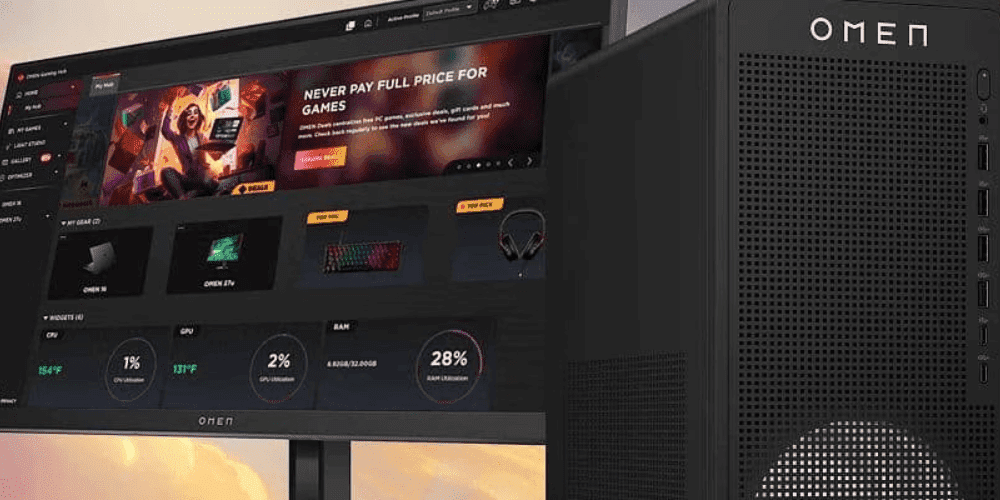
Every OMEN user in Australia already has a powerful performance optimisation tool at their fingertips. The OMEN Gaming Hub isn’t just a control panel—it’s a comprehensive suite of tools designed to extract maximum performance from your gaming hardware through intelligent optimisation and customisation.
This guide will walk you through the most impactful OMEN Gaming Hub settings, show you how to create game-specific profiles, and help you monitor system performance to ensure your HP gaming PC is delivering its absolute best. Whether you’re a competitive eSports player seeking every possible frame rate advantage or a casual gamer looking for the smoothest possible experience, these optimisations will elevate your gaming sessions across Australia’s thriving gaming community.
Contents
Getting Started with OMEN Gaming Hub
If you already own an OMEN PC, OMEN Gaming Hub should be pre-installed. If you don’t see it or are using a different brand of PC, follow these steps to install it.
Installation and Access
- Download the latest version from the official HP OMEN Gaming Hub website or the Microsoft Store
- Run the installer and follow the on-screen prompts
- Launch the application from your desktop or Start menu
- Sign in with your HP account (or create one) for full functionality
T
Pro Tip:
Make sure you are running the latest version of OMEN Gaming Hub to access the newest features and optimizations. The software should update automatically, but you can check for updates in the settings menu.
Interface Overview and Navigation
The OMEN Gaming Hub features an intuitive dashboard with several key sections that provide comprehensive control over your gaming experience:
- Home
- Performance Control
- OMEN AI
- Overlays
- Shop Games
- My Games
- Deals
- Gallery
- CAM & Voice Enhancer
- Light Studio
- OMEN
Initial Setup Recommendations
To get the most out of OMEN Gaming Hub from day one, configure these essential settings:
- Set Power Modes: On laptops, ensure Performance Mode is enabled when plugged in.
- Enable OMEN AI: Turn on OMEN AI to boost your game FPS.
- Enable Booster: Turn on OMEN Booster under “Optimiser” to help maximise game FPS.
- Set your preferred fan speed: Under “Performance Control” you can adjust how loud your fans will run. We recommend leaving it on Auto, but you can choose “Max” or “Manual” if you don’t like how the default fan speed sounds.
Advanced Performance Tuning
The Advanced Performance Tuning section is where you’ll find the most impactful settings for maximising frame rates and responsiveness. These tools allow you to fine-tune your hardware for optimal gaming performance.
CPU Overclocking
Undervolting (Advanced Users):
- Reduce CPU voltage slightly to improve thermals and efficiency
- Start with small increments (-0.05V) and test stability
- Monitor temperatures before and after adjustments
- Be cautious as incorrect settings may cause system instability
GPU Overclocking
Core Clock Adjustment:
- Increase GPU memory and core clock in small increments (1 MHz steps)
- Test stability with benchmarks or games
- Save optimised settings to profiles for specific games
- Monitor temperatures to ensure safe operating conditions
Memory Overclocking
- Select “Turbo” mode to enable Intel XMP or AMD EXPO profiles, which increase memory clock speeds and improve performance and latency in gaming or memory intensive scenarios
- Can improve performance in memory-bandwidth-limited scenarios
- More conservative adjustments compared to core clock are recommended
- Verify system stability after any memory adjustments
Performance Control
Power Mode
- ECO: An efficient mode to save battery life
- Balanced: The default mode to balance battery life and performance
- Performance: All out gaming mode, for the highest FPS
Thermal Control
- Max: Full throttle, cool your intense gaming workloads
- Auto: A balance between cool thermals and fan noise
- Manual: Manually tweak and control the fan curves exactly to your liking
Network Booster: Reducing Online Lag
Network performance is critical for online gaming, especially when competing in Australia’s competitive gaming scene or connecting to international servers. OMEN Gaming Hub’s Network Booster offers several ways to optimise your connection:
Network Prioritisation
- Gaming Priority Mode: Automatically detects and prioritises game traffic
- Application Control: Manually set priority levels for specific applications
- Particularly useful for Australian gamers dealing with higher latency to international servers
Game-Specific Optimisation
Creating Custom Game Profiles
One of OMEN Gaming Hub’s most powerful features is the ability to create custom profiles for individual games, allowing you to optimise settings for different gaming experiences:
- Navigate to the My Games section
- Select a game from your library or add a new one
- Click Create Profile or Edit Profile
- Customise performance settings specific to that game
- Save the profile, which will automatically activate when the game launches
Profile Customisation Options
Each game profile can include:
- Performance mode settings
- Fan curve adjustments
- Network priority configurations
- Lighting effects
- Display settings
This level of customisation ensures that whether you’re playing competitive esports titles or graphics-intensive single-player games, your system is configured optimally for each experience.
Advanced Monitoring Features
System Vitals Dashboard
The System Vitals section provides a comprehensive overview of your system’s performance metrics, giving you real-time insights into how your hardware is performing:
Key Metrics to Monitor
- CPU & GPU Usage: Indicates how heavily each component is being utilised
- Temperatures: Critical for ensuring components aren’t overheating
- Clock Speeds: Shows if your components are maintaining their boost frequencies
- Memory Usage: Helps identify if you need more RAM or better allocation
- Frame Rate: Real-time FPS monitoring for immediate performance feedback
Understanding Thermal Management
Heat is the enemy of consistent performance. The thermal management features in OMEN Gaming Hub help you:
- Monitor temperature trends over time
- Identify thermal throttling events where performance is reduced to protect components
- Adjust fan curves to maintain optimal temperatures
- Balance noise levels and cooling performance based on your preferences
- Performance benchmarking to establish baseline metrics
Real-Time Performance Overlay
The in-game overlay feature allows you to monitor system metrics without leaving your game:
- Display FPS, CPU/GPU usage, and temperatures
- Customise overlay position and transparency
- Toggle individual metrics on or off
- Minimal performance impact during gaming
Additional OMEN Gaming Hub Features
Light Studio
Personalise your gaming environment with customisable lighting effects that synchronise with your gameplay:
- Audio Sync: Lighting that pulses with game audio
- Effect Library: Pre-configured lighting schemes
- Custom Patterns: Create your own unique lighting effects
- Game-Specific Lighting: Set different lighting for each game profile
Recording and Streaming Tools
OMEN Gaming Hub includes integrated tools for content creators:
- Screen recording with customisable quality settings
- Screenshot capture with automatic organisation
- Integration with popular streaming platforms
- Minimal performance impact during recording
Troubleshooting Common Issues
Software Maintenance
Keep your OMEN Gaming Hub running smoothly with these maintenance practices:
-
Update regularly
- Check for updates in the settings menu
- Allow automatic updates when possible
- Restart the application after updates for best performance
-
Scan for conflicts
- Temporarily disable other gaming utilities that might interfere
- Check for conflicting RGB control software
- Ensure Windows is up to date
-
Reset to defaults if necessary
- If you encounter persistent issues, reset to default settings
- Gradually reapply your customisations to identify problematic settings
- Back up your profiles before resetting
Common Issues and Solutions
Issue: OMEN Gaming Hub won’t launch
- Verify Windows is updated to the latest version
- Reinstall the application
- Check for conflicting software
Issue: Performance profiles not applying
- Ensure the game is properly detected in My Games
- Verify profile settings are saved
- Restart the application and try again
Issue: Monitoring overlay not appearing
- Check overlay keybind settings
- Ensure the game is running in borderless or windowed mode
- Verify overlay is enabled for the specific game
Optimise, Customise, Dominate
The OMEN Gaming Hub provides a powerful suite of tools to maximise your gaming PC’s performance. By taking advantage of these features—from performance tuning and network optimisation to custom game profiles and real-time monitoring—you can ensure your system delivers its absolute best when it matters most.
Remember that optimisation is an ongoing process. As games update and your preferences evolve, continue to refine your profiles and settings. The time invested in mastering OMEN Gaming Hub will pay dividends in smoother gameplay, higher frame rates, and a more immersive gaming experience.
Keep exploring new features as they’re added through software updates, and don’t hesitate to experiment with different configurations to find what works best for your specific games and play style. Whether you’re gaming competitively or enjoying the latest releases, OMEN Gaming Hub ensures your system performs at its peak.
Enhance Your OMEN Gaming Experience
Ready to take your gaming setup to the next level? Explore HP’s complete range of gaming products designed to complement your optimised system. From high-refresh gaming monitors that bring your games to life, to precision gaming accessories that give you the competitive edge, HP has everything you need to build the ultimate gaming experience.
Discover how the right hardware paired with OMEN Gaming Hub’s software optimisations can transform your gaming sessions into unforgettable experiences.
Recent Posts




Popular Posts





Products purchased through this store are sold and fulfilled by Ingram Micro Pty Limited

CONTACT US
Call us
- Sales (Home, Students, Gamers)
- 1300 540 516
- Sales (Small Business Customers)
- 1800 891 209
- Post-Sales
- 13 23 47
- Technical support
- 13 10 47
Exc. public holidays
Chat with us
- Our specialist are here to help
- Live Product Demo
- Sales
- 61288061500 (WhatsApp)
-
- Post Sales
- 61288061700(WhatsApp)
- Technical Support
- 61341594000(WhatsApp)
Exc. public holidays
Live product demo
Submit feedback
We value your opinion!