Thank you for visiting the AUSTRALIA HP Store
-
Contact Us
CONTACT USCall us
- Sales
- 1300 540 516
- Technical support
- 13 23 47
Exc. public holidays
Chat with us- Our specialist are here to help
- Live Product Demo
- Sales
- 61288061500 (WhatsApp)
-

- Post Sales
- 61288061700(WhatsApp)
Exc. public holidays
Live product demo
Submit feedback We value your opinion! - My Account

Search
Best HP AirPrint Printers for iPhone

Posted:
December 01, 2025
Categories:
Printer
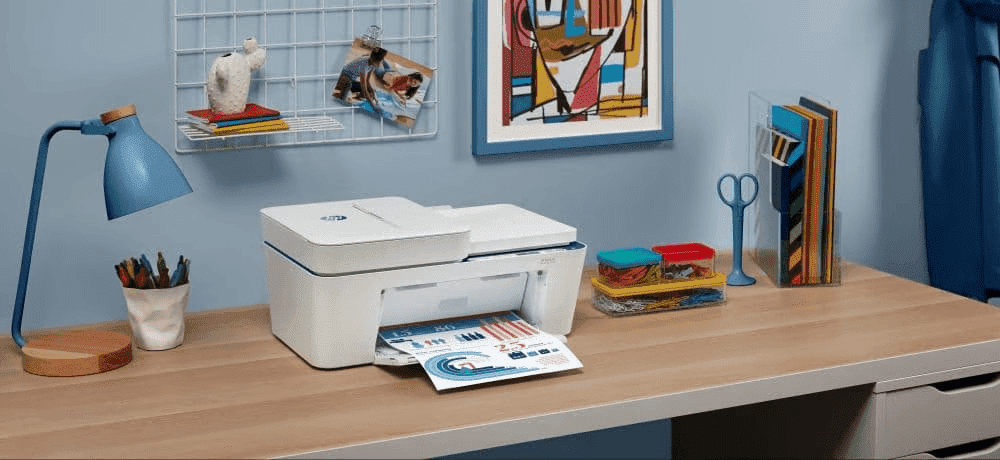
In 2025, printing from your iPhone shouldn't be complicated. Whether you're a student in Melbourne needing to print assignments, or working from home in Sydney handling administrative tasks, AirPrint® printers make it simple to print directly from your device without the hassle of cables or complex setup procedures.
Contents
- What Is AirPrint and Why Choose HP?
- Quick Setup Guide: Connecting iPhone to HP Printers
- Best HP AirPrint Printers by Category
- Understanding Australian Printing Needs
- Key Features Comparison
- HP Instant Ink and Cost Savings
- Common Questions About HP iPhone Printing (FAQ)
- Choosing the Right HP Printer for Your Australian Needs
- Conclusion
- Understanding Printer Categories in India
- Key Features Comparison
- HP Smart App: Enhanced iPhone Printing Experience
- Cost Considerations for Indian Users
- Printing in Indian Conditions
- Setting Up Your Printer for Indian Networks
- Common Questions About HP iPhone Printing in India (FAQ)
- Selecting the Right Printer for Your Indian Needs
- Maximising Your iPhone Printing Experience
- Conclusion and Recommendations
What Is AirPrint and Why Choose HP?
AirPrint is Apple's wireless printing technology that lets you print from your Apple device without installing drivers. It's a built-in iOS feature that enables wireless printing through your Wi-Fi network, making it incredibly convenient for Australian households and businesses that rely on multiple Apple devices.
HP leads the industry in AirPrint compatibility, offering the technology across our LaserJet, DeskJet, OfficeJet and ENVY series. All HP printers with AirPrint capability also work with our HP Smart app, which offers additional features like advanced scanning options and printer management. With an HP Instant Ink subscription, you won't run out of ink at crucial moments.
Quick Setup Guide: Connecting iPhone to HP Printers
Here's how to wirelessly connect your iPhone to an HP printer in your Australian home or office:
AirPrint Setup
-
Ensure both your HP printer and iPhone are connected to the same Wi-Fi network
-
Open any app with content you want to print (Mail, Photos, Safari, etc.)
-
Tap the Share icon, then select "Print"
-
Choose your HP printer from the list
-
Adjust settings as needed and tap Print
HP Smart App Alternative
For additional functionality, download the free HP Smart app from the App Store. The app automatically detects your HP printer and enables mobile scanning, ink level monitoring, and remote printing from anywhere across Australia.
Quick Troubleshooting Tip
If your printer doesn't appear in the list, ensure both devices are on the same Wi-Fi network and that your printer's wireless function is enabled. Restart both your iPhone and printer if connection issues persist, particularly in areas with multiple wireless networks like apartment buildings in Brisbane or Perth.
Best HP AirPrint Printers by Category
Finding the best AirPrint compatible printers in 2025 depends on your specific needs and budget. We've evaluated the best iPhone wireless printing setups available in Australia across different use cases to help you make the right decision for your home or business.
Best Overall: HP Colour LaserJet Pro MFP 3301fdw
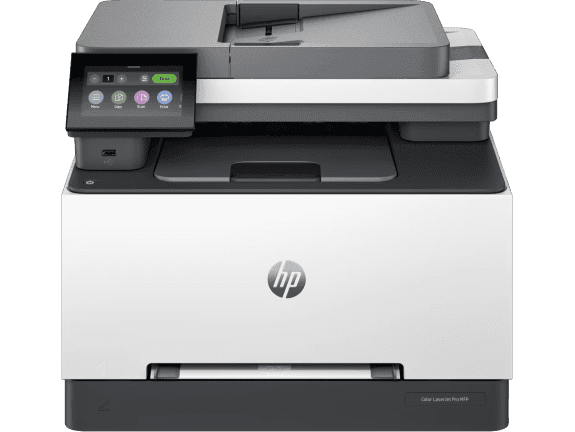
The HP Colour LaserJet Pro MFP 3301fdw delivers the perfect balance between performance, features, and reliability for Australian businesses. This colour laser multifunction printer produces professional-quality prints at impressive speeds, with automatic two-sided printing that saves paper and reduces operating costs.
-
Print, copy, scan and fax functionality with AirPrint compatibility
-
Print speed up to 25 ppm (black) and 25 ppm (colour)
-
Dynamic Security enabled printer for enhanced protection
-
Built-in dual-band Wi-Fi with WEP, WPA/WPA2 authentication and encryption
-
Automatic Document Feeder (ADF), Duplex Printing, Touchscreen Control Panel
This printer is ideal for small businesses and home offices needing reliable colour printing with professional results. The enhanced security features make it particularly suitable for Australian businesses handling sensitive client information or complying with privacy regulations. The recommended monthly page volume of 150 to 2,500 pages makes it perfect for growing Australian businesses.
Best for Home Office: HP OfficeJet Pro 9122e
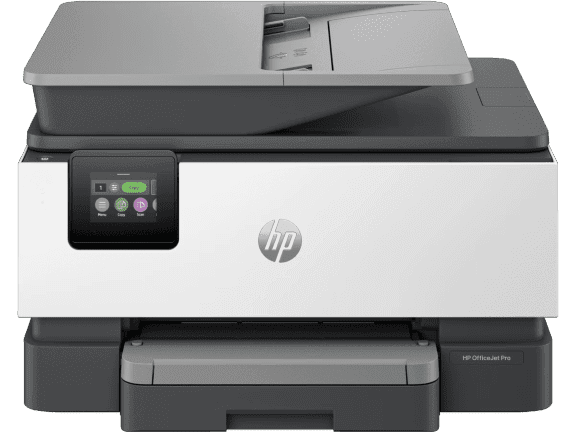
The HP OfficeJet Pro 9122e combines excellent value and versatility for iPhone users working from home across Australia. This all-in-one offers a comprehensive feature set at an affordable price point, making it perfect for Australian home offices.
-
Professional print speeds up to 20 ppm (black) and 10 ppm (colour)
-
Print, scan and copy capabilities for complete office functionality
-
Dynamic Security enabled printer for peace of mind
-
Built-in Wi-Fi with Ethernet and USB 2.0 connectivity
-
Automatic Document Feeder (ADF), Duplex Printing, Touchscreen Control Panel
Ideal for home office workers who need reliable document processing from their iPhone. The compact design fits well in Australian home offices, whilst the automatic document feeder handles multi-page scanning with ease. Perfect for businesses like a professional for your work.
Best for Small Business: HP LaserJet Pro MFP 3101fdw
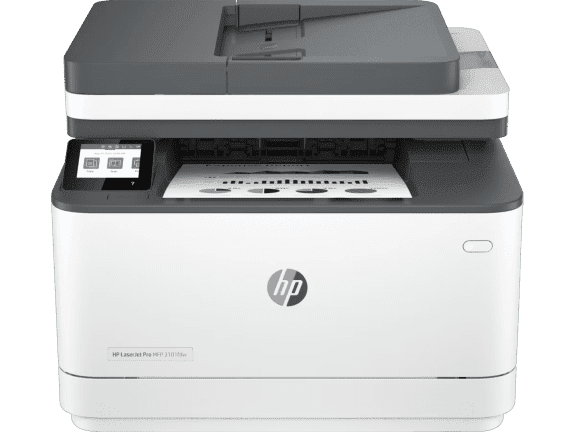
For demanding business environments, the HP LaserJet Pro MFP 3101fdw provides enterprise-level features and blazing-fast performance. This robust printer maintains professional quality consistently, making it ideal for Australian businesses requiring sharp, clear documents and reliable performance.
-
High-speed printing up to 33 ppm (black) for efficient document processing
-
Print, copy, scan and fax for complete office functionality
-
Built-in USB, Ethernet and Wi-Fi connectivity
-
Automatic Document Feeder (ADF), Duplex Printing, Touchscreen Control Panel
-
Designed for high-volume, high-speed document printing
Ideal for small businesses and teams requiring fast, secure printing. The impressive print speed and robust design make it suitable for busy Australian offices handling everything from daily correspondence to client documentation.
Best Budget Option: HP ENVY Inspire 7920e
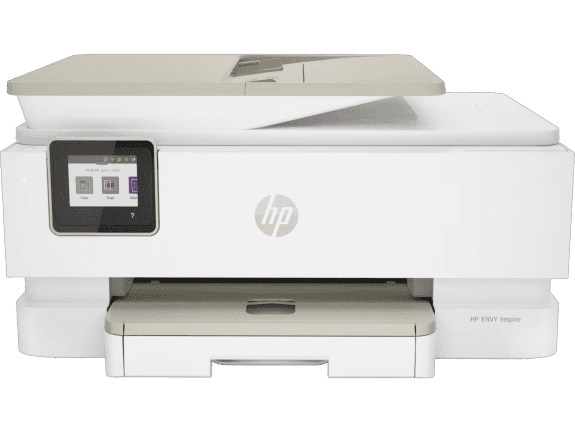
The HP ENVY Inspire 7920e proves that quality iPhone photo printing can be affordable. This all-in-one printer excels at both document printing and high-quality photo output, making it our best value printer for Australian families and students.
-
True-to-phone photo quality with self-healing dual band Wi-Fi (802.11a/b/g/n/ac)
-
Print, scan and copy functionality for everyday tasks
-
Print speed up to 15 ppm (black) and 10 ppm (colour)
-
Dynamic Security enabled printer
-
Automatic Document Feeder (ADF), Duplex Printing, Touchscreen Control Panel
Ideal for students and families who frequently print both documents and high-quality photos from their iPhone. The automatic duplex printing helps reduce paper consumption, particularly valuable for environmentally conscious Australian households and students printing lengthy assignments. The recommended monthly page volume of 300 to 400 pages is perfect for typical family printing needs.
Understanding Australian Printing Needs
Australian businesses and households face unique printing challenges that influence printer selection. From the humid conditions in tropical Queensland that can affect paper storage, to the dust concerns in outback regions, choosing a printer that can handle diverse Australian environmental conditions is crucial.
Climate Considerations
In coastal areas like Sydney and Perth, humidity can affect both printer performance and paper quality. HP's sealed toner systems in laser printers and protected ink cartridges in inkjet models help maintain print quality regardless of environmental conditions. For businesses in Darwin or Cairns with high humidity year-round, laser printers often provide more consistent results than inkjet alternatives.
Home Office Requirements
The rise of remote work across Australia has increased demand for reliable home office printing solutions. Australian professionals working from home need printers that can handle everything from RCM-compliant product labels to Australian Consumer Law documentation, business proposals, and client presentations. The ability to print wirelessly from an iPhone whilst moving between home office, kitchen, or outdoor work areas provides the flexibility modern Australian workers require.
Key Features Comparison
When choosing the best AirPrint printers for your iPhone in Australia, compare these key specifications to narrow down your options and ensure you're getting the right printer for your specific requirements.
Print Speeds (ppm)
The HP LaserJet Pro 3001dw and HP LaserJet Pro MFP 3101fdw both deliver 33 ppm black printing, whilst the HP Colour LaserJet Pro MFP 3301fdw provides 25 ppm for both black and colour documents. For moderate-speed colour printing, the HP OfficeJet Pro 9120e offers 22 ppm black and 18 ppm colour, excellent performance that suits most Australian small business needs.
Connectivity Options
All featured models include AirPrint and Wi-Fi compatibility, essential for iPhone users. You can also use the HP Smart App for enhanced functionality. The HP OfficeJet Pro 9120e adds dual-band Wi-Fi with self-healing technology for maximum reliability, particularly valuable in busy Australian offices with multiple wireless devices. For wired connections, several models include Ethernet capability for stable network connections.
For remote printing outside your Wi-Fi network, the HP Smart App is your best option, allowing you to print documents whilst travelling between Australian cities or working from remote locations.
Security Features
Business-focused printers include Dynamic Security features with preconfigured settings for protection, essential for Australian businesses complying with privacy regulations and protecting client information. Always protect sensitive documents with these features, particularly important for businesses in sectors like healthcare, finance, and legal services.
Cost-Per-Page Analysis
Laser models offer lower long-term costs for high-volume printing, making them ideal for busy Australian businesses. Meanwhile, inkjet models with HP Instant Ink subscriptions can reduce per-page costs for moderate usage patterns. Your printing volume determines the break-even point when investing in a laser model, with most Australian small businesses finding laser printers more economical beyond 500 pages per month.
HP Instant Ink and Cost Savings
HP Instant Ink helps manage printing costs when using iPhone printing apps across Australia. This subscription service monitors your ink levels and automatically ships replacement cartridges before you run out, ensuring you never delay important documents or shipments for your business.
Instead of purchasing ink cartridges as needed from Australian retailers, you pay monthly based on the number of pages you print (not the amount of ink you use). Plans start at affordable rates and scale based on your printing needs. Beyond saving money on ink, you'll never delay important documents waiting for cartridge deliveries, particularly valuable for businesses in regional and remote areas of Australia where same-day office supply delivery may not be available.
HP Instant Ink supports environmental responsibility through reduced packaging and prepaid recycling, helping Australian businesses achieve their corporate responsibility goals and reduce their environmental footprint. The service automatically adjusts to your usage patterns, making it ideal for Australian businesses with seasonal fluctuations in printing requirements.
For those who prefer less frequent ink refills, consider printers from the HP Smart Tank range, which includes substantial ink capacity, reducing the frequency of refills and providing excellent value for Australian households and businesses with moderate printing needs.
Common Questions About HP iPhone Printing (FAQ)
Do All HP Printers Work With iPhone?
Most current HP printer models include AirPrint compatibility, though verification is important, particularly when buying older or second-hand models from Australian retailers. Check the product specifications or look for the AirPrint logo on the packaging. All printers featured in this guide support iPhone printing through both AirPrint and the HP Smart app, ensuring seamless compatibility with your Apple devices.
What's the Difference Between AirPrint and HP Smart App?
AirPrint provides basic printing functionality directly from iOS apps, whilst the HP Smart app offers enhanced features including remote printing from outside your home or office (perfect for printing documents whilst travelling between Australian cities), advanced scanning options, ink level monitoring with automatic ordering, and comprehensive printer management. The HP Smart app is particularly valuable for Australian users who need to monitor multiple printers across different locations.
Can I Print Photos Directly From the iPhone Photos App?
Yes, all our recommended wireless printers for iPhone support photo printing directly from the Photos app, though select models like the HP ENVY Inspire 7920e feature dedicated photo capabilities for optimal true-to-phone quality prints. This is perfect for Australian families wanting to print holiday photos, students creating visual presentations, or businesses producing marketing materials.
Which HP Printer Is Best for Occasional Home Use?
The HP ENVY Inspire 7920e offers excellent value as an affordable HP printer whilst delivering quality printing and complete connectivity for wireless printing. Its recommended monthly page volume of 300 to 400 pages suits Australian homes with limited space, whilst the automatic duplex printing helps reduce paper consumption for environmentally conscious households.
Are HP Printers Compatible With Australian Power Standards?
Yes, all HP printers sold in Australia comply with RCM (Regulatory Compliance Mark) certification and operate on Australian 230V power standards. They include appropriate power adapters and meet all Australian electrical safety requirements.
How Does Humidity Affect Printer Performance in Australia?
HP printers are designed to operate in various environmental conditions. In humid coastal areas like Sydney or Darwin, store paper in sealed containers and ensure your printer is in a well-ventilated area. HP's sealed toner systems in laser printers and protected ink cartridges help maintain consistent print quality regardless of humidity levels.
What Printers Work Best for Australian Small Businesses?
For Australian small businesses, we recommend the HP Colour LaserJet Pro MFP 3301fdw for its balance of speed, quality, and security features. The HP LaserJet Pro MFP 3101fdw is ideal for businesses primarily printing text documents, whilst the HP OfficeJet Pro 9120e suits businesses requiring high-volume colour printing with fax capability.
Choosing the Right HP Printer for Your Australian Needs
Your choice depends on your specific use case, budget, and printing volume requirements. Consider these factors when selecting from our range of HP printers:
For small businesses: The HP Colour LaserJet Pro MFP 3301fdw stands out as one of the best all-around options available, offering professional colour printing, comprehensive security features, and the speed required for busy Australian offices.
For home offices: The HP OfficeJet Pro 9122e provides excellent value with complete functionality including automatic document feeding and reliable wireless connectivity perfect for Australian remote workers.
For budget-conscious users: The HP ENVY Inspire 7920e delivers quality printing for both documents and photos at an accessible price point, making it ideal for Australian students and families.
For high-volume printing: The HP OfficeJet Pro 9120e handles demanding printing requirements with ease, perfect for busy Australian businesses in sectors like real estate, legal services, and accounting.
For basic document printing: Budget-conscious users requiring high-volume document printing should consider the HP LaserJet Pro 3001dw, which offers fast, reliable monochrome printing at an economical cost per page.
For mobile professionals: The HP OfficeJet 200 Mobile Printer provides portable printing solutions for Australian professionals who need to print whilst travelling across the country.
All printers in this guide ensure seamless wireless printing with your Apple devices, maintaining HP's commitment to quality and reliability that Australian consumers have trusted for decades.
Conclusion
Wireless printing from your iPhone has never been easier for Australian users, thanks to HP's comprehensive range of AirPrint-compatible printers. Whether you're running a small business in Melbourne, studying in Brisbane, or working remotely in Perth, there's an HP printer designed to meet your specific needs and budget.
The key to choosing the right printer lies in understanding your printing patterns, considering your environmental conditions, and selecting features that match your workflow. From the affordable HP ENVY Inspire 7920e for occasional home use to the robust HP Colour LaserJet Pro MFP 3301fdw for demanding business environments, HP offers Australian users reliable solutions for every printing requirement.
Remember to consider factors like monthly page volume, paper handling capacity, and connectivity options when making your decision. With proper selection and the addition of HP Instant Ink for applicable models, you'll enjoy hassle-free printing from your iPhone for years to come, supporting your productivity whether you're in the office, at home, or anywhere across Australia.

For Indian users seeking premium features with high-volume capacity, the HP Smart Tank 750 delivers exceptional performance with automatic duplexing and an automatic document feeder, boosting productivity with up to 12,000 black or 8,000 colour pages of original HP ink included.
-
Print, scan, copy with ADF and wireless connectivity
-
Print speed up to 23 ppm (black) and 22 ppm (colour)
-
Automatic duplex printing saves paper and time
-
USB, Wi-Fi, LAN, mobile printing
-
Recommended monthly volume: 400 to 800 pages
This printer is perfect for modern Indian homes where multiple family members need to print from their iPhones regularly. The automatic document feeder proves invaluable when scanning multiple pages of property documents, educational certificates or business contracts. The included ink supply provides thousands of pages, dramatically reducing running costs compared to traditional cartridge systems. Currently available at ₹25,246 with a 15% discount, with EMI options starting from ₹2,805 per month.
Best High-Volume Business Printer: HP LaserJet Pro MFP 4104dw

For Indian businesses with demanding printing requirements, the HP LaserJet Pro MFP 4104dw delivers blazing-fast speeds with comprehensive wireless connectivity including Apple AirPrint™ support.
-
Print, copy and scan functionality
-
Prints up to 42/40 ppm (LTR/A4)
-
Apple AirPrint™, Ethernet, Mopria™, USB, Wi-Fi®, Bluetooth
-
Touchscreen interface for easy operation
-
Perfect for business use
Get blazing fast printing speeds, high-volume scanning and easy management tools with LaserJet Pro technology. Ideal for Indian small businesses, chartered accountants' offices and educational institutions requiring fast monochrome printing alongside modern wireless printing capabilities. Print invoices, receipts and documents directly from your iPhone whilst managing other business tasks. Currently available at ₹36,208 with a 27% discount, with EMI options starting from ₹4,023 per month.
Understanding Printer Categories in India
When exploring HP printers for iPhone compatibility, it's helpful to understand the different categories available to Indian consumers.
Inkjet vs Laser Printers
Personal and home printers typically use inkjet technology, which excels at colour photo printing and offers lower upfront costs. These printers suit Indian families needing versatile document and photo printing. Business printers often utilise laser technology, delivering faster speeds and lower per-page costs for high-volume text document printing common in Indian offices.
Smart Tank vs Traditional Cartridge Printers
The HP Smart Tank printer range revolutionises printing costs for Indian users. Instead of traditional cartridges, these printers use refillable ink tanks providing thousands of pages before refilling, dramatically reducing running costs. This proves especially valuable for Indian students, coaching centres and small businesses with high printing volumes.
Key Features Comparison
When choosing the best AirPrint printers for your iPhone in India, compare these specifications considering your usage patterns and local requirements.
Print Speeds and Technology
The HP LaserJet Pro MFP 4104dw leads with impressive speeds up to 42 ppm for high-volume business environments, whilst the HP Color LaserJet Pro MFP 3303sdw delivers professional colour printing at 25 ppm. For home users, the HP Smart Tank series provides reliable speeds perfect for everyday printing needs, with the Smart Tank 750 offering up to 23 ppm for black documents.
Connectivity Options
All featured models include wireless connectivity essential for iPhone printing. The HP LaserJet Pro MFP 4104dw offers comprehensive connectivity with Apple AirPrint™, Ethernet, Mopria™, USB, Wi-Fi® and Bluetooth. The HP Smart Tank 580 provides multiple wireless options including Apple AirPrint™, Google Cloud Print™, HP ePrint and Mopria™. Wi-Fi connectivity enables printing without requiring direct cable connection, useful during power cuts when you can use your iPhone's hotspot.
Paper Handling for Indian Conditions
Manual and automatic duplex printing features help conserve paper, reducing costs and environmental impact. The HP Smart Tank 750 and HP Color LaserJet Pro MFP 3303sdw include automatic duplex printing, whilst budget models like the HP Laser MFP 1188a provide manual duplex support through driver assistance. During monsoon season, ensure proper paper storage in dry conditions to prevent humidity damage. The automatic document feeders on premium models prove invaluable when scanning multiple pages of important documents like property papers, educational certificates or business contracts.
Power Efficiency Considerations
Indian users should consider power consumption, especially in areas experiencing frequent power fluctuations. Most HP printers include energy-efficient features and can handle voltage variations common in Indian electrical supply. Using a stabiliser or UPS protects your investment during power surges.
HP Smart App: Enhanced iPhone Printing Experience
Beyond basic AirPrint functionality, the HP Smart app transforms your iPhone into a comprehensive printer management tool particularly useful for Indian users.
Remote Printing Capabilities
Print documents from anywhere in India, whether you're travelling for business between cities or need to print whilst away from your office. This proves invaluable during India's extensive festival travel seasons when you may need to print important documents whilst visiting family.
Advanced Scanning Features
Use your iPhone camera to scan documents, receipts and business cards directly through the HP Smart app. The app automatically enhances scans, removes backgrounds and converts images to PDF format. This feature proves particularly useful for Indian professionals managing GST documentation, expense receipts and business correspondence.
Ink Level Monitoring
Monitor ink levels remotely and receive notifications before running out. This helps Indian users plan ink purchases, especially important in tier-2 and tier-3 cities where immediate ink availability might be limited.
Cost Considerations for Indian Users
Understanding total ownership costs helps Indian consumers make informed printing decisions aligned with their budget and usage patterns.
Initial Investment vs Running Costs
Whilst laser printers like the HP LaserJet Pro MFP 4104dw require higher initial investment, they offer lower per-page costs for high-volume printing. Inkjet printers, particularly the Smart Tank range, provide affordable entry points with reasonable running costs through refillable ink systems.
EMI and Festival Offers
Indian consumers can take advantage of EMI options available on most HP printers, making premium models accessible with manageable monthly payments. For example, the HP Color LaserJet Pro MFP 3303sdw is available with EMI starting from ₹5,778 per month, whilst the budget-friendly HP Laser MFP 1188a offers EMI from just ₹1,833 per month. During major Indian shopping festivals like Diwali, Dussehra and Republic Day sales, significant discounts become available on HP printer promotions.
Cost-Per-Page Analysis
For Indian users, the Smart Tank series delivers exceptional cost-per-page value, with refillable tanks providing thousands of pages before requiring new ink. The HP Smart Tank 750 includes up to 12,000 black or 8,000 colour pages of ink in the box, dramatically reducing running costs. This proves particularly economical for educational coaching centres, chartered accountants and small businesses with consistent high-volume printing needs.
Printing in Indian Conditions
Indian environmental conditions require specific considerations when selecting and maintaining your iPhone-compatible printer.
Monsoon and Humidity Management
During monsoon season, store paper in sealed containers to prevent moisture absorption. Keep your printer in well-ventilated areas away from direct moisture exposure. Most HP printers handle Indian humidity well, but proper paper storage ensures consistent print quality throughout the year.
Power Management
Frequent power fluctuations in some Indian areas necessitate proper electrical protection. Consider using a voltage stabiliser or UPS with your printer to prevent damage from power surges. Most HP printers feature auto-restart capabilities, resuming printing after power restoration.
Dust Protection
Indian homes and offices, especially in northern regions during summer months, experience significant dust accumulation. Regular cleaning of printer exteriors and occasional professional servicing maintains optimal performance. Place printers in locations minimising dust exposure whilst ensuring proper ventilation.
Setting Up Your Printer for Indian Networks
Connecting your HP printer to Indian Wi-Fi networks requires understanding common local network configurations.
Router Compatibility
Most HP AirPrint printers work seamlessly with popular Indian internet service providers like Jio Fiber, Airtel Xstream and ACT Fibernet. Models with dual-band connectivity provide better performance in congested urban environments where numerous neighbouring networks may interfere with 2.4 GHz connections.
Network Security
Protect your wireless printer with strong passwords, especially important in Indian apartment complexes where close proximity to neighbours requires robust security. Enable WPA2 or WPA3 encryption on your router and printer for maximum protection of sensitive documents.
Bandwidth Considerations
Printing from iPhone via AirPrint consumes minimal bandwidth, but large colour documents or photos may take longer on slower connections. Most Indian broadband connections easily handle wireless printing without impacting other internet activities.
Common Questions About HP iPhone Printing in India (FAQ)
Do All HP Printers Work with iPhone in India?
Most current HP printer models sold in India include AirPrint compatibility or work seamlessly with the HP Smart App. Verify specifications before purchasing, particularly when buying from offline retailers or considering older models. All printers featured in this guide support iPhone printing through wireless connectivity.
What's the Difference Between AirPrint and HP Smart App?
AirPrint provides basic printing functionality directly from iOS apps, whilst the HP Smart app offers enhanced features including remote printing from anywhere in India, advanced scanning options, ink level monitoring and comprehensive printer management. The app proves particularly valuable for managing printing whilst travelling between Indian cities.
Can I Print Photos Directly from iPhone Photos App?
Yes, printers with colour printing capabilities support photo printing directly from the Photos app. Models like the Smart Tank 580 and 750 deliver excellent colour photo quality, perfect for printing family photographs during festivals, printing children's school projects or creating small business marketing materials.
Which HP Printer is Best for Indian Students?
The HP Laser MFP 1188a or HP Laser MFP 1188nw offer excellent value for Indian students, combining affordability with low running costs. The 1188nw adds wireless connectivity for iPhone printing, whilst maintaining compact design suitable for hostel rooms and small apartments. The laser technology handles high printing volumes during examination periods efficiently.
Are These Printers Suitable for Indian Climate?
Yes, HP printers function reliably in Indian climate conditions. However, protect paper from monsoon humidity by storing in sealed containers, place printers in well-ventilated areas and use voltage stabilisers in areas with power fluctuations. Regular cleaning prevents dust accumulation common in Indian environments.
Can I Use My Printer During Power Cuts?
AirPrint requires your printer and Wi-Fi router to have power. During power cuts, you cannot print unless using a UPS or inverter to maintain power supply. However, you can queue print jobs on your iPhone which will automatically print once power resumes.
What About Service and Support in India?
HP maintains an extensive service network across India, with support centres in major cities and authorised service providers in smaller towns. Contact HP India's customer service through their website at 1800-108-4749 for sales or 1800-258-7170 for technical support. Most Indian cities offer same-day or next-day service for HP printers.
Selecting the Right Printer for Your Indian Needs
Your ideal HP AirPrint printer depends on specific requirements, usage patterns and budget considerations relevant to Indian contexts.
For Students and Education
Students should prioritise affordable running costs and reliable performance. The HP Laser MFP 1188a or 1188nw models offer excellent value, handling assignment printing efficiently whilst maintaining low cost-per-page. The laser technology proves economical during heavy printing periods like examination seasons.
For Home Offices and Freelancers
Home-based professionals in Indian metros benefit from the HP Smart Tank 580 or 750 models, which provide wireless connectivity, document feeders (750 model) and economical ink tank systems. These features support diverse requirements from printing client proposals to scanning business documents for digital record-keeping.
For Small Businesses
Indian small businesses requiring professional document printing should consider the HP Color LaserJet Pro MFP 3303sdw for colour requirements or the HP LaserJet Pro MFP 4104dw for high-volume monochrome needs. These laser printers deliver professional results with speeds and monthly volumes suitable for businesses with 5-15 employees.
For Coaching Centres and Tuition Classes
Educational coaching centres benefit enormously from HP Smart Tank models with their high-volume capacity and low running costs. The HP Smart Tank 750 with its included 12,000 black or 8,000 colour pages makes it ideal for producing study materials, practice papers and answer sheets throughout academic terms.
Maximising Your iPhone Printing Experience
Several practices optimise your wireless printing experience whilst managing costs and maintenance in Indian conditions.
Regular Maintenance Schedule
Clean printer exteriors monthly to prevent dust accumulation. Schedule professional servicing annually, particularly before monsoon season. This preventive maintenance extends printer life and maintains print quality throughout the year.
Optimal Print Settings
Use draft mode for internal documents to conserve ink or toner. Reserve high-quality settings for client presentations, important business documents or photo printing. Duplex printing reduces paper consumption whilst supporting environmental responsibility.
Strategic Paper Purchases
Buy printer paper during festival sales when significant discounts become available. Store paper properly in sealed containers, especially during monsoon season, to maintain quality and prevent wastage from humidity damage.
Firmware Updates
Regularly update printer firmware through the HP Smart app to access latest features, security patches and performance improvements. These updates often enhance AirPrint functionality and address connectivity issues.
Conclusion and Recommendations
Selecting the best HP AirPrint printer for your iPhone in India requires balancing functionality, running costs and specific usage requirements. All printers featured in this guide deliver reliable wireless printing with seamless iPhone integration through AirPrint technology or comprehensive HP Smart App support.
For most Indian home users and students seeking affordable laser printing, the HP Laser MFP 1188nw provides exceptional value with wireless connectivity at ₹18,999. For those prioritising economical high-volume colour printing, the HP Smart Tank 580 at ₹15,599 or HP Smart Tank 750 at ₹25,246 deliver outstanding cost-per-page value with included ink supplies lasting thousands of pages.
Budget-conscious buyers should consider the HP Laser MFP 1188a at just ₹16,499, whilst those requiring premium features benefit from the HP Smart Tank 750 with automatic duplexing and document feeder.
Indian small businesses prioritising professional colour laser printing should explore the HP Color LaserJet Pro MFP 3303sdw at ₹51,999, whilst high-volume monochrome environments benefit from the HP LaserJet Pro MFP 4104dw at ₹36,208. These models deliver professional results with robust features suitable for business environments.
Explore the complete range of HP printers available in India, take advantage of promotional offers during festival seasons, and consider EMI options to make your ideal printer affordable. With proper selection, maintenance and care suited to Indian conditions, your HP AirPrint printer will deliver years of reliable wireless printing from your iPhone.
Recent Posts




Popular Posts





Products purchased through this store are sold and fulfilled by Ingram Micro Pty Limited

CONTACT US
Call us
- Sales
- 1300 540 516
- Technical support
- 13 23 47
Exc. public holidays
Chat with us
- Our specialist are here to help
- Live Product Demo
- Sales
- 61288061500 (WhatsApp)
-
- Post Sales
- 61288061700(WhatsApp)
Exc. public holidays
Live product demo
Submit feedback
We value your opinion!