Save up to 71%
Weekly Deals
on our best weekly deals.
Save up to 71% on select products, free shipping storewide.
Get extra 25% off select HP, HyperX, and Poly accessories with code: SETUP25.

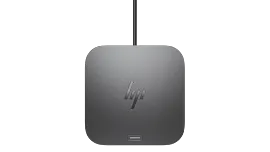
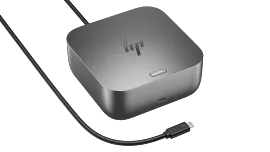
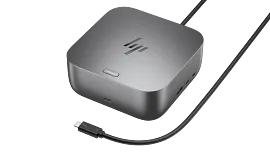
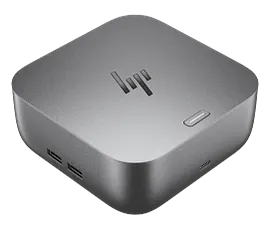
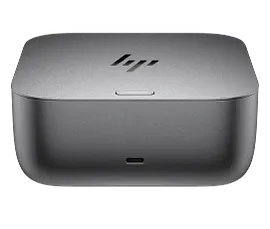
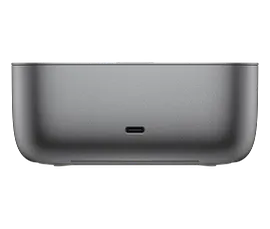
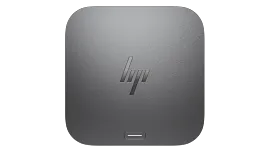
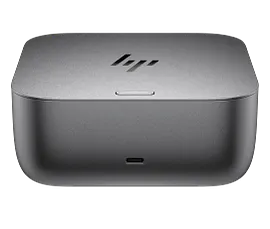
HP Thunderbolt Dock 120W G4

Other offers available with the product:

FREE Storewide Shipping

Financing options available for all credit scores

Weekly Deals

Get 25% off with code SETUP25

Product # 4J0A2AA#ABA
  • The Dock that Protects your Connected Devices.
  • Expanded Compatibility. Easy Connectivity.
  • The Power To Be Productive.
  • Device Management Made EasySee all Specs

3% back in HP Rewards

Add an HP Care Pack to protect your new device

Included

    • Remote problem diagnosis and technical telephone support
    • Prepaid shipping label, materials, and instructions
    • Convenient door-to-door service
    • Next Business day exchange

    Service starts on date of hardware purchase. Restrictions and limitations apply.

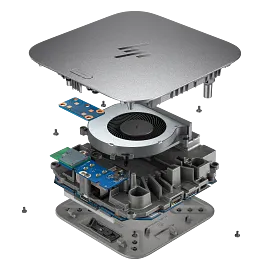
    Boost your security, productivity, and connectivity with this Thunderbolt™ 4 dock. It protects your network and devices from the moment you log in, supports multi-OS compatibility[1], and can support up to four 4K displays[2]. Ideal for ITDMs and hybrid workers, this dock also makes home or office device management easy.

    The Dock that Protects your Connected Devices.

    Feel safe and secure from the moment you log in. The HP Thunderbolt G4 Dock with HP Sure Start[3] prevents hackers from using the dock to attack the network and the attached notebook. Everything connected to this dock is protected and meets full NIST 800-193 requirements.

    Expanded Compatibility. Easy Connectivity.

    Focus on your work and not your compatibility[1] with a dock that works seamlessly with most notebooks and operating systems. Whether you use Windows, Mac, or Chrome OS—rigorous testing and certifications ensure that one USB-C® cable[4] connects your device and peripherals without issue.

    The Power To Be Productive.

    Multitask, create, and collaborate faster with a dock that supports up to four 4K displays through superfast Thunderbolt™ 4 technology[2] and has double the ethernet speed for faster downloads[5]. This dock also delivers up to 100W of power—enough to charge most notebooks.

    Device Management Made Easy

    Manage your mixed fleet more efficiently with wired Intel® vPro™ support that allows authorized administrators to remotely access and manage vPro™ enabled notebooks using wired connections to make updates. IT Managers can also plan dock firmware updates anytime, even after the user disconnects through a one click installer[6].

    Technical Specs

    External Ports 01

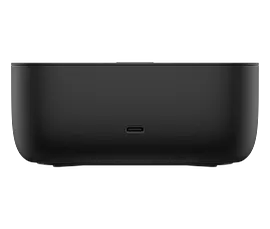
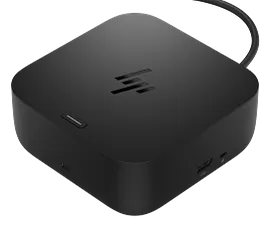
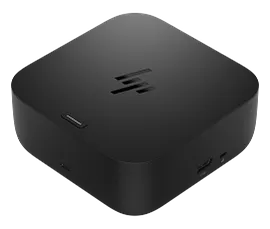
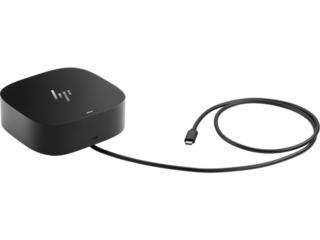
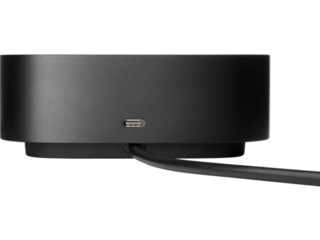
    Top components: LED and power button to power or wake host system Front components: 1 x USB-C data/power out, (USB 3.2 Gen 2 10 Gbps Data only) Side components: Right side: 1 x Kensington Standard Lock Slot
    2 x USB 3.2 Gen 1 ports - 1 on each side (charging) (5 Gbps) Back components: 2 x USB 3.2 Gen 1 (charging ports when docked) (5Gbps)
    1 x HDMI 2.0 port
    2 x DisplayPort 1.4 ports
    1 AC adapter port
    1 x Ethernet port: 2 internal NIC cards to support 1Gb and 2.5Gb Ethernet
    1 x USB-C DP alt mode port
    1 x Thunderbolt™ 4 port

    Power supply

    Input 100 to 240V 1.7A 50 to 60Hz. Output is 19.5V at 6.15A

    Security management

    Standard Kensington lock slot

    Compatible operating systems

    Windows 11
    Windows 10
    MacOS
    Chrome

    Dimensions (W X D X H)

    3.9 x 3.9 x 2.7 in

    Weight

    1.68 lb

    Warranty

    One-year limited warranty.

    What's in the box

    Dock, power supply, power cord, warranty

    Reviews and Q&A

    HP Thunderbolt Dock 120W G4 is rated 3.9 out of 5 by 80.
    • y_2026, m_4, d_29, h_11
    • bvseo_bulk, prod_bvrr, vn_bulk_3.0.43
    • cp_1, bvpage1
    • co_hasreviews, tv_42, tr_38
    • loc_en_US, sid_4J0A2AA, prod, sort_[SortEntry(order=SUBMISSION_TIME, direction=DESCENDING)]
    • clientName_hp
    • bvseo_sdk, java_sdk, bvseo-4.0.0
    • CLOUD, getAggregateRating, 3ms
    • REVIEWS, PRODUCT
    Rated 3 out of 5 by mrc311 from Ease of setup, but not what I was looking for This works fine and I can connect all my peripherals. However, I was looking for a true docking station that would allow me to close my laptop and still use my separate monitor, keyboard, and mouse. Since my laptop has outlets for all those already, this is not being used.
    Date published: 2026-03-31
    Rated 5 out of 5 by Lewie41 from Thunderbolt As advertised
    Date published: 2026-03-26
    Rated 4 out of 5 by Kurt Y from Dock It Good I basically just plugged my devices in and it all magically worked. I was even able to put my mouse dongle on the dock instead of on my laptop. One knock: I could not find anything about a Thunderbolt cable being included. I had purchased a cable earlier, so it wasn't an issue for me. But, there was a short cable included and I didn't need my other cable. That needs to be in any sales material or someone might buy an unnecessary cable.
    Date published: 2026-03-14
    Rated 1 out of 5 by QuietElectronics from Annoying Fan Noise When plugged into an HP laptop, the fan will randomly turn on and off intermittently throughout the day and it’s quite noticeable. When plugged into a Mac the fan will run continuously loud and never stop. I wish that HP would make a fan less docking station or at least release a firmware update for this one to reduce the fan noise.
    Date published: 2026-02-20
    Rated 3 out of 5 by Anonymous from Great device ….. but Great device but I have had to replace two of them with 1 to 2 years. Another one the ethernet socket quit working and I had to use a USB-C adapter to get internet connection.
    Date published: 2025-07-04
    Rated 5 out of 5 by Marine57 from Compatible with Pavilion 16. Took sometime to find the right docking station for my HP Pavilion 16. It might be a little more expensive than some of the other docking stations out there but this has exacting what I needed. It matches the power supply of the laptop so it's always charged. Could use maybe one or two more ports and it would be nice if the audio mini plug port was in the rear.
    Date published: 2025-06-19
    Rated 4 out of 5 by Semi from good brick It's a good dock. Only wish it had a better form factor. Does the job.
    Date published: 2025-06-18
    Rated 1 out of 5 by Dweebs from Doesn’t provide the power…hp said it would. I was sold the wrong dock for my laptop. This doesn’t provide enough power for my laptop which it was paired with …from hp. Pretty expensive disappointment.
    Date published: 2025-06-05
    • y_2026, m_4, d_29, h_11
    • bvseo_bulk, prod_bvrr, vn_bulk_3.0.43
    • cp_1, bvpage1
    • co_hasreviews, tv_42, tr_38
    • loc_en_US, sid_4J0A2AA, prod, sort_[SortEntry(order=SUBMISSION_TIME, direction=DESCENDING)]
    • clientName_hp
    • bvseo_sdk, java_sdk, bvseo-4.0.0
    • CLOUD, getReviews, 5ms
    • REVIEWS, PRODUCT

    The dock was working fine for 2 external monitors. Now it only allows 1 monitor to be displayed. How could it be addressed. I tried rebooting laptop, dock, checking cables etc. but no matter what, only 1 monitor works.

    Asked by: vksk
    I am having the same problem with another model, G2 - I updated all drivers including the ones on a laptop (HP Model - in fact when I run the HP tool on this even the firmware and driver update for the docking was recommended) , and the firmware - issue seems to have resolved (or not sure if it is transient )
    Answered by: nfle
    Date published: 2023-05-27

    Hello. Will it be compatible with Elitebook 840 g8 14"

    Asked by: MertS
    Thank you for your question! Unfortunately, more information is needed to answer your question. Please resubmit the question with the full product number and your question will be answered as quickly as possible. The product number will be located on the bottom of the laptop.
    Answered by: HP Team Grant
    Date published: 2023-05-27

    Will this be able to provide power to my Probook

    Asked by: Dawgman77
    HP ProBook 650 G8 Notebook PC
    Answered by: dawgman77
    Date published: 2024-08-07

    I need a new HP ZBook Power 15.6 G10 docking station. My old one is starting to fail.

    Asked by: KDunn8135
    Hello. Thanks for your question. We need more information on your HP ZBook Power laptop such as the product number. Here are some instructions: https://bit.ly/3p128NH Resubmit your question with the product number. We will respond to your question as soon as possible.
    Answered by: HP Team Cheri
    Date published: 2025-05-05

    will this work with a ProBook 450 G9

    Asked by: troy 1928
    Hello Troy and thank you for your question! The HP Thunderbolt Dock 120W G4 is designed for laptops with a Thunderbolt Port and will provide up to 100W charging power via USB-C. For laptops needing more than 100W charging, the HP Thunderbolt Dock 280W G4 Dock w/ Combo Cable is recommended.
    Answered by: HP Team Grant
    Date published: 2023-05-27

    Dear HP support-team, I have a brand new HP EliteBook 850 G8. Is this new dock compatible with this one too? Are there any restrictions? Is a wake-up of the device by pressing the button on top of the dock supported?

    Asked by: TH_DE
    Thank you for your question! Yes, this HP Thunderbolt Dock 120W G4 is the recommended dock for your HP EliteBook 850G8. Thank you for being an HP customer!
    Answered by: HP Team Grant
    Date published: 2023-05-27

    Hello, is it Compatible with EliteBook 650G9?

    Asked by: Anonymous
    If the EliteBook 650 G9 has an Intel processor then this HP Thunderbolt Dock will be compatible. With the limited information provided about the EliteBook, it is impossible to determine with certainty what processor it has. For further assistance, please resubmit the question with the product number. The product number is located on the bottom of the EliteBook.
    Answered by: HP Team Grant
    Date published: 2023-05-27

    I have a Elitebook 840 G7. Quickspec says: HP Thunderbolt Dock 120W G2 2UK37AA is compatible. However, when looking https://www.hp.com/au-en/shop/hp-thunderbolt-dock-120w-g2-2uk37aa.html it is not listed. Is the above docking compatible with mine laptop

    Asked by: Kwok
    Thank you for your question! As the HP EliteBook 840 G7 will be compatible with the HP Thunderbolt Dock 120W G4.
    Answered by: HP Team Grant
    Date published: 2023-05-27
    • y_2026, m_4, d_29, h_11CST
    • bvseo_bulk, prod_bvqa, vn_bulk_3.0.43
    • cp_1, bvpage1
    • co_hasquestionsanswers, tq_235
    • loc_en_US, sid_4J0A2AA, prod, sort_[SortEntry(order=NUM_ANSWERS, direction=DESCENDING)]
    • clientName_hp
    • bvseo_sdk, java_sdk, bvseo-4.0.0
    • CLOUD, getContent, 3ms
    • QUESTIONS, PRODUCT

    Similar Products

    Return and exchange information
    Most items may be returned within 30 days of delivery. A restocking fee of up to 15% of the purchase price may be deducted from your refund for returned items, except where prohibited by law. No restocking fee applies to defective or incorrect items. A restocking fee is not applicable for printers, ink, toner, paper, care packs, software and services. For details, please visit: https://www.hp.com/us-en/shop/cv/returnsandexchanges.