Thank you for visiting the AUSTRALIA HP Store
-
Contact Us
CONTACT USCall us
- Sales (Home, Students, Gamers)
- 1300 540 516
- Sales (Small Business Customers)
- 1800 891 209
- Post-Sales
- 13 23 47
- Technical support
- 13 10 47
Exc. public holidays
Chat with us- Our specialist are here to help
- Live Product Demo
- Sales
- 61288061500 (WhatsApp)
-

- Post Sales
- 61288061700(WhatsApp)
- Technical Support
- 61341594000(WhatsApp)
Exc. public holidays
Live product demo
Submit feedback We value your opinion! - My Account

Search
Business Laptop vs. Mobile Workstation: How to Choose the Right Device for your Australian Workplace


Should you choose a slim, lightweight business laptop, or invest in a high-powered mobile workstation instead?
The answer depends entirely on your work requirements. Whether you’re a 3D-rendering animator working on Australia’s booming film industry, a data-crunching engineer in mining operations, or an on-the-go executive managing teams across multiple Australian cities, your decision should be based on your specific professional needs.
This comprehensive guide will explore the differences between these two laptop categories, outline their advantages and disadvantages, discuss optimal use cases, and present top HP options available in Australia. This way, you can make an informed purchasing decision and achieve excellent return on investment whilst supporting your productivity in the Australian business landscape.
Contents
- Business Laptops vs. Mobile Workstations: Understanding the Differences
- Best Use Cases: Choosing Your Ideal Device
- HP Business Laptop Solutions: EliteBook Series
- HP Mobile Workstation Solutions: ZBook Series
- Decision Framework: Business Laptop vs. Mobile Workstation
- Technical Specifications Comparison
- Value Proposition and Investment Considerations
- Making the Right Decision
- Professional Support and Services
Business Laptops vs. Mobile Workstations: Understanding the Differences
A business laptop is a premium portable computer designed to optimise productivity during routine work-related tasks. The mobile workstation, on the other hand, is a larger, more powerful device purpose-built for specialised, resource-intensive roles such as video editing, engineering, and scientific research.
What Is a Business Laptop?
Business laptops are characterised by:
- High-performance design optimised for professional use
- Superior hardware compared to average consumer laptops
- Integrated or entry-level dedicated GPU sufficient for business applications
- Small-to-medium-sized screens, typically 33-38 cm
- Slim, lightweight design to maximise portability
- Efficient CPU and extended battery life for all-day productivity
- Professional aesthetic suitable for boardroom environments
- Balanced cost structure - higher than consumer laptops but more affordable than gaming laptops or mobile workstations
What Is a Mobile Workstation?
Mobile workstations feature:
- Top-tier laptop specifications for high-intensity tasks
- Cutting-edge hardware, including CPU, GPU, storage, and RAM
- More processing power than business laptops and most gaming computers
- High-end dedicated GPU for graphically demanding applications
- Larger screens than other laptops, typically 41 or 43 cm (with 36-38 cm models available)
- Heavier weight than most business laptops, typically 1.8-3.2 kg
- Reduced battery life due to intensive resource usage
- Premium investment with higher cost than most business laptops and gaming computers
Best Use Cases: Choosing Your Ideal Device
Who Should Buy A Business Laptop?
Business laptops are ideal for professionals including:
Executive and Management Roles:
- Executives and administrators managing teams and operations
- Project managers and accountants handling financial and organisational tasks
- IT professionals and finance specialists working with enterprise software
- Entrepreneurs, consultants, and sales professionals requiring mobility
Creative and Content Professionals:
- Graphic designers working with 2D design applications
- Copywriters and content creators focussing on text and web content
- Online educators conducting virtual training and presentations
- Marketing professionals creating presentations and campaigns
Key Benefits for Business Users:
- Productivity optimisation makes business laptops a smart long-term investment
- Lightweight design perfect for mobile professionals
- All-day battery life for uninterrupted work sessions
- Professional appearance suitable for client meetings and presentations
Who Should Buy A Mobile Workstation?
Mobile workstations are essential for technical professionals performing resource-intensive tasks, particularly relevant in Australia’s growing tech and engineering sectors:
Engineering and Architecture:
- Architects and civil engineers running CAD software and 3D modelling for infrastructure projects
- Mechanical engineers performing simulations and finite element analysis
- Structural engineers working with complex building information modelling (BIM)
- Mining engineers analysing geological data and mine planning software
Creative and Media Production:
- Video editors handling 4K/8K footage and complex post-production
- 3D animators creating detailed models and rendered animations
- VFX artists working on visual effects and compositing
Data and Scientific Research:
- Data scientists and AI developers training machine learning models
- Radiologists and medical researchers processing high-resolution imaging
- Scientific researchers running complex simulations and data analysis
Specialised Technical Work:
- Professionals requiring top-tier CPU/GPU performance for intensive computations
- Users needing substantial storage and RAM for large datasets
- Technical specialists who cannot compromise on computational power
A mobile workstation is necessary if you need to relocate your powerful computing capabilities frequently. However, if your workstation can remain stationary, a desktop workstation typically offers superior price-to-performance ratios.
Whilst mobile workstations aren’t as portable as business laptops, they remain transportable for technical specialists with high computational requirements who cannot compromise on performance by switching to lighter alternatives.
HP Business Laptop Solutions: EliteBook Series
For professionals seeking the ideal business laptop, HP’s business laptop range deserves serious consideration. Featuring high-end specifications and sporting a sleek, boardroom-ready design, these business-focused devices perfectly suit productive corporate professionals across Australia.
Best Business Laptop for Executive Performance
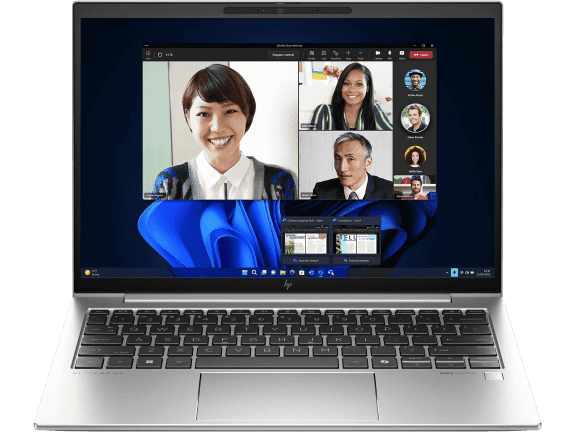
The HP EliteBook 840 14 inch G11 represents the pinnacle of business laptop design, perfectly suited for Australian executives and senior professionals who demand both performance and portability. This premium device delivers exceptional productivity capabilities whilst maintaining the professional appearance essential for client meetings and boardroom presentations.
- Intel® Core™ Ultra 7 155U processor (up to 4.8 GHz with Intel® Turbo Boost Technology)
- 32 GB memory with 1 TB SSD storage for seamless multitasking
- 14" diagonal WUXGA display optimised for professional presentations
- 2 Thunderbolt™ 4 with USB Type-C® 40Gbps signaling rate for versatile connectivity
This device excels in Australia’s demanding business environment, offering the perfect balance of performance and portability for professionals who frequently travel between Melbourne, Sydney, Brisbane, and Perth. The extended battery life ensures productivity throughout long domestic flights and cross-country business trips.
Best AI-Enhanced Business Laptop for Power Users
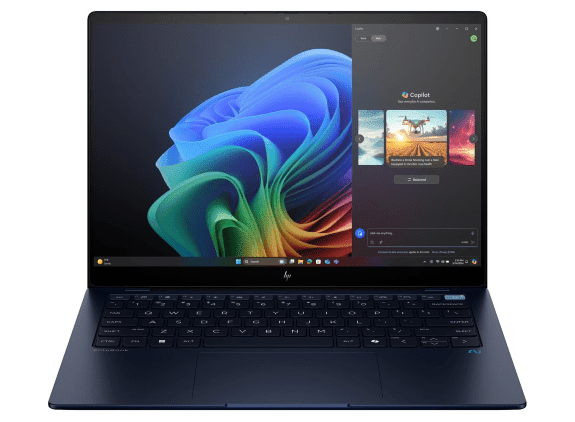
For Australian professionals requiring cutting-edge AI capabilities, the HP EliteBook Ultra G1i delivers next-generation performance. This AI-enhanced laptop transforms how business professionals approach data analysis, content creation, and productivity tasks across Australia’s evolving digital landscape.
- Intel® Core™ Ultra 7 258V processor (up to 4.8 GHz with Intel® Turbo Boost Technology)
- 32 GB memory with 512 GB storage for advanced AI workloads
- 14" diagonal 2.8K OLED touch display for exceptional visual clarity
- 3 Thunderbolt™ 4 with USB Type-C® 40Gbps signaling rate for maximum connectivity
This AI PC represents the future of business computing, enabling Australian professionals to leverage artificial intelligence for enhanced productivity, automated workflows, and advanced data analysis capabilities that drive competitive advantage in today’s digital economy.
HP Mobile Workstation Solutions: ZBook Series
For technical specialists running resource-intensive processes, HP’s mobile workstation range delivers exceptional power. Equipped with cutting-edge hardware, these high-performance workhorses handle even the most complex workflows with ease.
Best Mobile Workstation for Professional Performance
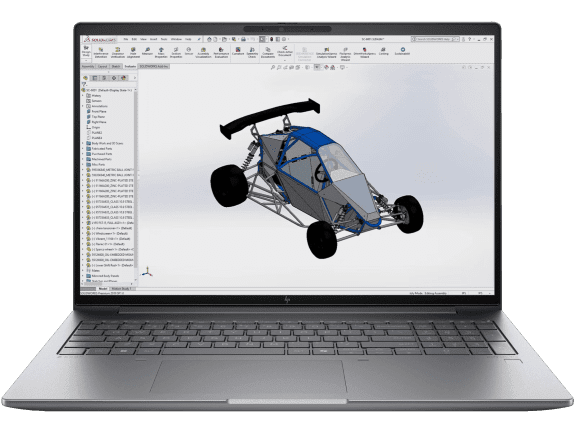
The HP ZBook Power 15.6 inch G11 Mobile Workstation delivers professional-grade performance for Australian engineers, architects, and technical professionals. This powerful device handles CAD applications, 3D modelling, and complex simulations with exceptional efficiency, making it ideal for Australia’s growing engineering and construction sectors.
- Intel vPro® with Intel® Core™ Ultra 7 processor
- Windows 11 Pro
- 16" diagonal WUXGA touch display with NVIDIA RTX™ 2000 Ada Generation
- 32 GB DDR5-5600 RAM
- 1 TB SSD Hard Drive
This mobile workstation excels in demanding professional environments, from mining operations in Western Australia to architectural firms in Sydney. The robust build quality and professional graphics capabilities ensure reliable performance for mission-critical applications.
Best Ultra-Portable Mobile Workstation for AI Workflows
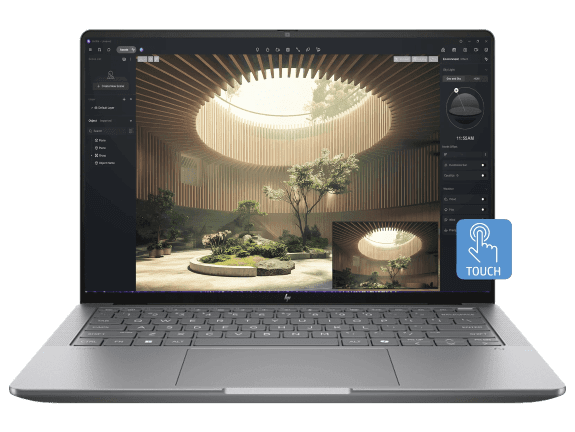
The HP ZBook Ultra 14 inch G1a represents a revolutionary approach to mobile workstation design, combining desktop-class performance with exceptional portability. This groundbreaking device enables Australian professionals to tackle complex AI workflows previously impossible on a laptop.
- AMD Ryzen™ AI Max PRO processor with desktop-class CPU cores
- Discrete-like integrated graphics with game-changing unified memory
- 14" diagonal display in the thinnest ZBook design ever created
- Hardware AI accelerators delivering up to 50 TOPS NPU performance
This ultra-portable workstation transforms how Australian professionals approach complex workflows, enabling local AI processing, advanced 3D modelling, and professional rendering capabilities whilst maintaining exceptional mobility for on-site work across Australia’s diverse professional landscape.
Decision Framework: Business Laptop vs. Mobile Workstation
Performance Requirements Assessment
Choose a Business Laptop if you primarily:
- Work with Microsoft Office applications
- Conduct video conferences and presentations
- Manage email and web-based applications
- Perform financial analysis and reporting
- Create marketing materials and documents
- Need maximum portability for frequent travel across Australia
Choose a Mobile Workstation if you regularly:
- Use CAD software for engineering or architecture
- Edit video content or create 3D animations
- Run data analysis or machine learning models
- Perform scientific research or simulations
- Work with large datasets requiring substantial RAM
- Need professional-grade GPU acceleration
Technical Specifications Comparison
Processor and Performance
Business Laptop Processors:
- Intel Core i5/i7 optimised for efficiency and battery life
- AMD Ryzen 5/7 offering strong multi-core performance
- Focus on power efficiency rather than maximum performance
- Integrated AI acceleration on newer models
Mobile Workstation Processors:
- Intel Core i7/i9 HX series for maximum performance
- Intel Xeon for mission-critical applications
- AMD Ryzen PRO 7000 series for multi-threaded workloads
- Dedicated NPU for AI acceleration in demanding applications
Graphics and Display
Business Laptop Graphics:
- Integrated graphics sufficient for business applications
- Entry-level dedicated GPU for enhanced productivity
- 33-38 cm displays optimised for portability
- Standard colour accuracy for business use
Mobile Workstation Graphics:
- NVIDIA RTX professional GPUs for intensive applications
- AMD Radeon Pro for specialised workflows
- 41-43 cm high-resolution displays for detailed work
- Professional colour accuracy for creative applications
Value Proposition and Investment Considerations
Mobile workstations, featuring state-of-the-art hardware, typically represent a larger investment than business laptops, though the value proposition depends entirely on your professional requirements and Australia’s competitive business environment.
Return on Investment Analysis
Business Laptop ROI:
- Immediate productivity gains through enhanced portability
- Reduced travel fatigue with lightweight design across Australia’s vast distances
- Improved professional image with premium build quality
- Extended battery life enabling all-day productivity
- Lower total cost of ownership for standard business use
Mobile Workstation ROI:
- Significant time savings on compute-intensive tasks
- Professional-grade reliability for mission-critical work
- Extended product lifecycle through component upgrades
- Competitive advantage through enhanced capabilities
- Higher billable efficiency for technical professionals
Long-Term Considerations
Future-Proofing Factors:
- Software requirements evolving toward more demanding applications
- AI integration becoming standard in professional workflows
- Remote work trends requiring reliable, powerful portable computing
- Professional development potentially requiring enhanced capabilities
When properly maintained, both business laptops and mobile workstations can provide excellent long-term return on investment. Mobile workstations offer additional value through component upgradeability, making the initial investment more justifiable over time.
Making the Right Decision
Your choice between a business laptop and mobile workstation should align with your specific professional requirements and Australia’s unique business landscape.
Decision Checklist
Evaluate These Key Factors:
- Primary Work Applications
- What software do you use daily?
- Do you need specialised professional applications?
- Are your tasks computationally intensive?
- Mobility Requirements
- How often do you travel with your laptop?
- Do you work from multiple locations across Australia?
- Is weight a significant concern for domestic travel?
- Performance Expectations
- Do you experience performance bottlenecks currently?
- Will your workload intensity increase?
- Do you need maximum processing power?
- Professional Environment
- Do you attend client meetings regularly?
- Is professional appearance important?
- Do you work in technical environments?
- Budget and Timeline
- What’s your investment budget?
- How long do you plan to use the device?
- Do you need immediate ROI or long-term value?
Final Recommendations
Choose a Business Laptop if:
- Your work focuses on standard business applications
- Portability and battery life are top priorities
- You attend frequent client meetings or presentations
- You travel regularly for business
- You need a professional appearance
- Your budget is moderate and focused on efficiency
Choose a Mobile Workstation if:
- You use specialised professional software
- Computational performance directly impacts your productivity
- You work with large files or complex datasets
- Screen real estate is important for detailed work
- You need professional-grade graphics capabilities
- Performance limitations currently hinder your work
The best business laptops offer affordability, portability, and sufficient specifications for standard work-related tasks. Whilst mobile workstations require a larger investment and reduced portability, they provide the processing power necessary to handle high-intensity workflows efficiently.
Regardless of which option best suits your business needs, you’ll find the perfect solution in HP’s comprehensive laptop range. Consider your daily tasks, mobility requirements, performance needs, and budget to make the most informed decision for your professional success in Australia’s dynamic business environment.
Whether you prioritise portability and efficiency or require maximum computational power, HP offers professional-grade solutions designed to enhance your productivity and support your career goals across Australia’s diverse industries.
Professional Support and Services
HP Business Services
For Business Laptop Deployment:
- Configuration and setup services for teams
- Asset management and lifecycle planning
- Technical support and warranty options
- Training and adoption assistance
For Mobile Workstation Implementation:
- Performance optimisation and configuration
- Software certification and compatibility testing
- On-site installation and setup
- Ongoing technical support for complex workflows
Getting Started
Next Steps:
- Assess your current workflow challenges and performance bottlenecks
- Evaluate your mobility requirements and work environment
- Consider your team’s needs if purchasing multiple units
- Plan for future growth and changing requirements
- Consult with HP specialists for personalised recommendations
The choice between a business laptop and mobile workstation ultimately depends on your specific professional requirements, mobility needs, and performance expectations. By carefully evaluating your current and future needs, you can make an informed decision that supports your productivity and professional success in Australia’s competitive business landscape.
Recent Posts



Popular Posts





Products purchased through this store are sold and fulfilled by Ingram Micro Pty Limited

CONTACT US
Call us
- Sales (Home, Students, Gamers)
- 1300 540 516
- Sales (Small Business Customers)
- 1800 891 209
- Post-Sales
- 13 23 47
- Technical support
- 13 10 47
Exc. public holidays
Chat with us
- Our specialist are here to help
- Live Product Demo
- Sales
- 61288061500 (WhatsApp)
-
- Post Sales
- 61288061700(WhatsApp)
- Technical Support
- 61341594000(WhatsApp)
Exc. public holidays
Live product demo
Submit feedback
We value your opinion!