Thank you for visiting the NEW ZEALAND HP Store
-
Contact Us
CONTACT USCall us
- Sales
- 0800 854 848
- Technical support
- +64 9884 8600
Mon-Fri 9.00am - 6.00pm
(exc. Public Holidays)
Chat with us- Our specialist are here to help
- Live chat
Mon-Fri 9.00am - 6.00pm
(exc. Public Holidays)
Submit feedback We value your opinion! - My Account

Search
5 Critical Questions New Zealand SMBs Should Ask About Workstations for Business

Posted:
April 29, 2025
Categories:
Business

Modern workstations for business are revolutionising how small to mid-sized companies operate across New Zealand. Unlike the expensive, bulky machines of decades past, today’s business workstations offer enhanced processing power, superior graphics capabilities, and expanded storage in compact, stylish, and affordable packages.
With more competitive pricing than ever before, it’s no wonder Kiwi SMBs are increasingly considering workstations as viable alternatives to standard consumer PCs. But how can New Zealand business owners determine if a workstation for business is the right investment, and if so, which models best suit their specific requirements?
Contents
5 Essential Questions to Ask when Evaluating Workstations for Business
1. How Critical are Processing Power and Performance to my Business Operations?
Every business, regardless of size, needs reliable computing power. Inadequate performance directly impacts operational efficiency and productivity.
Today’s business environment demands machines that won’t freeze, lag, or crash during mission-critical operations. Modern business workstations deliver superior reliability, faster processing speeds, and enhanced security compared to consumer devices. Many entry-level workstations for business even approach the functionality of enterprise-class systems at a fraction of the cost.
The market now offers workstation options across virtually every price point and business need. Custom workstation solutions can be tailored to your specific industry requirements, whether you need advanced graphics processing or enhanced computational power. New Zealand companies do themselves a disservice by not comparing the performance benefits of business workstations against consumer alternatives before making purchasing decisions.
2. What Software Applications are my Employees Using Daily?
The decision to invest in workstations for business ultimately depends on your employees’ software requirements.
For basic office productivity applications like Microsoft Word or Excel, standard consumer PCs might suffice. However, if your team works with graphically intense applications or specialised software for architecture, engineering, data analysis, or creative design, the superior performance and reliability of a workstation for business becomes essential.
Engineers, animators, photographers, financial analysts, programmers, and other professionals typically achieve their best work using high-performance machines. Quality business workstations enable them to fully express their vision and skills, enhancing productivity and accelerating product development cycles. Many professionals prefer custom workstation builds that precisely match their specific software requirements.
For creative professionals working with resource-intensive design software, a high-performance desktop like the HP All-in-One desktop PC 27-cr0004a can provide the necessary power while maintaining a streamlined workspace.
3. Do my Employees Need Computing Mobility?
Many SMB owners still associate workstations with stationary office setups. However, with remote work becoming increasingly common across New Zealand, workstation manufacturers have responded with powerful portable options.
For employees running resource-intensive applications outside the office, mobile workstations offer significant performance and security advantages over standard laptops.
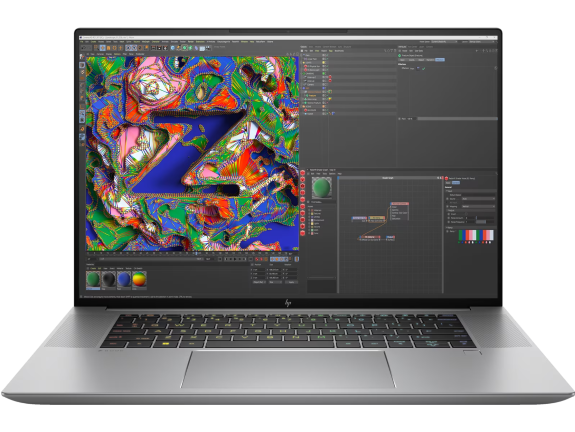
The HP ZBook Studio 16 inch G10 Mobile Workstation PC exemplifies this evolution with cutting-edge technology designed specifically for creative and technical professionals who demand high-performance computing on the go. This powerful mobile workstation combines robust processing capabilities with professional-grade graphics, making it ideal for designers, engineers, and content creators who need workstation-class performance with the flexibility of a laptop.
-
Windows 11 Pro operating system
-
Intel® Core™ i7-13700H processor (up to 5.0 GHz with Intel® Turbo Boost Technology)
-
32 GB memory; 1 TB SSD storage
-
NVIDIA RTX™ 3000 Ada Generation Laptop GPU (8 GB GDDR6 dedicated)
This mobile workstation delivers professional-grade performance in a portable package, enabling New Zealand creative professionals and technical users to maintain productivity whether they’re in the office, working from home, or travelling across the country.
4. How Much Office Space Can I dedicate to Computing Equipment?
With remote work becoming more common, office spaces in Auckland, Wellington, and other New Zealand business hubs are often shrinking, and desk sizes are decreasing accordingly. For SMBs operating from small offices or home environments, space-efficient computing solutions are increasingly important.
Fortunately, manufacturers like HP have developed business workstations with remarkably small footprints. The HP ZBook Power 16 inch G11 Mobile Workstation PC combines powerful performance with mobility, making it perfect for businesses with limited office space.
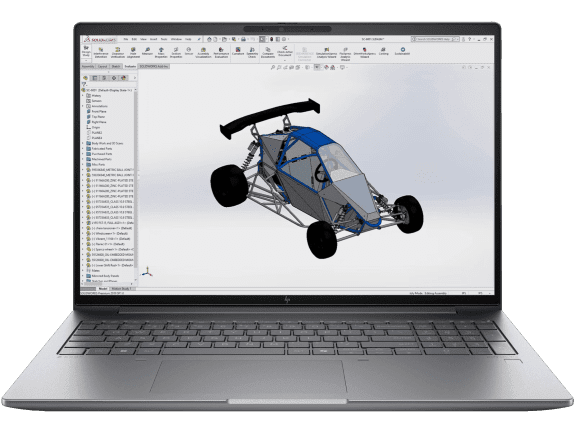
The HP ZBook Power 16 inch G11 Mobile Workstation PC offers professional ZBook performance and security at an unbelievably affordable price. Power up your productivity on this durable yet premium device—delivering enhanced collaboration features and pro-grade components to run professional software applications for CAD, 3D concepting, modelling, rendering, and more.
-
Blaze through 3D workloads with an integrated or discrete GPU, Intel® CPU, and large memory configurations
-
Durable all-aluminum chassis designed to pass rigorous military standard testing
-
Collaborate effectively with a 5MP camera, Wi-Fi 6E, and a long-lasting battery
-
EPEAT® Gold registered with 100% sustainably sourced outer box packaging
Modern workstations have evolved dramatically from the bulky machines of previous generations. When evaluating workstations for your business, don’t assume they’ll consume significant office space – today’s custom workstation options include models designed specifically for space-constrained environments common in New Zealand’s urban business districts.
5. How Important is Cybersecurity to my Business Continuity?
If your answer is anything but “extremely important,” your business may be at significant risk. Consider these alarming statistics: cyber incidents targeting businesses nearly doubled from 82,000 in 2016 to 159,700 in 2017, and 60% of SMBs victimised by cyberattacks didn’t recover and closed within six months.
For New Zealand businesses, cybersecurity is particularly crucial as the country’s geographical isolation doesn’t provide immunity from cyber threats. In fact, the New Zealand National Cyber Security Centre has reported steady increases in cyber incidents affecting Kiwi businesses of all sizes.
Consumer-grade computers typically lack robust built-in security features. Business workstations, meanwhile, often include enterprise-class security protections. With many business workstations available at price points comparable to premium consumer devices, the enhanced security alone often justifies the investment.
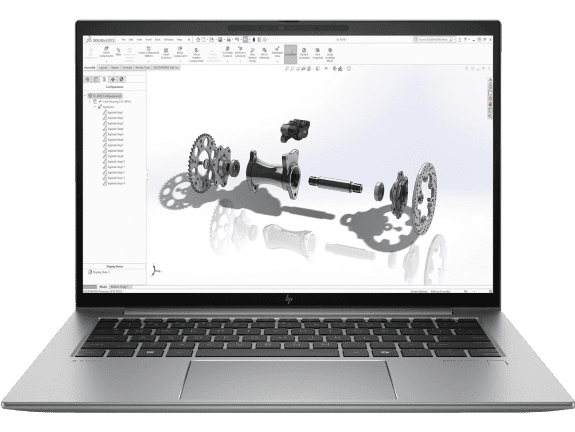
The HP ZBook Firefly 14 inch G11 Mobile Workstation PC combines pro-level performance with true mobility in an amazingly sleek and powerful laptop. Stay productive wherever you’re working with integrated or discrete graphics and processor, AI-enhanced webcam and audio, and a stunning display—everything you need to collaborate and manage projects anywhere.
-
Step up to pro-level performance with an Intel® CPU and integrated or discrete GPU
-
Starting at just 1.45 kg, this sleek device is made to move
-
Work effectively anywhere with Wi-Fi 6E, a 5MP camera, and AI software to block background noise
-
EPEAT® Gold registered with 100% sustainably sourced outer box packaging
The built-in security features of this business-class mobile workstation provide peace of mind for New Zealand SMBs concerned about protecting their critical data and maintaining business continuity in an increasingly threatening digital landscape.
Making the Right Workstation for Business Decisions
The lines between consumer PCs and business workstations continue to blur, especially for small and mid-sized businesses. Ultimately, your choice should depend on which options best serve your specific business requirements. When evaluating your computing needs, don’t dismiss workstations for business because you assume they provide more power than necessary.
For New Zealand businesses with specialised software requirements, mobile employees, limited office space, or heightened security concerns, today’s workstations offer compelling advantages over consumer alternatives. Custom workstation options allow businesses to select precisely the components and configurations that match their performance needs without paying for unnecessary features. By asking these five critical questions, you can better determine if investing in business workstations will enhance your company’s productivity, security, and competitive position in the New Zealand market.
Modern workstations for business have evolved dramatically – they’re more accessible, versatile, and affordable than ever before. For growing Kiwi businesses, the right workstation investment can scale with you, providing the computing foundation needed for long-term success in New Zealand’s dynamic business environment.
To explore the full range of business computing solutions available for your specific industry needs, visit HP for business or browse our collection of business laptops and business desktops.
Recent Posts

Popular Posts


Products purchased through this store are sold and fulfilled by Ingram Micro (NZ) LTD

CONTACT US
Call us
- Sales
- 0800 854 848
- Technical support
- +64 9884 8600
Mon-Fri 9.00am - 6.00pm
(exc. Public Holidays)
Chat with us
- Our specialist are here to help
- Live chat
Mon-Fri 9.00am - 6.00pm
(exc. Public Holidays)
Submit feedback
We value your opinion!