8Results
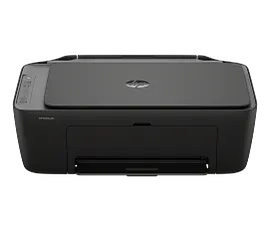
HP DeskJet 2923 All-in-One Printer
Special Buy! While supplies last!Print, copy, scan in color, wireless printingEasy setup, worry-free connectionPerfectly formatted prints with HP AIDynamic security enabled printer
B18JWA#B1H
ENERGY STAR | NEW | Home
Sustainability features
3% back in HP Rewards
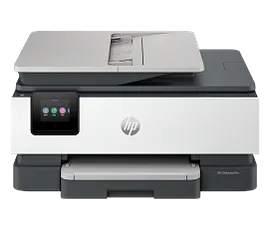
HP OfficeJet Pro 8139 All-in-One Printer with 12 months free Instant Ink, AI-capable
Print up to 20 ppm, copy, scan, fax, wireless printingProfessional-quality printing for your home office. 2.7" color touchscreen, 35-sheet auto-doc feeder, 22Perfectly formatted prints with HP AIGet 12 months FREE Instant InkDynamic security printer
C2VK3A#B1H
ENERGY STAR | Home and home office
Sustainability features
3% back in HP Rewards
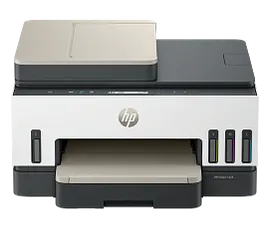
HP Smart Tank 7303 All-in-One Printer
Print, scan, copy, wireless, ADFUp to 3 years of vibrant ink includedISO Speed: Black: Up to 15 ppm; Color: Up to 9 ppmSimplify tasks with HP AI
9B5D0A#B1H
Home
Sustainability features
Get $30 extra savings with any PC purchase!
3% back in HP Rewards
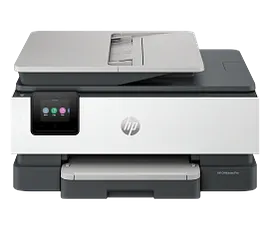
HP OfficeJet Pro 8125 All-in-One Printer with 3 months free Instant Ink, AI-capable
Print up to 20 ppm, copy, scan, wireless printingProfessional-quality printing for your home office. 2.7" color touchscreen, 35-sheet auto-doc feeder, 225Perfectly formatted prints with HP AIGet 3 months FREE Instant InkDynamic security printer
C2VJ4A#B1H
ENERGY STAR | Home and home office
Sustainability features
3% back in HP Rewards
HP DeskJet 2955 All-in-One Printer with 3 months free Instant Ink, AI-capable
Print, copy, scan in color, wireless printingEasy setup, worry-free connection. Contains at least 70% recycled plastic.Perfectly formatted prints with HP AIGet 3 months FREE Instant InkDynamic security enabled printer
A24HJA#B1H
ENERGY STAR | Home
Sustainability features
3% back in HP Rewards
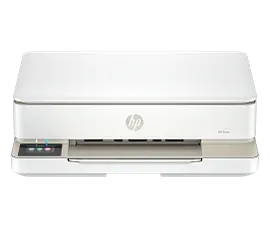
HP Envy 6155 All-in-One Printer with 3 months free Instant Ink, AI-capable
Print, copy, scan in color, wireless printingVersatile home printer with 2.4" color touchscreenPerfectly formatted prints with HP AIGet 3 months FREE Instant InkDynamic security enabled printer
C2WR7A#B1H
ENERGY STAR | Home
Sustainability features
3% back in HP Rewards
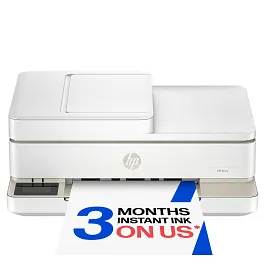
HP Envy 6555 All-in-One Printer with 3 months free Instant Ink, AI-capable
Print, copy, scan in color, mobile fax, wireless printingVersatile home all-in-one with 2.4" color touchscreen, 35-sheet auto-document feederPerfectly formatted prints with HP AIGet 3 months FREE Instant InkDynamic security enabled printer
C2XR6A#B1H
ENERGY STAR | Home
Sustainability features
3% back in HP Rewards
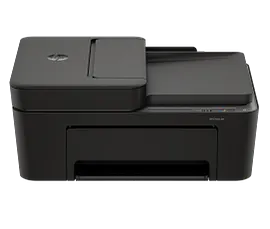
HP DeskJet 4355 All-in-One Printer with 3 months free Instant Ink, AI-capable
Print, copy, scan in color, wireless printingEasy-to-use home printer with an automatic document feeder. Contains at least 70% recycled plastic.Perfectly formatted prints with HP AIGet 3 months FREE Instant InkDynamic security enabled printer
AJ4Y0A#B1H
ENERGY STAR | Home
Sustainability features
3% back in HP Rewards
FAQs
What Makes HP's Color Printers Ideal for Home Use?
HP's color printers, including models from the DeskJet and OfficeJet Pro series, are ideal for home use due to their versatility, high print quality, and affordability. They offer a balance of efficient color printing, ease of use, and features like wireless printing, making them suitable for various home printing needs.
How Do HP's Laser Printers Compare to Inkjet Printers for Home Use?
HP's laser printers, known for their fast print speeds and efficiency in printing text documents, are great for home offices with high-volume printing needs. In contrast, HP's inkjet printers, such as those in the DeskJet series, are more versatile, excelling in text and photo printing, making them ideal for general home use.
What Are the Benefits of an All-in-One Printer from HP?
All-in-one printers from HP, particularly in the OfficeJet Pro series, offer multiple functionalities – printing, scanning, copying, and sometimes faxing – in one device. This multifunctionality, combined with features like automatic document feeders and duplex printing, makes them a space-saving and efficient solution for home offices.
Can HP Printers Provide High-quality Photo Printing?
Many HP printers, especially inkjet models like the HP DeskJet, can produce high-quality photo printing. They have vibrant colors and detailed images, making them suitable for printing photos on photo paper right at home.
How Do Duplex Printing Features Enhance HP Printers?
Duplex printing features in HP printers, such as the OfficeJet Pro series, allow for automatic double-sided printing. This saves time and reduces paper usage, making it an eco-friendly feature for home users who print multi-page documents regularly.
Are HP Color Printers Cost-Effective in Terms of Ink Usage?
HP color printers are designed to be cost-effective, with options like high-yield ink cartridges and the HP Instant Ink subscription service, which can help save money on ink. This makes them an affordable choice for home users who need to regularly print color documents and photos.
What Wireless Printing Capabilities Do HP Printers Offer?
HP printers offer wireless printing capabilities, including Wi-Fi connectivity and HP ePrint. This allows for easy printing from smartphones, tablets, and laptops without a wired connection, enhancing convenience for home users.
Can HP Printers Handle Different Types and Sizes of Paper?
Yes, HP printers are versatile in handling different types and sizes of paper. From standard plain paper to specialty photo paper and small photo sizes to more extensive documents, HP printers like those in the DeskJet and OfficeJet Pro series can accommodate various printing needs.
How Do HP Printers Ensure Ease of Use and Setup?
HP printers are designed with user-friendliness in mind. They often come with simple setup processes, intuitive interfaces, and clear instructions, making them easy to use immediately. This is particularly beneficial for home users who may need more technical expertise.
What Should I Consider When Choosing an HP Printer for My Home?
When choosing an HP printer for your home, consider:
Printing Needs: Determine if you need a printer for essential documents, high-quality photos, or a combination.
Volume: Consider how much you'll print to determine if an inkjet or laser printer is more suitable.
Features: Look for features like wireless connectivity, duplex printing, and all-in-one capabilities based on your specific needs.
Features: Look for features like wireless connectivity, duplex printing, and all-in-one capabilities based on your specific needs.
1557783074970214.png)
Be the first to find out about our Home Color Printer, latest deals on all printers, and get a special product offer just for joining us at the Official HP Store.


