Apply Quick Filters :
Selecting filters will refresh results and may change available options.
Related articles
HP Printer Software Download: How To Download And Install The Latest Version
Learn how to download and install the latest HP printer software. Our guide covers drivers, management tools, and tips for keeping your printer software up-to-date.
How to Connect Printer to Computer: Complete Guide for Windows and Mac
Learn how to connect your printer to your computer with our comprehensive guide. Covers USB, wireless, Bluetooth & network printer setup. Expert tips for seamless installation.
How to Clean Printhead for Better Ink Efficiency
Learn how to clean printheads on your HP printer to improve ink efficiency and print quality. Follow our expert tips for both automatic and manual cleaning methods.
How to Connect Your Printer to WiFi: The Complete Guide
Learn how to connect your printer to WiFi with our comprehensive step-by-step guide. Master wireless printing setup, mobile printing, and troubleshooting tips.
What Are the Best All-in-One Tank Printers?
Find the best all-in-one tank printer for your home or small business needs by exploring key features, considerations, and top HP Smart Tank models.
How To Connect Your HP Smart Tank Printer To Wi-Fi
If you want to learn how to connect your HP Smart Tank printer to Wi-Fi, look no further than this guide. Read on for all the basics.
What Are the Best Ink Tank Printers for Small Businesses?
Learn how to choose the best ink tank printer for small business needs, including which models from HP are well-suited for the job.
What Are the Best Budget Ink Tank Printers?
What is the best budget ink tank printer? Determine which one is right for you and what you should know with this helpful guide from HP.

FREE shipping & FREE returns

Order by Phone 877-203-4758
HP Sales Advisors

HP for Business

Back to School Guide
HP LaserJet printers use toner cartridges rated for thousands of pages per cartridge — the HP LaserJet Pro series handles up to 3,000 pages per standard black cartridge (ISO/IEC 19752), making it the low-cost-per-page choice for offices printing text documents daily at volumes of 500–5,000+ pages per month. Inkjet families like HP OfficeJet Pro cover high-volume color printing — with print speeds up to 22 pages per minute, automatic two-sided printing, and a 35–50 page automatic document feeder — making them well suited to small offices and remote workers printing 200–800 pages per month.
Households printing infrequently — under 100 pages per month — get the most from HP DeskJet and HP ENVY, which keep upfront costs low with occasional-use ink technology. For households or small businesses printing 300+ pages per month, HP Smart Tank printers use refillable ink reservoirs holding enough ink for up to 6,000 black pages or 8,000 color pages per fill — dramatically reducing per-page cost versus cartridge-based printers, which typically yield 200–500 pages per cartridge.
Best for: HP covers every printing use case from occasional home photo printing to wide-format technical drawings, with each family optimized for a specific volume and output type.
Consider your monthly page volume before choosing: cartridge-based printers have lower upfront cost but higher per-page cost; tank and laser printers reverse that equation over 6-12 months of regular use.
Each HP printer family addresses different output volumes, ink technologies, and use cases. Use this table to match your printing needs to the right starting point.
| Family | Technology | Best Monthly Volume | Best For | Ink/Toner Cost |
|---|---|---|---|---|
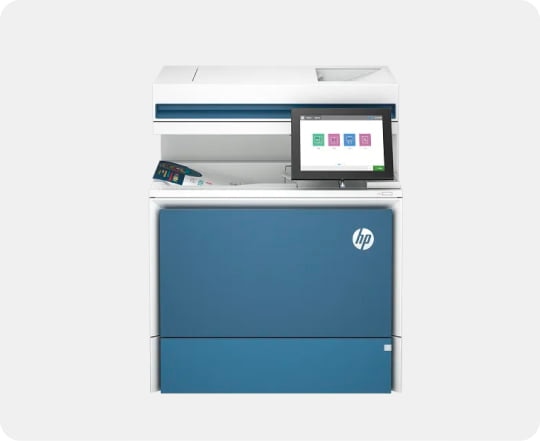
| HP LaserJet | Laser / toner | 500-5,000+ pages/mo | Office text documents, high-volume | Low per-page cost |
| HP OfficeJet | Inkjet (cartridge) | 200-800 pages/mo | Color documents, small office MFP | Mid-range per-page cost |
| HP DeskJet | Inkjet (cartridge) | 25-150 pages/mo | Casual home printing | Standard (low usage) |
| HP ENVY | Inkjet (cartridge) | 25-200 pages/mo | Photo printing, creative home use | Standard (photo-optimized) |
| HP Smart Tank | Inkjet (tank / refill) | 300-1,500 pages/mo | High-volume color on a budget | Very low per-page cost |
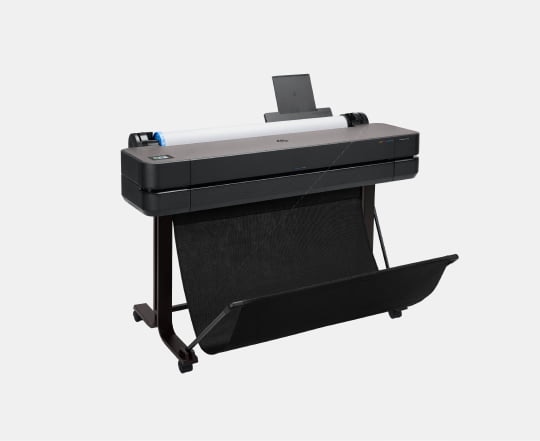
| HP DesignJet | Large-format inkjet | Varies (wide format) | CAD, architecture, technical drawings | Higher (large media) |
Note: DesignJet printers print on media up to 36 or 44 inches wide - primarily suited to engineering, architecture, and print production environments. They are not designed for standard letter or A4 home printing.
Most households overestimate their printing needs. Under 100 pages per month, HP DeskJet or ENVY is financially sensible — the lower upfront cost won't be recovered through per-page savings with a laser or tank printer. Over 300 pages per month, HP Smart Tank or LaserJet typically pays back within 6–12 months through lower per-page costs. HP Instant Ink subscription service is an alternative that converts cartridge-based printers to a monthly page-based plan, with tiers starting at 10 pages per month and a subject maximum of 700 pages per month.
HP LaserJet Pro black-and-white models cost significantly less than color laser equivalents and are faster for text documents. If 90% of your printing is text — invoices, forms, contracts — a monochrome LaserJet is the cost-efficient choice, with standard toner cartridges rated at up to 3,000 pages (ISO/IEC 19752). Color printing for photos, presentations, or marketing materials points to inkjet: HP ENVY handles photo-quality output with a 6-ink system on select models, outperforming 4-ink configurations for skin tones and subtle gradients.
HP OfficeJet and LaserJet MFP models add scanning, copying, and fax to a single device. For home offices that receive paper documents needing digital archiving, the scanner alone justifies the MFP premium over a print-only model. HP's automatic document feeder (ADF) on OfficeJet Pro models handles 35–50 page batches unattended — a practical time-saver for scanning multi-page contracts or legal documents without manual page-by-page feeding.
All current HP consumer printers include Wi-Fi connectivity and support the HP Smart app for mobile printing from iOS and Android devices, as well as Apple AirPrint and Mopria Print Service. Select OfficeJet Pro and LaserJet models add HP+ smart printing features including automatic firmware updates, supply monitoring, and remote print submission over mobile data when away from home Wi-Fi. Browse all HP printers to filter by technology type, features, and connectivity options.
HP DeskJet is the best starting point for most home users printing under 100 pages per month, with low upfront cost and wireless printing from the HP Smart app. For households that also print photos, HP ENVY adds photo-quality inkjet output with a compact footprint. According to HP's usage guidelines, HP Instant Ink subscription reduces per-page cost further for DeskJet and ENVY owners printing regularly.
HP LaserJet is better for offices printing primarily text documents at volumes over 500 pages per month - HP rates standard LaserJet Pro toner cartridges at 3,000 pages, making per-page costs significantly lower than inkjet cartridges. HP OfficeJet Pro is better when the office needs high-quality color printing for presentations and marketing materials, where laser color quality is not required.
HP Smart Tank printers use refillable ink reservoirs instead of cartridges - you pour bottled ink directly into the tank. HP rates Smart Tank reservoirs at up to 6,000 black pages or 8,000 color pages per fill, compared to 200-500 pages per cartridge on standard inkjet printers. The higher upfront cost of the printer is typically recovered within 6-12 months for users printing 300 or more pages per month.
Yes - all current HP consumer and small office printers support wireless printing from iPhone and Android devices via the HP Smart app, Apple AirPrint, and Mopria Print Service. HP Smart app allows scanning, ink level monitoring, and remote print submission from anywhere on the same network. Select HP+ enabled printers also support printing over mobile data when away from home Wi-Fi.
HP OfficeJet is designed for small office and home office use, with faster print speeds (up to 22 pages per minute on OfficeJet Pro), automatic two-sided printing, and automatic document feeders for multi-page scanning. HP DeskJet targets casual home users with simpler features and lower upfront cost. OfficeJet handles 200-800 pages per month efficiently; DeskJet is optimized for under 150 pages per month.
Offers subject to change, not combinable with all other offers, and exclusions may apply, while supplies last. HP may impose a purchase quantity limit (for example, 3 units per order). Taxes, shipping, and other fees may apply as applicable. HP reserves the right to cancel orders arising from pricing or other errors. Prices, specifications, availability, and terms of offers may change without notice. Price protection, price matching or price guarantees do not apply to Intra-day, Daily Deals or limited-time promotions. These terms apply only to products sold by HP.com; reseller offers may vary. Items sold by HP.com are not for immediate resale. Orders that do not comply with HP.com terms, conditions, and limitations may be cancelled. Contract and volume customers not eligible.
✻HP’s strikethrough price is HP’s MSRP, which is HP’s suggested retail price for authorized channel partners, based on a number of factors, including but not limited to manufacturing and component parts. The MSRP may not be the prevailing market price or regular retail price.
Earn HP Rewards on select products from the following categories: Laptops, Desktops, Printers, Business PC’s, select Accessories, and select Ink, Toner & Paper. Exclusions apply, and program membership required. See details HP Rewards
HP Instant Ink sign up required. HP Instant Ink not available in all countries. Subject to monthly page limit of 700. Must complete HP Instant Ink signup within 7 days of setting up the printer with the HP-recommended setup process as indicated in the instructions that came with your printer. Use of in-box ink cartridge is included in period of offer. Unless service is cancelled within the promotional period online at www.hpinstantink.com, a monthly service fee, based on the plan chosen, plus tax and overage fees will be charged to your credit/debit card. Customer will be charged for any overage fees and applicable taxes at the end of each month in the promotional period. One offer redeemable per printer. Trial offer with HP Instant Ink subject to change after 12.31.2024. Offer cannot be redeemed for cash. Setup Offer may be combined with other offers; see terms and conditions of the other offer for more details. Requires a valid credit/debit card, an email address, and Internet connection to printer. See additional offer information available during online signup process. For service details, see www.hpinstantink.com.
The personal information you provide will be used according to the HP Privacy Statement
✦America’s most trusted printer brand: Based on 2022 semi-annual internal brand surveys commissioned by HP.
*3 years of ink included for skus with 8000 or more total pages based upon 200 pages per month of HP Smart Tank customers’ usage. 3 years of ink included for skus with 6000 total pages based upon 167 pages per month of HP Smart Tank customers’ usage. Actual yield varies considerably based on content of printed pages and other factors. Average yield based on ISO/IEC 24711 or HP testing methodology and continuous printing. Some ink from included bottles is used to start up the printer. For details, see: www.hp.com/go/learnaboutsupplies. Commissioned by HP Inc., this Keypoint Intelligence consumer study determined that HP inkjet tank printers provide the best everyday print quality compared to competitive inkjet tank printers from Brother, Canon, and Epson. All devices are available in the market and are currently active. Prices range from $199 to less than $500 and all competitive products fall within the same category as the HP printers. The competitors were chosen because they represent the top 80% of the competitive landscape for 3:1 and 4:1 wireless A4 inkjet tank printers under $500 USD, as reported by the IDC Quarterly Hardcopy Peripherals Tracker-Final Historical CYQ3 2025. Samples were printed in the United States and then reviewed by consumers in the US, Mexico, the United Kingdom, and China. Details: www.keypointintelligence.com/hpbesteverydayprintquality.
+Deferred Interest, Payment Required Plan: Interest will be charged to your Account from the purchase date if the promotional plan balance is not paid in full within the promotional period. Minimum payments are required for each Credit Plan. Minimum payments are NOT guaranteed to pay the promotional plan balance within the promotional period. You may have to pay more than the minimum payment to avoid accrued interest charges. Valid for single transaction only. Gift cards do not qualify for promotional plans. Qualifying purchases will automatically be placed on a promotional plan. If purchase qualifies for more than one plan, it will be placed on the qualified plan with the longest promotional period. As of September 2025, terms for new Accounts: Purchase APR of 35.99%. Variable Penalty APR up to 39.99%, based on Prime Rate. Minimum interest charge is $3 in any billing period in which interest is due. A fee of $2.99 per month may apply for each paper billing statement mailed to you. You can avoid this fee by enrolling in paperless statements. Existing Account holders: see your credit card agreement for Account terms.
Credit account offers are subject to credit approval.
HP Credit Accounts are issued by Comenity Capital Bank, a Bread Financial™ Company.
^^^Free sheet organizer promotion is on the T850 DesignJet printers. This offer is combinable with standalone instant rebate savings. This promotion is not combinable with any of HP’s Trade-In promotions. Purchases by HP resellers and internal HP orders are ineligible. HP may modify or withdraw this promotion at any time. Offer valid through 2/14/26 or while supplies last.
*Customers receive three bonus months on Microsoft 365 Personal and Family subscriptions when a credit card is provided during activation. After the initial subscription period, your subscription automatically renews for 1 year, unless it is cancelled.
Disclaimers for DeskJet
HP Deskjet 2800, 4200 and 4900 printer series have self-healing Wi-Fi® , HP’s best and most reliable wireless technology. Internet access required and must be purchased separately. Wireless operations are compatible with 2.4 GHz operations only. Learn more at www.hp.com/go/mobileprinting
Disclaimers for Envy
Disclaimers for Smart Tank
Disclaimers for OfficeJet Pro