Thank you for visiting the NEW ZEALAND HP Store
-
Contact Us
CONTACT USCall us
- Sales
- 0800 854 848
- Technical support
- +64 9884 8600
Mon-Fri 9.00am - 6.00pm
(exc. Public Holidays)
Chat with us- Our specialist are here to help
- Live chat
Mon-Fri 9.00am - 6.00pm
(exc. Public Holidays)
Submit feedback We value your opinion! - My Account

Search
HP Pavilion Upgrade Guide: OmniBook 5 vs. OmniBook 7

Posted:
April 09, 2026
Categories:
Laptops

Still pushing your HP Pavilion laptop hard? Whether you’re studying in Wellington, working remotely from Auckland, or on the go across New Zealand’s stunning landscapes, it’s time to discover what you’re missing. The series that mastered the balance of price and performance has levelled up with artificial intelligence (AI) capabilities and enhanced features.
This guide will help you navigate the new HP OmniBook series to find the perfect upgrade from your current device, whether you’re a student, professional, or everyday user seeking exceptional value.
Choosing between the HP OmniBook 5 and HP OmniBook 7 isn’t about finding the “best” laptop — it’s about finding the right one for you. The OmniBook 5 is an all-day endurance champion, while the OmniBook 7 is a creative powerhouse.
Think of it this way: the HP OmniBook 5 is your incredibly efficient and reliable everyday companion, perfect for tackling your to-do list from sunrise to well past sunset. The HP OmniBook 7, on the other hand, is built for heavy lifting, offering serious graphics for creators and demanding professionals.
Contents
- Say Good-Bye to Your HP Pavilion
- Why It’s Time to Upgrade Your HP Pavilion
- New OmniBook Capabilities Your Pavilion Is Missing
- Meet the HP OmniBook Series
- HP OmniBook 5
- HP OmniBook 7
- HP OmniBook 5: The Smart Upgrade for Families and Students
- HP OmniBook 7: The Professional Powerhouse
- Side-by-Side Laptop Comparison
- Decision Framework: Which HP OmniBook Is Right for You?
- Common Questions About Upgrading from HP Pavilion
- Conclusion
Say Good-Bye to Your HP Pavilion
The AI revolution in PCs is here, and it’s more than just a buzzword — it represents a genuine upgrade to how you work, create, and play. With options from leaders like Intel®, AMD, and Microsoft, choosing the right AI-powered laptop can feel overwhelming.
That’s where we come in. We’ll help you navigate the new world of AI-powered audio, gaming, and content creation to find the perfect computer that’s not just new, but genuinely smarter.
If you’re ready to explore what’s available right now, browse the full range of HP laptops available in New Zealand to get started.
Why It’s Time to Upgrade Your HP Pavilion
AI Processing with Dedicated NPUs
Considering an AI-ready PC? You don’t need a premium beast of a machine, but you will want solid processing power. Here’s what to look for:
- RAM: At least 8GB, but 16GB is the sweet spot for smooth multitasking
- Processor (CPU): A chip with at least two cores will work, but quad-core (or more) is highly recommended for handling multiple tasks simultaneously
- Graphics (GPU): This is critical for AI work — aim for a dedicated GPU with at least 8GB of VRAM, though 16GB is ideal for heavy-duty projects
- Storage: Ensure you have at least 30GB of free space, but more is always better
The best AI PC for you will blend powerful components like a top-tier processor and GPU with practical features such as a brilliant display, long battery life, and robust cooling.
Extended Battery Life
Your HP Pavilion might serve you well as an all-day companion, ideal for moving between lectures, study sessions, and campus locations. If you need even more endurance, the HP OmniBook 5 and HP OmniBook 7 deliver impressive results. Select Snapdragon X models offer up to 34 hours of video playback. With fast charging, you can reach 50% battery in about 30 minutes — perfect for quick breaks between classes or meetings.
OLED Display Technology
The HP Pavilion combines a thin, lightweight design with sharp display options. The x360 version adds a versatile hinge for touch and pen use, while the HP OmniBook 5 offers a premium build and a wider 16-inch canvas — even in 2K OLED. Enhanced dual speakers ensure your audio always sounds great.
Enhanced Durability and Portability
Your HP Pavilion is made with recycled materials, including ENERGY STAR® certified models. The HP OmniBook 5 takes sustainability further with top-tier EPEAT Gold and Climate+ certifications, more recycled metals, and plastics sourced from ocean-bound waste streams — values that resonate strongly with environmentally conscious Kiwi consumers.
New OmniBook Capabilities Your Pavilion Is Missing
On-Device AI Processing for Privacy
The HP OmniBook 5 prioritises your privacy with on-device AI processing. It handles sensitive tasks locally, so your personal data stays with you instead of being sent to the cloud. This is powered by a built-in AI engine — a Neural Processing Unit (NPU) — in its processor.
Copilot+ PC Experiences
The HP OmniBook 5 and 7 are designed as true AI companions, built to deliver the full, seamless experience of Microsoft Copilot. A dedicated Copilot key on the keyboard lets you launch the AI assistant instantly. The specialised NPU handles tasks directly on the device, meaning you get faster responses, better efficiency, and enhanced privacy for your AI features — unlike older PCs that rely solely on the cloud.
Advanced Creative Tools
The HP OmniBook 5 and 7 supercharge your creativity with smart, AI-powered capabilities thanks to their advanced processors and dedicated Neural Processing Units that work seamlessly with Windows Copilot+. The HP OmniBook 5 serves as your capable daily driver, while the HP OmniBook 7 steps up with more powerful hardware for demanding professional projects and intensive creative work.
Explore the full range of personal laptops to find an HP laptop suited to your creative ambitions.
Meet the HP OmniBook Series
Why HP OmniBook 5 and 7 Are in High Demand
Next-Gen AI Capabilities: The HP OmniBook 5 and 7 put next-gen AI right at your fingertips. Thanks to their dedicated NPUs, they’re designed to boost your productivity, tighten security, and make your daily computing easier. The HP OmniBook 7 is the more powerful sibling, ready to handle intensive AI workloads with ease.
Sustainability Credentials: The HP OmniBook 5 is designed with the planet in mind. It’s earned top-tier EPEAT Gold and ENERGY STAR certifications and features recycled ocean-bound plastic and metals.
Range of Form Factors and Sizes: Whether you need a simple, portable laptop or a powerful machine for creative work, the HP OmniBook series has you covered.
HP OmniBook 5
Built for students and families, the HP OmniBook 5 focuses on portability and long battery life. Available in two styles:
- Standard Laptop: A familiar, no-fuss clamshell design
- 2-in-1 Flip: A flexible convertible that works as a laptop, tablet, or tent, complete with a touch screen
Available in two sizes:
- 14-inch: Super portable, with some models featuring a stunning 2K OLED screen
- 16-inch: A larger display perfect for multitasking
HP OmniBook 7
The HP OmniBook 7 is for power users and creatives who need serious performance for demanding applications. Available in multiple configurations:
- Standard Laptop: A powerful clamshell for traditional computing
- Flip 2-in-1: A versatile model that adds a touch screen for interactive tasks
Choose from three display sizes:
- 14-inch: A compact but mighty option with discrete graphics
- 16-inch: A great balance of screen space and power
- 17.3-inch: A massive screen, perfect for video editors and animators needing a large canvas
HP’s Commitment to Innovation
We believe a company’s purpose extends beyond the bottom line. Our real job is to make a difference through meaningful action on climate, human rights, and digital equity. Our 80-year history demonstrates this commitment, and it gives us the courage to imagine a future where technology serves humanity in extraordinary ways. Everything we create is specially designed to fuel this progress. The next great idea that changes everything could come from anyone, at any time.
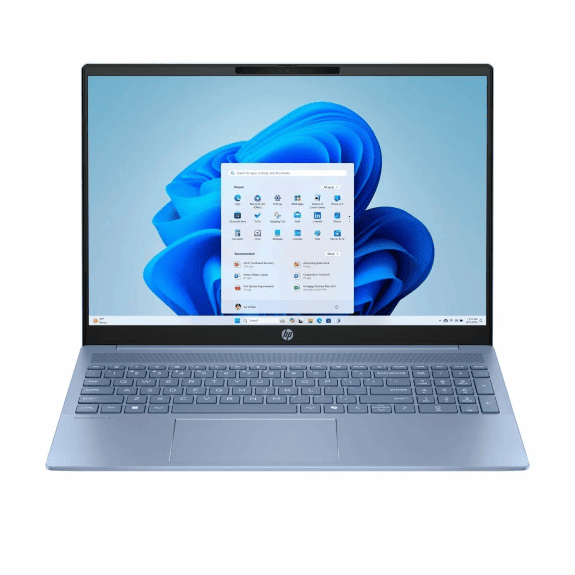
HP OmniBook 5: The Smart Upgrade for Families and Students
Key Strengths
Extended Battery Life: Get up to 34 hours of battery with select Snapdragon X configurations, so you can go from morning lectures to late-night library sessions without scrambling for an outlet.
Affordable Starting Price: The HP OmniBook 5 offers competitive pricing, though it varies depending on screen size and configuration. Check the HP New Zealand store for the latest pricing and availability.
14-inch and 16-inch Options with 2K OLED Displays: Both the 14-inch and 16-inch models offer 2K OLED screens (availability varies by region). The 14-inch model features a 16:10 aspect ratio with low blue light, while the 16-inch boasts a super-fast 0.2ms response time. Both deliver a sharp 1920x1200 resolution.
Perfect for Everyday Computing with AI Enhancement: The HP OmniBook 5 offers three AI-capable processor choices: Intel® Core™ Ultra, AMD Ryzen™ AI, and Snapdragon X Plus. The best choice depends on your priorities — decide what matters most to you: graphics performance, software compatibility, or battery life.
Ideal For
- Students needing all-day battery
- Families wanting reliable performance
- Budget-conscious upgraders
- Users prioritising portability
HP OmniBook 7: The Professional Powerhouse
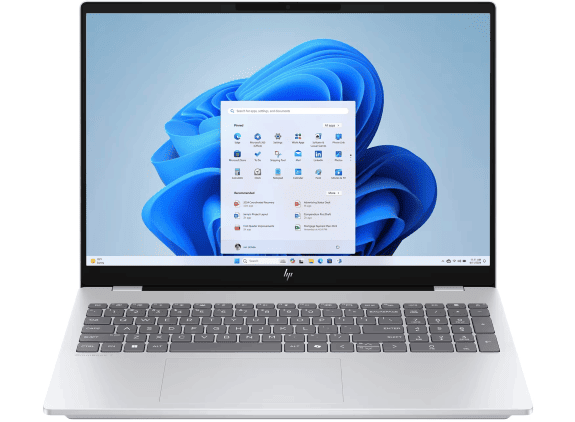
Key Strengths
- Intel® Core™ Ultra processors with up to 48 TOPS
- Optional NVIDIA® GeForce RTX™ 4050 graphics
- Military-grade durability testing
- Four form factors, including a 17.3-inch option
Ideal For
- Creative professionals
- Business users needing maximum performance
- Users wanting discrete graphics options
- Those requiring larger displays
Side-by-Side Laptop Comparison
| Feature | HP OmniBook 5 | HP OmniBook 7 |
|---|---|---|
| Processor | Snapdragon X Series |
Intel® Core™ Ultra |
| AI performance | Up to 45 TOPs |
Up to 48 TOPs |
| Battery life | Up to 34 hours |
Up to 20 hours |
| Display options | 14-inch, 16-inch (2K OLED) |
14-inch, 16-inch, 16-inch Flip, 17.3-inch (3K OLED) |
| Graphics | Integrated Intel® Arc™ |
Optional RTX™ 4050 |
| Durability | Standard |
Military-grade tested |
| Starting price | More affordable |
Premium pricing |
| Best for | Students, families |
Professionals, creators |
Decision Framework: Which HP OmniBook Is Right for You?
Choose HP OmniBook 5 if you:
- Value battery life above all for work or school
- Need a reliable daily driver
- Have a tighter budget
- Primarily use productivity applications
Choose HP OmniBook 7 if you:
- Need maximum performance
- Work with creative applications
- Want military-grade durability
- Require discrete graphics options
Not sure where to begin? Browse the full range of premium laptops to explore all your options in New Zealand.
Common Questions About Upgrading from HP Pavilion
Q: Can I transfer my files from my HP Pavilion laptop easily?
A: Yes. To move your files to a new device, you can use an external hard drive or take advantage of online cloud services like OneDrive or Google Drive. Both methods make the transfer process straightforward and effortless.
Q: Will my current software work on the new HP OmniBook?
A: Yes. The HP OmniBook series is designed to prioritise what matters most: faster, more responsive performance, helpful AI features, and an engaging user experience. Your existing software will run smoothly.
Q: Is the price jump worth it for AI features?
A: Yes. You don’t need to pay a premium for a top-tier AI laptop. The HP OmniBook series delivers high-end performance at an affordable price point. For professionals, students, and creators who need powerful AI tools without compromising on quality, the OmniBook series offers the best value.
Q: Which has better support and warranty options?
A: Both models offer the same HP support and warranty options.
Conclusion
The HP OmniBook 5 and 7 are excellent upgrades from your HP Pavilion. The OmniBook 5 shines with everyday reliability, exceptional battery life lasting up to 34 hours, and flexible 2-in-1 design options — making it ideal for students, families, and general users. Its biggest strengths are its versatility and long-lasting endurance for everything from note-taking to streaming.
In contrast, the HP OmniBook 7 is built for performance, targeting power users and designers who need serious power. It steps up with larger, stunning displays, smoother refresh rates, and powerful dedicated graphics options like the NVIDIA® RTX™ 4050. This extra power is perfect for gaming, video editing, and other demanding applications, though it comes with a shorter battery life of up to 20 hours.
Great tech should work together, not just come in the same box. That’s why HP partners with leaders like Intel®, NVIDIA®, and Adobe to ensure every HP OmniBook is a cohesive system. The result is a perfectly synchronised experience for everything you do. Whatever your task or budget, comparing all OmniBook models side by side helps you find your perfect laptop and study, work, or create with confidence.
Ready to find the perfect HP laptop for your needs? Browse the full selection of HP laptops in New Zealand and discover the right fit for your lifestyle today.
Recent Posts


Popular Posts



Products purchased through this store are sold and fulfilled by Ingram Micro (NZ) LTD

CONTACT US
Call us
- Sales
- 0800 854 848
- Technical support
- +64 9884 8600
Mon-Fri 9.00am - 6.00pm
(exc. Public Holidays)
Chat with us
- Our specialist are here to help
- Live chat
Mon-Fri 9.00am - 6.00pm
(exc. Public Holidays)
Submit feedback
We value your opinion!