Thank you for visiting the NEW ZEALAND HP Store
-
Contact Us
CONTACT USCall us
- Sales
- 0800 854 848
- Technical support
- +64 9884 8600
Mon-Fri 9.00am - 6.00pm
(exc. Public Holidays)
Chat with us- Our specialist are here to help
- Live chat
Mon-Fri 9.00am - 6.00pm
(exc. Public Holidays)
Submit feedback We value your opinion! - My Account

Search
OMEN Desktop Airflow Analysis: A Technical Deep-Dive into Thermal Design

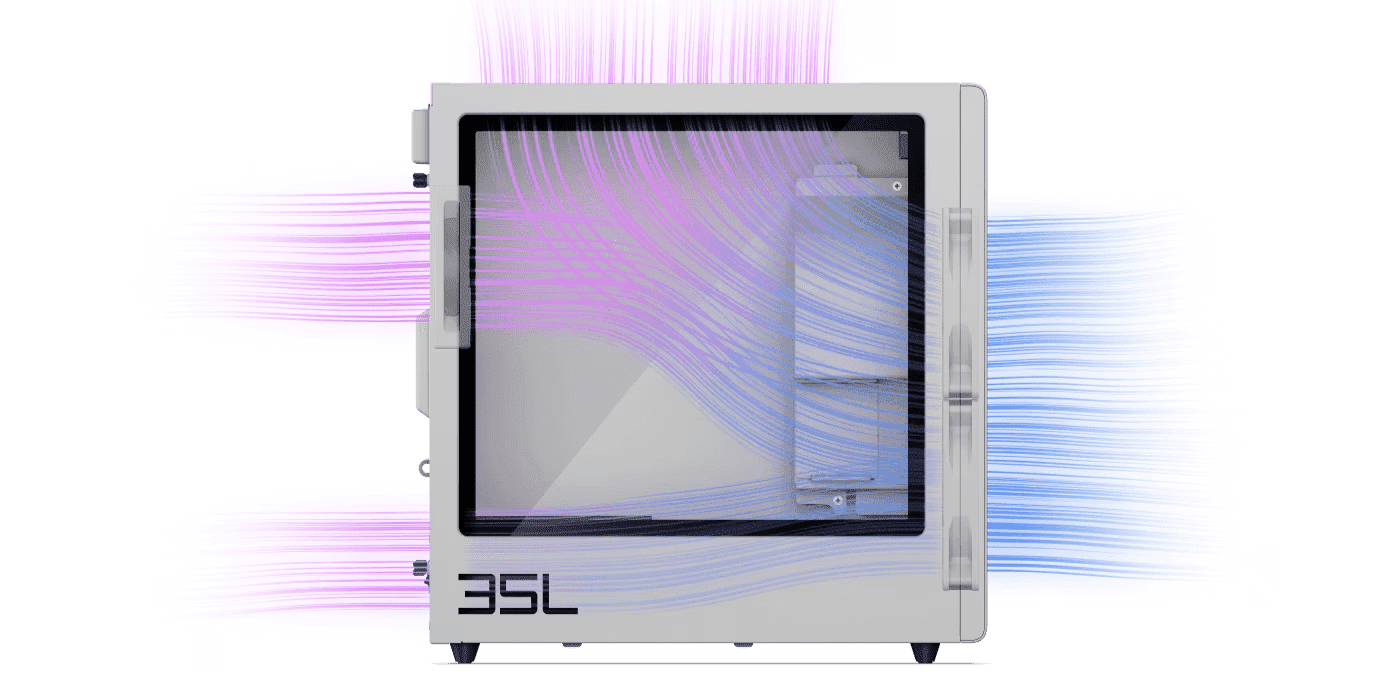
As gaming technology continues to advance across New Zealand, from Auckland esports enthusiasts to Wellington content creators, the demand for powerful hardware with efficient cooling has never been greater. HP OMEN desktops are specifically engineered for peak gaming performance, and the secret often lies in their sophisticated thermal architecture designed to keep heat under control.
However, efficient cooling isn’t merely about preventing overheating; it’s intrinsically related to desktop computer power consumption, optimal clock speeds, system stability, and long-term performance. In this comprehensive deep dive, we’ll analyse the technologies within HP OMEN desktops, including airflow patterns, Cryo Chamber technology, smart cooling algorithms, and other methods that make OMEN desktops a favourite amongst gamers.
We’ll also examine OMEN’s advanced gaming PC cooling solutions, system-level cooling design, including how to prevent thermal throttling, how to optimise your Intel®, NVIDIA®, and AMD® CPUs and GPUs to operate at maximum performance, and how to enhance your OMEN system for gaming, content creation, or heavy workstation tasks by understanding their thermal architecture.
Contents
What Is Desktop Thermal Architecture?
Thermal architecture refers to the integrated design of cooling systems and heat management in high-performance desktops. This architecture is designed to provide stable performance under heavy workloads whilst maintaining proper airflow management, cooling modules, thermal design power (TDP) compliance, and desktop thermal management strategies.
Effective thermal design ensures that every component—from the CPU and GPU to memory modules and storage drives—operates within safe temperature ranges. For gamers and content creators, this translates directly into sustained performance, reduced system noise, and extended component lifespan.
The Science Behind OMEN Cooling Systems
Understanding thermal management helps you learn how heat is handled in a high-performance gaming system. Let’s explore the fundamental principles that govern OMEN’s cooling efficiency.
Heat Generation Sources in Gaming Desktops
The latest gaming components generate significant heat during peak performance sessions. For example, high-end graphics cards like NVIDIA® RTX or AMD Radeon™ GPUs generate 200-350W during high-performance gaming, whilst CPUs typically produce around 65-125W of thermal energy. Memory and storage components also generate heat that must be effectively managed; otherwise, it can cause performance issues and potentially shorten component lifespan.
Modern triple-A (AAA) games push these components to their limits, creating sustained thermal loads that require intelligent cooling solutions. When multiple components generate heat simultaneously, the challenge becomes managing cumulative thermal output whilst maintaining quiet operation.
Thermal Dissipation Principles and Heat Transfer Methods
Heat dissipation is based on three main principles: conduction, convection, and radiation. OMEN cooling systems are designed based on these principles and modern airflow patterns to reduce heat effectively. Heat transfers from components to heat sinks through heat pipes and thermal architecture, creating a pathway for thermal energy to escape the system.
Conduction moves heat from the component surface to the cooler, convection carries heat away through airflow, and radiation disperses residual thermal energy. OMEN systems optimise all three methods to create a comprehensive cooling solution.
How Thermal Throttling Impacts Gaming Performance
For CPUs, normal operating temperature is around 85-90°C, and for GPUs, it’s 80-83°C. Thermal throttling begins to impact gaming performance when system components exceed normal operating temperatures. This throttling causes frame rate drops, lag, and inconsistency during extended AAA gaming sessions. Cryo Chamber technology and smart cooling algorithms are developed to eliminate these issues.
When throttling occurs, your expensive hardware cannot deliver its full potential, resulting in stuttering during crucial gameplay moments or longer render times for content creators. Understanding and preventing throttling is essential for maintaining competitive performance.
OMEN Desktop Cooling Architecture Analysis
We’ve optimised different cooling strategies across the OMEN desktop series; each model features distinct performance characteristics and thermal capabilities tailored to different gaming needs and budgets.
Detailed Breakdown of Airflow Patterns and Fan Configurations
OMEN desktops employ sophisticated front-to-back airflow configurations that draw cool air through strategically positioned front panel intakes. Multiple exhaust fans at the rear expel warm air, creating a cooling environment that prevents dust buildup and maintains consistent airflow. This positive pressure design ensures that air enters only through filtered intakes, reducing dust accumulation inside the chassis.
Every component inside the desktop is carefully positioned to optimise airflow paths, ensuring the system stays cool whilst running at maximum performance. Cable management channels and component placement work together to eliminate airflow obstructions.
Cryo Chamber Cooling Technology Implementation
The Cryo Chamber in select OMEN desktops is engineered to provide a cooled environment whilst reducing noise levels. It separates heat produced by the CPU and GPU, allowing each component to stay cool independently. This technology directs hot air away from heated components and channels cool air towards the components that need it most.
By creating thermal zones within the chassis, Cryo Chamber prevents heat from one component affecting another’s performance. This isolation is particularly beneficial during sustained gaming sessions when both CPU and GPU operate at high loads simultaneously.
Smart Cooling Algorithms and Temperature Monitoring
OMEN desktops feature smart cooling algorithms that rely on dynamic thermal management to monitor internal temperatures continuously. Once temperatures are analysed, the system automatically adjusts fan speeds to provide peak performance during gaming sessions whilst maintaining acceptable noise levels during lighter workloads.
These algorithms learn from your usage patterns, predicting when intensive workloads occur and preemptively adjusting cooling profiles. The result is a system that stays cool without unnecessary fan noise during casual use.
Case Design Elements That Optimise Thermal Performance
OMEN cases feature strategically positioned vents that allow air to flow efficiently throughout the chassis. They offer easy upgradability through tool-less side panels and organised cable management that ensures nothing blocks the cooling path.
Perforated panels, mesh sections, and thoughtful internal layout all contribute to superior thermal performance. The case design isn’t merely aesthetic—every element serves a functional purpose in the thermal management system.
Advanced Thermal Management Features
Modern systems demanding high performance require sophisticated thermal management. OMEN desktops available through HP’s gaming desktop range incorporate multiple advanced features.
CPU and GPU Cooling Solution Integration
These systems use advanced CPU coolers and GPU cooling strategies to maximise performance. Integrated cooling ensures both components avoid thermal throttling during heavy workloads or extended AAA gaming sessions. High-quality thermal interface materials and optimised heatsink designs work together to efficiently transfer heat away from critical components.
The coordination between CPU and GPU cooling prevents thermal interference, where heat from one component doesn’t negatively impact the other’s cooling efficiency.
Memory and Storage Thermal Considerations
Gamers often overlook that memory modules and high-speed SSDs also contribute to desktop heat output. Proper airflow optimisation techniques prevent heat buildup around these components, ensuring data stability and extending component lifespan.
Modern NVMe SSDs, in particular, can generate significant heat under sustained read/write operations. OMEN systems ensure adequate airflow reaches these drives, preventing thermal throttling that would slow storage performance.
Power Supply Thermal Efficiency Impact
The PSU (power supply unit) plays an important role in system cooling. An efficient PSU generates less heat, reducing the system’s power consumption and improving overall OMEN cooling performance. High-quality PSUs with 80 PLUS certification ratings waste less energy as heat, contributing to lower overall system temperatures.
Additionally, PSU fans often serve as exhaust points, helping to expel warm air from the chassis whilst cooling the power supply itself.
Cable Management Effects on Airflow
Keeping cables neat is more than just aesthetics; it improves airflow paths throughout the system. When cables are organised properly, airflow remains unobstructed. Clean cable management allows fans to operate efficiently and deliver optimal cooling throughout the desktop.
Bundled cables create air resistance and dead zones where hot air can accumulate. OMEN systems feature cable routing channels and tie-down points that keep cables organised and out of the airflow path.
Performance Optimisation Through Thermal Design
The ultimate goal of thermal design is performance stability and reliability. When components run cooler, the system can maintain better clock speeds over time. This environment supports higher and more consistent frame rates during gameplay, whether you’re exploring open-world titles or competing in fast-paced shooters.
Thermal headroom is a bonus feature for enthusiasts. It provides room to overclock, allowing users to push their systems beyond default settings whilst maintaining optimal temperatures. Whether you’re rendering heavy graphics or competing in esports, the cooling system maintains stability throughout your session.
Cooler components also experience less thermal stress over time, potentially extending the operational lifespan of expensive hardware investments. This long-term reliability is particularly valuable for content creators and professional gamers who depend on their systems daily.
Real-World Performance Benefits
During extended gaming marathons or intensive rendering projects, proper thermal management prevents the gradual performance degradation that plagues poorly cooled systems. Your frame rates remain consistent from the first minute to the fourth hour, ensuring competitive performance throughout.
Additionally, quieter operation during moderate workloads means less distraction during strategy games, content creation, or when using your system for productivity tasks between gaming sessions.
Common Questions About OMEN Desktop Cooling
How does Cryo Chamber cooling work in OMEN desktops?
In select OMEN models, there’s a dedicated compartment called the Cryo Chamber positioned strategically within the chassis. Its main purpose is to create a separate cooling zone that isolates CPU and GPU heat sources to prevent thermal interference and optimise component-specific cooling strategies. This separation ensures that hot air from the GPU doesn’t warm the CPU cooler’s intake air, and vice versa.
What causes thermal throttling in gaming PCs?
Thermal throttling is a protective mechanism that occurs when a computer’s processor (CPU or GPU) exceeds safe temperature limits. To prevent damage from overheating, the processor reduces its clock speed, which limits heat output but often leads to lower frame rates and inconsistent performance. Proper cooling prevents throttling, allowing components to maintain their maximum speeds continuously.
How do OMEN smart cooling systems adapt to workloads?
Smart cooling technology uses built-in sensors and desktop temperature monitoring to manage fan speeds intelligently. During high workloads, fans speed up to expel heat quickly, whilst the system stays quiet during light tasks such as web browsing or document editing. This smart cooling maintains a balance between performance and power consumption whilst minimising noise pollution.
What are optimal operating temperatures for gaming desktops?
By today’s standards, 60-85°C is considered a safe and normal thermal range for modern CPUs and GPUs under load. OMEN desktops are designed to stay within these limits during typical gaming sessions, ensuring longevity and stable performance through hours of gaming. Idle temperatures typically range from 30-45°C depending on ambient conditions.
How often should I clean my OMEN desktop’s cooling system?
Regular maintenance helps preserve optimal cooling performance. Inspect dust filters monthly and clean them when visibly dusty. A thorough internal cleaning every 6-12 months, depending on your environment, prevents dust buildup that can restrict airflow. Always power down and unplug your system before cleaning.
Can I upgrade the cooling system in my OMEN desktop?
OMEN desktops are designed with effective cooling from the factory, but enthusiasts can often add additional case fans or upgrade CPU coolers for even better thermal performance. Before making modifications, consult your system’s documentation to ensure compatibility and maintain warranty coverage.
Maintaining Peak Thermal Performance
Beyond the excellent cooling systems HP engineers into OMEN desktops, users can take steps to maintain optimal thermal performance over time. Regular maintenance ensures your cooling system continues operating at peak efficiency years after purchase.
Keep your desktop’s exterior vents clear of obstructions and dust. Compressed air cleaning every few months prevents dust accumulation on heatsinks and fans. Ensure your room has adequate ventilation, especially during summer months in New Zealand when ambient temperatures rise.
Monitor your system temperatures using HP’s included software or third-party monitoring tools. Establishing a baseline when your system is new helps you identify when cooling performance degrades over time, indicating maintenance is needed.
Conclusion
HP OMEN desktops are engineered to handle all your thermal challenges with precision and reliability. With features like smart cooling, Cryo Chamber technology, advanced CPU coolers, and thoughtful cooling system design, OMEN desktops easily maintain stability during high-graphics games or heavy workloads, preventing thermal throttling and maximising power efficiency.
Whether you’re building a gaming setup, creating content, or running a high-performance workstation, understanding desktop thermal management and airflow optimisation techniques ensures your system performs at its best. The sophisticated thermal architecture in OMEN desktops provides the foundation for sustained peak performance, allowing you to focus on your games and projects rather than worrying about overheating.
For New Zealand gamers and creators seeking reliable, high-performance computing, OMEN’s thermal design philosophy delivers the cool, quiet operation necessary for long gaming sessions and intensive creative work. Explore HP’s full range of gaming desktops to find the perfect thermally-optimised system for your needs.
Recent Posts





Popular Posts




Products purchased through this store are sold and fulfilled by Ingram Micro (NZ) LTD

CONTACT US
Call us
- Sales
- 0800 854 848
- Technical support
- +64 9884 8600
Mon-Fri 9.00am - 6.00pm
(exc. Public Holidays)
Chat with us
- Our specialist are here to help
- Live chat
Mon-Fri 9.00am - 6.00pm
(exc. Public Holidays)
Submit feedback
We value your opinion!