Thank you for visiting the NEW ZEALAND HP Store
-
Contact Us
CONTACT USCall us
- Sales
- 0800 854 848
- Technical support
- +64 9884 8600
Mon-Fri 9.00am - 6.00pm
(exc. Public Holidays)
Chat with us- Our specialist are here to help
- Live chat
Mon-Fri 9.00am - 6.00pm
(exc. Public Holidays)
Submit feedback We value your opinion! - My Account

Search
HP OmniBook Features: What Makes Each Model Unique

Posted:
April 21, 2026
Categories:
Laptops
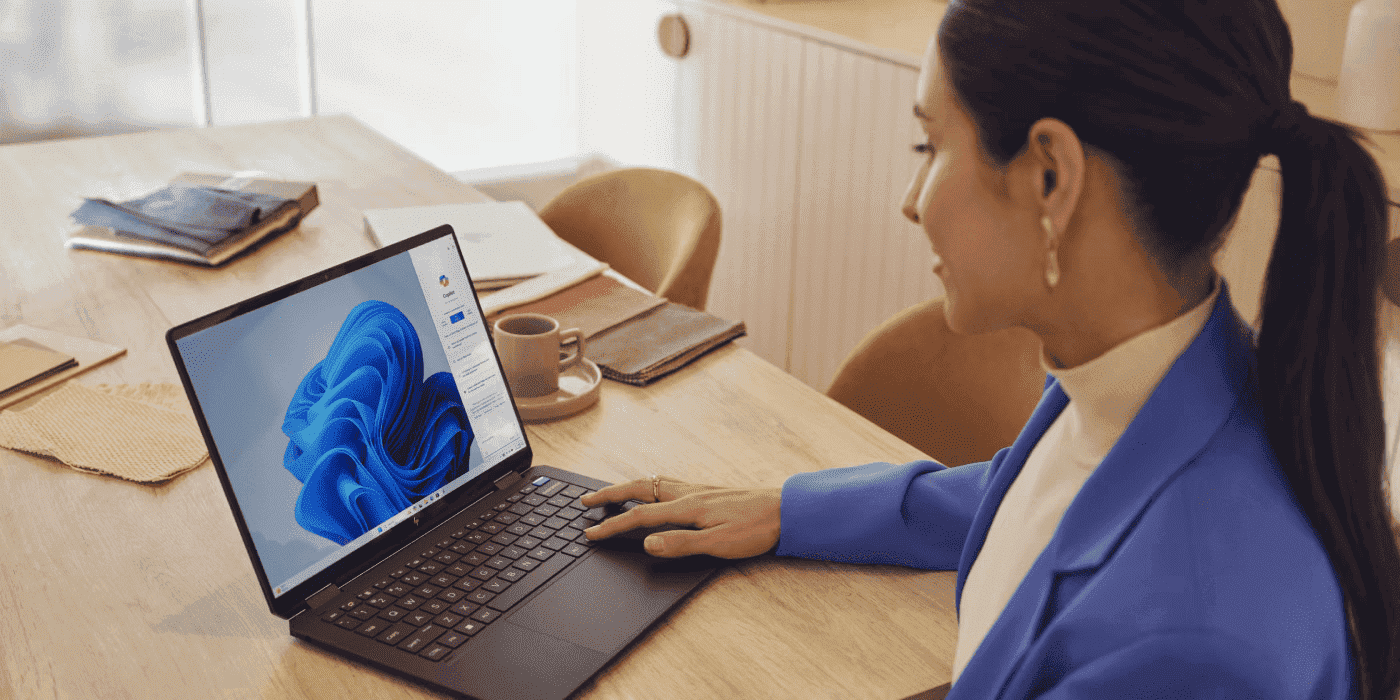
Quick Answer: HP OmniBook Unique Features by Model
OmniBook 3 (Entry-Level):
AMD Ryzen AI 7, up to 13 TOPS, 12-hour battery, 1080p FHD display, up to 1TB storage. HP True Vision camera, privacy shutter, dual array microphone. Best for students and everyday computing at an affordable price.
OmniBook 5 (Mid-Range):
Snapdragon X Series, up to 45 TOPS, up to 34-hour battery (longest in lineup), 16" 2K OLED option, up to 32GB RAM. HP Audio Boost with dual speakers. Perfect blend of performance and battery life for families and students.
OmniBook 7 (Professional):
Intel Core Ultra/AMD, up to 48 TOPS, 12-hour battery, military-grade durability (MIL-STD-810H), optional NVIDIA GeForce RTX, up to 2TB storage, 3K OLED options. Built for business professionals and mobile workers.
OmniBook X (Premium):
Intel/AMD/Snapdragon X Elite, up to 50 TOPS, 28-hour battery, ultra-thin lightweight design (ENVY evolution), multiple form factors (14" standard, Flip 14", Flip 16"), 3K OLED, Poly Camera Pro. Best for mobile productivity and creative work.
OmniBook Ultra (Ultra-Premium):
Intel Core Ultra/AMD Ryzen AI 9, up to 55 TOPS (highest), 22-hour battery, 3K OLED with variable refresh, AMD FreeSync, Flip 2-in-1 with stylus support, HP Wolf Security, 85% recycled metals. Maximum creative power and premium materials.
Common Features Across All Models:
HP AI Companion, NPU processors, Copilot+ PC capabilities (40+ TOPS models), Windows Studio Effects, Corning Gorilla Glass protection, sustainable materials.
Best Battery Life:
OmniBook 5 (up to 34 hours with Snapdragon)
Most AI Power:
OmniBook Ultra (up to 55 TOPS)
Most Durable:
OmniBook 7 (military-grade MIL-STD-810H)
At HP, we’ve been shaping the future of modern work with our comprehensive lineup of AI-enhanced laptops across different price points. Now unified under the OmniBook name, each model offers something unique and different.
From the college-friendly HP OmniBook 3 with everyday applications for academic success to more powerful options like the HP OmniBook 7 for content creation, we’ve got it all under one roof. Whether you’re a student heading into a new semester or a professional working remotely across Aotearoa, there’s an OmniBook built for your lifestyle.
For those seeking premium features, high-end options like the HP OmniBook Ultra Flip 14 bring AI-enhanced features and premium OLED screen quality. Not sure which model is the best fit for your needs? Read on for our complete buyer’s guide to the HP OmniBook series.
Contents
- What Is the HP OmniBook Series?
- HP OmniBook Model Overview at a Glance
- Unique Features by OmniBook Model
- AI Capabilities Across the OmniBook Line
- Display and Design Differences
- Common Questions About HP OmniBook Models
- How to Choose the Right HP OmniBook for Your Needs
- Choosing an HP OmniBook in New Zealand: What to Keep in Mind
- Conclusion
What Is the HP OmniBook Series?
The OmniBook series of AI-powered laptops is designed to meet the needs of all users, offering diverse models from the affordable to the premium segment. From family users to students, content creators, designers, and mobile professionals — we’ve got an option for everyone.
The OmniBook brand is the continuation of the success story fuelled by the popularity of HP’s signature laptop series, like the Pavilion and Spectre. This time around, HP did things a bit differently, aiming to create a series of laptops packed with modern AI features to suit every user’s needs.
While considerably different, each of the laptops from the series also shares common similarities in terms of display quality, processor options, graphics, and storage. Browse the full range of HP laptops to explore what’s available in New Zealand.
All of the laptops from this series come with automated features, such as the HP AI Companion for academic and professional research, as well as the AI Copilot+ integration. Subtle differences are there to suit the needs of all types of users, as shown by the table below.
HP OmniBook Model Overview at a Glance
| Model | Price range | Processor options | AI capabilities (TOPs) | Battery life | Best for |
|---|---|---|---|---|---|
| OmniBook 3 | Entry-level |
AMD Ryzen™ AI 7 |
Up to 13 |
Up to 12 hrs |
Students, everyday users |
| OmniBook 5 | Mid-range |
Snapdragon X Series |
Up to 45 |
Up to 34 hrs |
Families, students |
| OmniBook 7 | Professional |
Intel® Core™ Ultra / AMD |
Up to 48 |
Up to 12 hrs |
Business professionals |
| OmniBook X | Premium |
Intel / AMD / Snapdragon |
Up to 50 |
Up to 28 hrs |
Creators, professionals |
| OmniBook Ultra | Ultra-premium |
Intel® Core™ Ultra / AMD |
Up to 55 |
Up to 22 hrs |
Content creators, power users |
Tip: The head-to-head laptop comparison table above showcases different use cases and specs of each laptop from the OmniBook lineup. Check the table in detail to learn more about the price range, computing power, AI features, and the estimated battery life of each model.
Unique Features by OmniBook Model
HP OmniBook 3: Essential Computing Made Simple
The OmniBook 3 is the entry point into enhanced multi-tasking functionalities powered by AI features like live captions, the Paint Cocreator, and integrated Windows Studio Effects. It’s the best HP laptop for students and live conferencing, backed by the HP True Vision camera, privacy shutter, and a dual array microphone.
Best for: College students and everyday users on a budget
Standout features:
- Up to 1TB of storage
- 1080p Full HD display for clear viewing
- AMD Radeon™ graphics for everyday tasks
- Next Gen AI capabilities with Microsoft Copilot® integration
Why it’s unique: Enables affordable entry into HP AI laptops
Best use cases: Web browsing, document work, video calls, light content consumption
HP OmniBook 5: The Family Powerhouse
The HP OmniBook 5 is powered by Snapdragon X Series processors, which are perfect for high-performance computing for family use. As a practical replacement for a home PC, the OmniBook 5 delivers with an OLED touch display, 256GB of SSD memory, and Radeon™/Intel® enhanced graphics (specs vary depending on the exact model).
Best for: Families, everyday users, students in need of versatility
Standout features:
- Available with Snapdragon X Series for exceptional battery life (up to 34 hours)
- 16-inch 2K OLED display option for immersive viewing
- Up to 32GB memory for smooth multitasking
- HP Audio Boost with dual speakers
Why it’s unique: Perfect blend of high performance and optimal battery life for everyday use
Best use cases: Family computing, remote learning, multimedia consumption
HP OmniBook 7: Built for Business Durability
The OmniBook 7 is one of the best HP laptops for work, designed with power users in mind. Its next-gen AI features, pre-installed Windows 11 Home, and powerful NVIDIA® GeForce RTX™ chips make it stand out. With up to 2TB of SSD storage, this business laptop is a solid option for storing all your files and documents in one place without compromising performance.
For those seeking capable business laptops that can handle demanding professional workloads, the OmniBook 7 is worth serious consideration.
Best for: Business professionals, mobile workers
Standout features:
- US military-grade standard certification (MIL-STD-810H)
- Multiple processor options (Intel®, AMD)
- 3K OLED display options with variable refresh rates
- Professional security features
Why it’s unique: Rugged durability combined with AI performance
Best use cases: Field work, frequent travel, demanding business applications
HP OmniBook X: Premium Portability Redefined
The HP OmniBook X lineup follows in the footsteps of the ENVY series with an ultra-thin and lightweight laptop design for ultimate portability. With an OLED touch screen display and Snapdragon X Elite processors, these laptops deliver unmatched, AI-enhanced performance at a fraction of the size and price of a high-grade home PC setup. Explore the HP OmniBook X range available in New Zealand.
Best for: Independent professionals, university students, creators
Standout features:
- Exceptional battery life (up to 28 hours with Snapdragon)
- Ultra-thin, lightweight design (evolution of ENVY series)
- Multiple form factors (14" standard, Flip 14", Flip 16")
- Poly Camera Pro with Magic Background
Why it’s unique: Best combination of battery life and premium design without compromise
Best use cases: All-day mobile productivity, creative work on the go
HP OmniBook Ultra: Maximum Creative Power
Discover the ultimate computing power with the AI-assisted HP OmniBook Ultra. HP’s top-tier OmniBook models come with a stylish design, powerful AMD Ryzen™ AI 9 processors, and up to 2TB of internal storage. Think of it as the AI evolution of the HP Spectre — only with faster and more powerful computing.
Best for: Content creators, professionals needing top performance
Standout features:
- Up to 55 TOPS AI processing power
- 3K OLED displays with variable refresh rates
- AMD FreeSync™ technology for smooth visuals
- Flip 2-in-1 options with stylus support
- HP Wolf Security for enterprise-grade protection
Why it’s unique: Highest performance tier with premium materials and features
Best use cases: Video editing, 3D rendering, high-end creative work, gaming
AI Capabilities Across the OmniBook Line
The question of “What is the best laptop to buy?” takes on a new dimension with the HP OmniBook lineup. It’s more of a “Which OmniBook laptop suits me?” type of decision, and the following AI features come included across all models.
HP AI Companion availability across models: HP’s AI Companion feature is included in all HP OmniBook laptops, from light content and student laptops like the OmniBook 3 to workhorse options for demanding loads like the OmniBook Ultra. This personal assistant helps fetch data, summarise documents, and conduct research for academic and professional work.
NPU performance differences: With varying NPU performance specs, OmniBook laptops are optimised for AI workloads without affecting overall performance — by relieving the CPU and GPU of demanding tasks. Powerful chips like the AMD Ryzen™ AI 9 contribute significantly to this AI potential.
Copilot+ PC features: With Copilot+ PC benefits and integrated Windows 11 Home, OmniBook laptops make an excellent choice for handling advanced AI tasks across Windows and Microsoft 365 toolkits.
Windows Studio Effects and collaboration tools: Joining a call with family, friends, or your project collaboration team has never been easier with Windows Studio Effects integrated across every OmniBook model. It’s perfect for fine-tuning lighting and noise cancellation for smooth video calls and conferences.
On-device vs. cloud AI processing capabilities: Whether it’s offline data processing or cloud-based, AI-enhanced processing for greater online scalability, the OmniBook series ticks all the boxes.
Display and Design Differences
Display options: Starting with the OmniBook 3’s 1080p Full HD display, HP OmniBook laptops deliver crisp image quality with wide viewing angles across all models. Mid-tier options step up to 2K resolution, while top-tier models like the OmniBook X Flip 2-in-1 offer 3K OLED resolution for premium viewing quality.
Variable refresh rate: With refresh rates of up to 120 Hz, OmniBook models deliver smooth and fluid scrolling through Windows and its interface as a whole.
Corning Gorilla Glass: Standard OmniBook models come equipped with Corning Gorilla Glass 5 screen protection against scratches and damage. OmniBook X and Ultra models with OLED displays come with an even higher level of protection — Corning Gorilla Glass Victus.
Form factors: The OmniBook lineup is as versatile as can be, with a standard clamshell design for home PC use, as well as 2-in-1 flip convertible models for extra versatility.
Colour options and premium materials: As you move up the OmniBook model ladder, you’ll notice progressive improvements in build quality and finish options. From the aluminium finish and basic colours like Ceramic White or Meteor Silver for entry models, to sophisticated Nightfall Black and smooth, machined metal finishes for premium tiers.
If you’re also considering a display upgrade to go with your new laptop, check out the range of HP monitors available for New Zealand customers.
Common Questions About HP OmniBook Models
Which HP OmniBook Has the Best Battery Life?
The HP OmniBook 5 with Snapdragon X Series processor offers up to 34 hours of battery life, making it the longest-lasting model in the series. The OmniBook X lasts up to 28 hours with the Snapdragon X Elite.
Do All HP OmniBook Models Support AI Features?
Yes, all HP OmniBook models include Next Gen AI PC capabilities with dedicated NPU processors, though performance varies from 13 TOPS (OmniBook 3) to 55 TOPS (OmniBook Ultra). Models with 40+ TOPS support full Copilot+ PC experiences.
Which OmniBook Is Best for Students?
The HP OmniBook 3 and OmniBook 5 are ideal for students, offering excellent value with sufficient performance for coursework, research, and entertainment. The OmniBook 3 suits budget-conscious buyers, while the OmniBook 5 provides more power and battery life. Browse HP’s range of student laptops to explore your options.
Can HP OmniBook Models Run Demanding Creative Software?
The HP OmniBook Ultra and OmniBook X are specifically designed for creative professionals, with powerful processors, ample memory (up to 32GB), and high-resolution OLED displays suitable for video editing, graphic design, and 3D work.
What Is the Difference Between Standard and Flip Models?
Flip models feature a 360-degree hinge that allows the laptop to transform into tablet, tent, and stand modes. They include touch screen displays with stylus support, making them ideal for creative work, note-taking, and presentations.
Which OmniBook Offers the Best Gaming Performance?
The HP OmniBook Ultra with AMD FreeSync™ technology and the OmniBook 7 with optional NVIDIA® GeForce RTX™ 4050 graphics offer the best gaming performance. Both provide smooth frame rates and enhanced visual quality for modern games.
How to Choose the Right HP OmniBook for Your Needs
Budget considerations: The pricing structure of the OmniBook models grows progressively from the entry OmniBook 3 to the Ultra models. There are, however, some nuances to consider — for instance, the OmniBook 7 Flip 2-in-1 may be priced higher than the starter OmniBook Ultra model, so it’s worth comparing across tiers.
Primary use case: If you need a student’s laptop or an everyday option, entry-level models like the OmniBook 3 and 5 are the way to go. Power users, on the other hand, should look to the OmniBook 7 and above.
Portability requirements: Standard models like the OmniBook 5 are somewhat bulkier when compared to the OmniBook X, which is designed with lightweight portability at the forefront.
Performance needs: Each OmniBook model features distinctive performance capabilities. Whether it’s the AI features or processor architecture (Intel® or AMD Ryzen™), each brings something different to the table.
Display preferences: From basic 1080p Full HD to 3K OLED displays, the OmniBook lineup covers all display preferences.
Form factor: HP OmniBook laptops are available in a standard clamshell format or as a 2-in-1 convertible design, depending on the model.
For a wider view of what’s available, explore the full laptops and tablets range on HP New Zealand.
Choosing an HP OmniBook in New Zealand: What to Keep in Mind
New Zealand users have a few additional considerations worth factoring into their decision. If you work remotely — whether from a home office in Wellington, a café in Auckland, or on the road across the country — battery life becomes a priority. The OmniBook 5 and OmniBook X both offer exceptional endurance for all-day use away from a power socket.
For students enrolled at New Zealand universities and polytechnics, the OmniBook 3 and OmniBook 5 offer a strong feature set at accessible price points. Meanwhile, businesses and sole traders looking to upgrade their technology will find the OmniBook 7 well-suited to professional environments — particularly with its military-grade durability for those who travel frequently for work.
If you’re also in the market for printing or scanning solutions for your home or office setup, explore the full range of HP printers available in New Zealand.
Conclusion
Whether you’re looking for a budget student laptop or the best laptop for remote work and virtual meetings, the HP OmniBook series offers something for everyone. The lineup suits every need and budget, all while delivering signature next-gen AI PC features as standard.
Choosing the right model comes down to your individual needs — from the HP OmniBook 3 for everyday use, to the HP OmniBook X and Ultra tiers for power users. Explore the full selection of HP laptops on HP New Zealand and find the solution that ticks all your boxes.
Weigh up the specs using the comparison table above, and take the time to understand CPU speed, RAM, and other key specifications to make a well-informed decision that suits your lifestyle and budget.
Recent Posts




Popular Posts



Products purchased through this store are sold and fulfilled by Ingram Micro (NZ) LTD

CONTACT US
Call us
- Sales
- 0800 854 848
- Technical support
- +64 9884 8600
Mon-Fri 9.00am - 6.00pm
(exc. Public Holidays)
Chat with us
- Our specialist are here to help
- Live chat
Mon-Fri 9.00am - 6.00pm
(exc. Public Holidays)
Submit feedback
We value your opinion!