




Save up to
$500 off
Finding a PC you’ll love is easier and more affordable with HP. We're offering free extended warranty, free shipping, and free extended returns because we want to make sure it's the right PC for you.1
Explore new PCs
Not just sharp in style
The camera and screen are, too. Perfect for looking your best during video calls with family and seeing their smiles clearly in turn. Factor in the sustainable design and long battery life and you’ll have everything you need to keep up with your world.


The right PC at the right price
It’s never been easier to invest in a new device that’s a great price, powerful, and easy to use! With beautiful displays, modern Windows 11 operating system, and longer than ever battery life, the greatest challenge comes down to deciding between your next fantastic computer.
The right PC at the right price
It’s never been easier to invest in a new device that’s a great price, powerful, and easy to use! With beautiful displays, modern Windows 11 operating system, and longer than ever battery life, the greatest challenge comes down to deciding between your next fantastic computer.
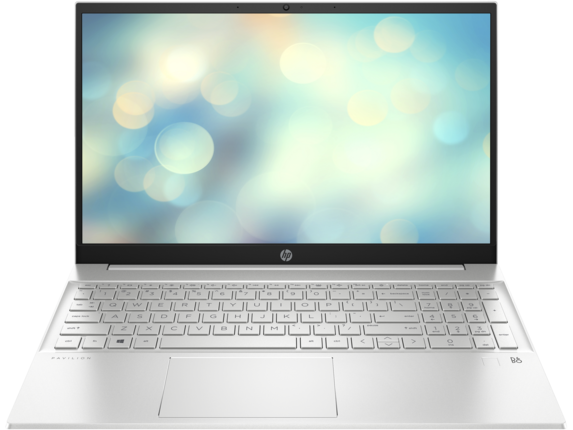
HP Pavilion 15" laptop
Bursting with the latest high-tech specs but wrapped in a slim, beautiful frame. Function has never had so much form. This high performance laptop is perfect for photo editing, browsing, or remote work out of chic cafes.
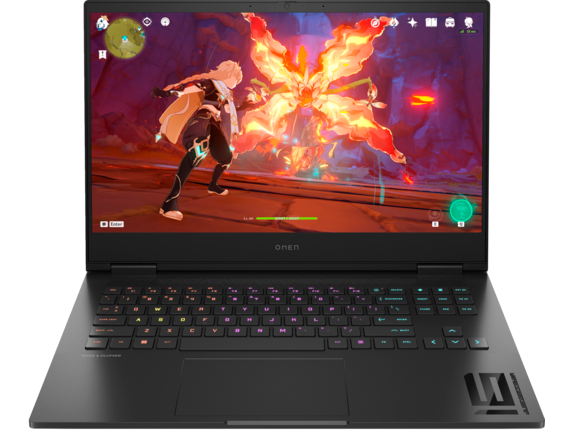
OMEN by HP Gaming laptop 16"
The OMEN 16 inch gaming laptop is ready to go wherever you are. Enjoy desktop-level power with a 13th Gen Intel® Core™ processor and a modern NVIDIA® graphics card, both regulated by enhanced internal cooling.
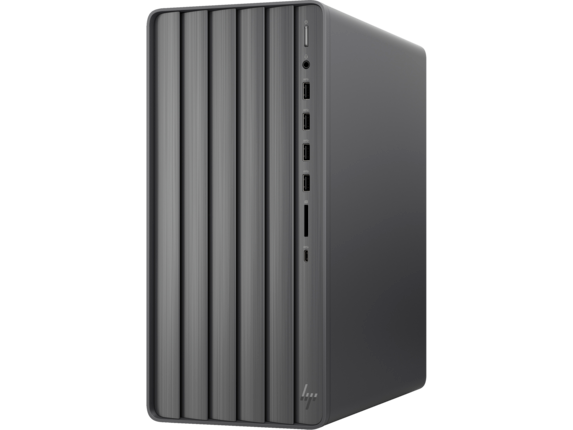
HP ENVY Tower desktop
Fuel your creativity with the sleek and ultra-powerful HP Envy Desktop PC. Design, edit, and create like never before with the latest Intel® Processor and ample storage space.
Ideal for
Email, browsing, sharing files
Email, browsing, sharing files
Email, browsing, sharing files
Operating system
Windows 11 Home
Windows 11 Home
Windows 11 Home
Screen size
15.6 inches
16.1 inches
-
Memory
Up to 16 GB
Up to 32 GB
Up to 32 GB
Storage
Up to 1 TB SSD
Up to 2 TB SSD
Up to 1 TB SSD
HDMI ports
1 HDMI 2.1
1 HDMI 2.1
1 HDMI-out 1.4b
GPU
Up to NVIDIA® GeForce® MX550
Up to NVIDIA® GeForce® 4080
Up to NVIDIA® GeForce® 3060
CPU
Up to Intel® Core™ i7
Intel® Core™ i7
Up to Intel® Core™ i7
Colors available
Natural silver, Ceramic white, Fog blue, Forest teal, Warm gold
-
-
Windows 11 makes the everyday easier
Discover the benefits of a new PC

Easier to use
Your time is valuable. So, don’t waste it doing things the hard way. Windows 11 brings a fresh experience with new ways to get things done in a fast, fun, and easy kind of way.

Easier to be productive
Achieve the dream. Get deep in that Excel, reach more with that podcast—whatever you’re looking to achieve Windows 11 comes with the built-in tools to help you get it done efficiently and with focus.

Easier to be safe
Rest assured with smart security. Banking, buying, selling, planning, playing, dreaming, whatever you’re doing—Windows 11 comes with built-in security to help make sure your digital life is protected.

Easier to play
Enjoy the win. Crush it. Crash it. Love it. Live it. More games. More power. More ways to meet, beat, and win. The world of gaming is yours with Windows 11.

Earning rewards is easy
Get back 3% in rewards for your eligible HP.com purchases. Rewards post to your account soon after you join the program.
Join nowStart fresh without starting over
Bring over the files, apps, and preferences from your old PC and enjoy them with the performance of your new one.2,3 Here are 3 easy steps to back up your device.
- Step 1: Make sure you're using the most up-to-date version of Windows 10.
- Step 2: Use the Windows 10 Search bar to search for and open "Windows Backup" to save your data to your Microsoft account. 4
- Step 3: The first time you start your new Windows 11 PC, sign in and follow the setup instructions to bring your stuff with you. 4,5,6

Frequently asked questions
How can I tell if my device can upgrade to Windows 11? 
To see if your PC qualifies, go to Settings > Update & Security > Windows Update and select Check for updates if there is not already an indication that your PC can upgrade or not.
What external hardware will I need on a Modern PC with Windows 11?
The answer depends on your specific needs. Many people find everything they need right on their new PC, but sometimes there is a need to add additional hardware to augment your experience. If you use CD-ROM software, with most modern PCs you’ll need an external CD-ROM. If you’re switching from a laptop to a desktop, you might need to purchase a monitor (and potentially a docking station). If you already own hardware that you want to continue to use, most software and accessories that worked with Windows 10 are expected to work with Windows 11. If you want to be sure, please check with your accessory manufacturer.
Disclaimer
- HP offer available in U.S. from 11/1/2023 through 11/30/2023. Limited availability, subject to change without notice. While supplies last.
- Windows can back up files, settings, and apps from PCs running Windows 10 and higher. Restore is available on Window 11, version 22H2 and higher. Geographic restrictions may apply.
- Requires Microsoft account. Up to 5GB of Microsoft Storage is included. Data transfers exceeding 5GB require an active Microsoft subscription or trial.
- Internet access required. Fees may apply.
- Using Windows Backup to restore to a Windows 11 PC requires you to sign in during initial device setup with the same Microsoft account you used for Windows 10 PC backup.
- When you open apps for the first time on your new Windows 11 PC, some will reinstall when you first open them. Other apps may require you to reinstall them manually from the original app provider.
- Battery life varies significantly with settings, usage, and other factors.