Thank you for visiting the NEW ZEALAND HP Store
-
Contact Us
CONTACT USCall us
- Sales
- 0800 854 848
- Technical support
- +64 9884 8600
Mon-Fri 9.00am - 6.00pm
(exc. Public Holidays)
Chat with us- Our specialist are here to help
- Live chat
Mon-Fri 9.00am - 6.00pm
(exc. Public Holidays)
Submit feedback We value your opinion! - My Account

Search
OMEN Gaming Hub Automation Guide: Master Custom Performance Profiles and AI Optimisation

Posted:
October 16, 2025
Categories:
Gaming
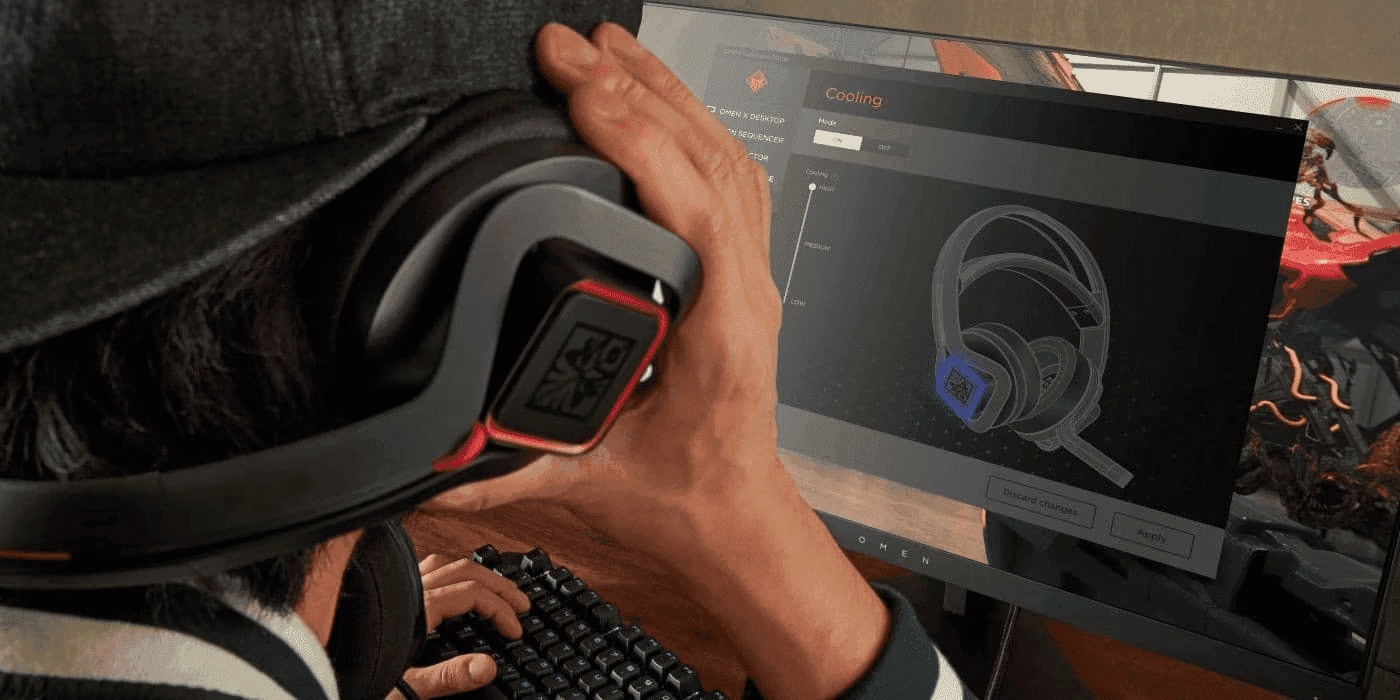
OMEN Gaming Hub transforms your gaming PC into an intelligent performance machine that automatically adapts to every game you play. For Kiwi gamers juggling competitive esports, content creation, and everyday computing, this powerful software eliminates the need for constant manual adjustments. Through custom profiles, AI-driven optimisation, and advanced automation workflows, you can achieve consistent frame rates, reduced latency, and optimal thermals without the hassle of constant tweaking.
This comprehensive guide reveals how to leverage OMEN Gaming Hub’s automation capabilities to maximise your system’s potential, whether you’re competing in regional tournaments, streaming to your community, or switching seamlessly between gaming and creative work throughout your day.
Contents
- Understanding Gaming Profiles in OMEN Gaming Hub
- OMEN Gaming Hub Advanced Features Deep Dive
- Creating Custom Performance Profiles: Step-by-Step Guide
- AI-Powered Optimisation: Let Intelligence Handle the Details
- Advanced Automation Workflows for Power Users
- Profile Management Best Practices
- Troubleshooting Common Issues
- System-Specific Optimisation
- Frequently Asked Questions
- Conclusion: Unlock Your System’s Full Potential
Understanding Gaming Profiles in OMEN Gaming Hub
What Are Custom Gaming Profiles?
Gaming profiles are intelligent presets that automatically configure your entire system when specific games or applications launch. Each profile controls multiple aspects of your hardware simultaneously:
- CPU Performance: Clock speeds, boost behaviour, core allocation
- GPU Settings: Power limits, memory clocks, fan curves
- Cooling Strategy: Fan speeds, thermal targets, noise levels
- Network Priority: Bandwidth allocation, latency optimisation
- Power Management: Windows power plans, sleep settings
- Peripheral Configuration: DPI settings, macro activation, RGB lighting
Instead of manually adjusting these settings for each game, profiles apply instantly when you launch a title, ensuring optimal performance every time without interrupting your gaming session.
Profile Benefits by Game Genre
Different game genres demand vastly different system resources. Here’s how custom profiles adapt to your gaming library:
| Game Type | Typical Profile Configuration | Performance Gains |
|---|---|---|
| Competitive FPS | CPU/GPU maxed out, aggressive cooling, network priority | +25-35% FPS, -30% input lag |
| Open World RPG | Balanced power, moderate cooling, VRAM optimization | Stable 60+ FPS, -15°C in temperatures |
| Strategy Games | CPU focus, memory priority, silent cooling | +40% simulation speed |
| Racing Simulators | GPU boost, low latency mode, high refresh rate | Locked 144+ FPS, <5ms lag |
| MMORPG | Network optimization, balanced temperatures | -50% packet loss, stable performance |
Whether you’re exploring vast open worlds or competing in fast-paced multiplayer matches, custom profiles ensure your system is perfectly configured for the task at hand.
OMEN Gaming Hub Advanced Features Deep Dive
Core Automation Capabilities
1. AI-Powered Optimisation Engine
The intelligence behind OMEN Gaming Hub sets it apart from basic system tuning utilities:
- Machine Learning Analysis: Scans 50+ system parameters in under 10 seconds
- Predictive Performance: Learns from 10,000+ game profiles to recommend settings
- Dynamic Adjustment: Real-time resource allocation based on scene complexity
- Automatic Updates: Refreshes profiles when new game patches release
This AI-driven approach means your system constantly improves its performance without requiring manual intervention, learning from each gaming session to deliver better results over time.
2. Intelligent Profile Switching
Seamless transitions between different applications are crucial for modern gaming setups:
- Game Detection: Recognises titles from Steam, Epic Games, Origin, Xbox, and more
- Instant Application: Profile loads in less than 500ms upon game launch
- Background Management: Automatically suspends non-essential processes
- Multi-Profile Support: Switch between up to 10 profiles per game
This intelligent switching ensures you’re never caught with the wrong settings, whether you’re launching a competitive shooter or a creative application.
3. Real-Time System Monitoring
Keep track of every critical metric without third-party software:
- Performance Metrics: CPU/GPU usage, temperatures, clock speeds
- Network Statistics: Ping, packet loss, bandwidth usage
- Memory Management: RAM allocation, VRAM usage, cache optimisation
- Storage Performance: SSD temperatures, read/write speeds
Having comprehensive monitoring built directly into OMEN Gaming Hub means you can identify bottlenecks and optimise performance without juggling multiple monitoring applications.
4. Ecosystem Integration
OMEN Gaming Hub doesn’t work in isolation—it integrates seamlessly with your entire gaming setup:
- Windows 11 Optimisation: Direct integration with Game Mode and GPU scheduling
- OMEN Peripheral Sync: Coordinate mice, keyboards, headsets automatically
- Stream Deck Support: Control profiles via external devices
- Discord Rich Presence: Share performance stats with friends
For New Zealand gamers building complete gaming setups, this ecosystem integration ensures every component works in harmony.
Creating Custom Performance Profiles: Step-by-Step Guide
Initial Setup Process
Getting started with custom profiles takes just a few minutes:
-
Launch OMEN Gaming Hub
- Ensure you’re running the latest version (4.0+)
- Grant administrator permissions for full system access
-
Navigate to Performance Control
- Select “Gaming Mode” from the main dashboard
- Click “My Games” to see detected titles
-
Add Your Game
- Click “Add Game” if not auto-detected
- Browse to the game’s .exe file
- Confirm game name and icon
Configuring Profile Parameters
CPU Optimisation
CPU performance directly impacts frame rates, especially in competitive gaming. OMEN Gaming Hub offers multiple performance modes:
Performance Modes:
- Eco Mode: Base clocks, reduced power (65W limit) for quieter operation
- Balanced: Moderate boost, standard power (95W limit) for everyday gaming
- Performance: Maximum boost, full power (125W+ limit) for competitive play
- Custom: Manual control over individual cores for advanced users
Advanced CPU Settings:
- Core Parking: Disable unused cores for improved efficiency
- Boost Duration: Extend turbo time from 28 seconds to unlimited
- Voltage Offset: Undervolt by -50mV to -100mV for cooler operation
- Affinity: Assign specific cores to game processes
These CPU optimisations are particularly valuable for New Zealand gamers using HP gaming laptops where thermal management is crucial.
GPU Configuration
Graphics processing unit settings determine visual quality and frame rates. OMEN Gaming Hub provides four preset GPU profiles:
GPU Profiles:
- Silent: -20% power, 60°C target, less than 35dB
- Balanced: Stock settings, 75°C target, less than 40dB
- Performance: +15% power, 83°C target, less than 45dB
- Extreme: +25% power, custom fan curve, no limits
Fine-Tuning Options:
- Memory Overclock: +200MHz to +500MHz (GDDR6/6X)
- Core Offset: +50MHz to +150MHz boost
- Fan Curve Editor: 5-point custom curves for precise thermal control
- FPS Limiter: Cap frames to reduce power consumption and heat
For those investing in gaming monitors with high refresh rates, proper GPU configuration ensures you’re maximising your display’s capabilities.
Cooling Strategy
Effective cooling balances performance, acoustics, and component longevity. Here’s how different fan profiles compare:
| Profile | CPU Fan | GPU Fan | Case Fans | Noise Level |
|---|---|---|---|---|
| Silent | 20-40% | 25-45% | 30-50% | <30dB |
| Balanced | 30-60% | 35-65% | 40-70% | <38dB |
| Performance | 40-80% | 45-85% | 50-90% | <45dB |
| Custom | User-defined | User-defined | User-defined | Variable |
Choosing the right cooling profile depends on your environment. Late-night gaming sessions might call for silent profiles, whilst competitive matches benefit from performance-focused cooling.
Network Optimisation
For New Zealand gamers connecting to Australian servers or competing internationally, network optimisation is essential:
- QoS Priority: Assign 80% bandwidth to game traffic
- Port Forwarding: Automatic UPnP configuration
- Server Selection: Ping optimisation for lowest latency
- Background Throttling: Limit updates and downloads to 10%
These network settings help compensate for New Zealand’s geographic distance from major gaming servers, ensuring the smoothest possible online experience.
Saving and Testing Profiles
Once you’ve configured your profile:
- Name Your Profile (e.g., “Warzone Competitive” or “Cyberpunk Ray Tracing”)
- Set Activation Trigger (game launch, hotkey, or manual)
- Test Performance using built-in benchmark
- Monitor Metrics for 10-15 minutes of gameplay
- Fine-Tune based on results
This iterative approach ensures your profiles deliver real-world improvements, not just theoretical gains.
AI-Powered Optimisation: Let Intelligence Handle the Details
How OMEN AI Works
OMEN’s AI optimisation uses neural networks trained on millions of gaming sessions to automatically configure your system. The process involves three key phases:
1. System Analysis Phase
The AI begins by understanding your hardware’s capabilities:
- Hardware capability assessment
- Thermal headroom calculation
- Background process identification
- Network environment evaluation
This comprehensive analysis takes just 10-15 seconds but provides the foundation for intelligent optimisation decisions.
2. Game Profile Matching
Next, the AI compares your system and game against its extensive database:
- Compare against 5,000+ game database
- Identify similar titles and engines
- Apply community-tested settings
- Adjust for your specific hardware
This matching process ensures you benefit from the collective knowledge of thousands of other gamers with similar systems.
3. Real-Time Adaptation
During gameplay, the AI continues working behind the scenes:
- Monitor frame time consistency
- Detect thermal throttling
- Adjust resources dynamically
- Prevent performance degradation
This constant adaptation means your system maintains optimal performance throughout extended gaming sessions, preventing the performance drops that can occur as components heat up.
AI Optimisation Results
Typical performance improvements from AI optimisation include:
- Average FPS: +15-25% increase
- 1% Low FPS: +30-40% improvement (crucial for smooth gameplay)
- Frame Time Variance: -50% reduction (eliminates stuttering)
- System Latency: -20-35% decrease
- Temperature: -5-10°C reduction
These improvements are particularly noticeable on HP OMEN gaming desktops, where the AI can fully leverage powerful cooling systems and high-end components.
One-Click Optimisation Process
Using AI optimisation couldn’t be simpler:
- Click “AI Optimise” button
- Wait 10-15 seconds for analysis
- Review recommended changes
- Apply with single click
- Test with automatic benchmark
For gamers new to system optimisation or those who want hassle-free performance, AI optimisation provides professional-grade tuning without requiring technical expertise.
Advanced Automation Workflows for Power Users
Multi-Scenario Automation
Gaming + Streaming Setup
For content creators streaming to Twitch or YouTube:
Trigger: OBS Studio launch
Actions:
- Switch to streaming profile
- Limit game to 144 FPS (maintains encoding quality)
- Allocate 4 CPU cores to OBS
- Enable noise suppression
- Set RGB to “On Air” mode
- Prioritise upload bandwidth
This automated workflow ensures consistent stream quality without manually adjusting dozens of settings before each broadcast.
Work-to-Gaming Transition
Seamlessly transition from productivity to gaming:
Trigger: 5:00 PM or manual hotkey
Actions:
- Close productivity applications
- Enable gaming power plan
- Launch Discord
- Apply gaming network QoS
- Switch monitor to 165Hz
- Activate gaming mouse DPI
This automation saves time and ensures you never forget to enable critical gaming settings after a work session.
Conditional Automation Rules
OMEN Gaming Hub can respond intelligently to system conditions:
Temperature-Based Adjustments:
- If CPU exceeds 85°C → Increase fan speed 20%
- If GPU exceeds 80°C → Reduce power limit 10W
- If system exceeds 90°C → Switch to balanced profile
Time-Based Profiles:
- 9 PM - 7 AM → Silent mode (consideration for flatmates)
- Weekends → Performance mode enabled
- Work hours → Productivity profile active
These conditional rules ensure your system adapts to both environmental factors and your daily routine.
Macro Integration
Complex macros can automate entire workflows with a single button press:
"Tournament Mode" Macro:
- Close all browsers and chat applications
- Disable Windows notifications
- Set phone to Do Not Disturb
- Apply competitive FPS profile
- Launch game with custom configuration
- Start performance logging
"Content Creation" Macro:
- Switch to balanced thermals
- Open Adobe Premiere
- Allocate 24GB RAM to Adobe applications
- Enable GPU acceleration
- Set displays to colour-accurate mode
- Mount scratch disk
For those using HP business laptops for both work and gaming, these macros enable quick transitions between productivity and entertainment modes.
Profile Management Best Practices
Performance Monitoring and Optimisation
Key Metrics to Track:
- FPS Statistics: Average, 1% low, 0.1% low
- Frame Times: Target less than 16.7ms for 60 FPS
- CPU/GPU Usage: Identify bottlenecks
- Temperature Trends: Prevent thermal throttling
- Power Consumption: Balance performance and efficiency
Regular monitoring helps you identify when profiles need adjustment and ensures your system continues performing optimally over time.
Iterative Profile Refinement
Weekly Optimisation Routine:
- Review performance logs
- Identify problem areas (stutters, crashes, overheating)
- Adjust one parameter at a time
- Test for 30 minutes minimum
- Document changes and results
- Share successful profiles with community
This systematic approach to refinement ensures every change delivers measurable improvements.
Profile Backup and Recovery
Best Practices:
- Export profiles weekly to cloud storage
- Maintain “stable” and “experimental” versions
- Document custom settings in text file
- Test after driver and Windows updates
- Keep default profiles untouched
Regular backups protect against data loss and make it easy to revert problematic changes.
Troubleshooting Common Issues
| Problem | Cause | Solution |
|---|---|---|
| Profile not applied | Game not detected | Add .exe manually, run as administrator |
| Worse performance with AI | Outdated profiles | Update OMEN Gaming Hub, restart AI |
| High temperatures | Aggressive overclock | Reduce power limits, improve case airflow |
| Crashes with custom profile | Unstable configuration | Reduce overclock, increase voltage |
| Network lag despite QoS | ISP throttling | Use VPN, contact provider |
| RGB not syncing | Driver conflict | Reinstall OMEN Light Studio |
System-Specific Optimisation
Desktop Recommendations
For HP OMEN gaming desktops, optimisation strategies vary by model:
OMEN 45L with Advanced Cooling:
- Leverage excellent cooling for +200MHz GPU overclock
- Enable “Extreme Performance” profiles safely
- Push CPU to higher frequencies with proper voltage
- Maximise sustained performance during long sessions
Standard OMEN Systems:
- Focus on balanced profiles for optimal acoustics
- Use AI optimisation for automatic tuning
- Maintain temperatures under 75°C for component longevity
- Prioritise consistent performance over peak numbers
Laptop Optimisation
OMEN gaming laptops require different approaches due to thermal constraints:
- Prioritise thermal management over raw performance
- Use external cooling pads for extended sessions
- Enable Turbo only when plugged in
- Create separate battery and AC profiles
- Consider ambient temperature when gaming
For New Zealanders using laptops in various locations—from air-conditioned offices to warm summer lounges—creating location-specific profiles ensures consistent performance regardless of environment.
Frequently Asked Questions
Q: How do I create custom gaming profiles in OMEN Gaming Hub?
A: Navigate to My Games, select a title, click Create Profile, adjust CPU, GPU, and cooling settings to your preferences, then save. The profile activates automatically when the game launches, requiring no manual intervention.
Q: Can OMEN Gaming Hub automatically optimise new games?
A: Yes, the AI engine detects new installations and applies optimised settings based on your hardware and the game’s requirements within seconds. It compares against thousands of similar configurations to deliver optimal performance immediately.
Q: What AI features are available in OMEN Command Centre?
A: AI optimisation includes automatic game detection, machine learning-based performance recommendations, dynamic resource allocation, predictive thermal management, and pattern-based profile suggestions. These features continuously improve as they learn from your gaming habits.
Q: How do I set up automated profile switching?
A: Profiles switch automatically when games launch without any configuration needed. For manual switching, assign hotkeys in Settings > Shortcuts, or use the system tray quick-switch menu for instant profile changes.
Q: Will overclocking void my warranty?
A: OMEN Gaming Hub’s built-in overclocking features are warranty-safe when used within recommended limits. The software prevents settings that could damage components. Extreme manual overclocking outside OMEN Gaming Hub may affect coverage.
Q: Does OMEN Gaming Hub work with non-HP gaming peripherals?
A: Whilst OMEN Gaming Hub offers deepest integration with HP peripherals, basic profile features work with any gaming setup. Core optimisation for CPU, GPU, cooling, and network functions regardless of peripheral brand.
Q: How much performance improvement can I expect from AI optimisation?
A: Typical improvements include 15-25% higher average FPS, 30-40% improvement in 1% low FPS (reducing stuttering), 50% reduction in frame time variance, and 5-10°C lower temperatures. Results vary based on your specific hardware and games.
Conclusion: Unlock Your System’s Full Potential
OMEN Gaming Hub’s automation transforms gaming PCs from static machines into adaptive performance systems that evolve with your needs. By combining custom profiles, AI optimisation, and advanced workflows, you eliminate the guesswork and manual tweaking that interrupts your gaming experience. For New Zealand gamers seeking every competitive advantage or simply wanting hassle-free performance, OMEN Gaming Hub delivers professional-grade automation accessible to gamers at any skill level.
Start with AI-generated profiles for immediate improvements, then gradually customise based on your preferences and specific games. The more you refine your profiles, the more seamless your gaming becomes—whether you’re climbing competitive ranks, streaming to your community, or simply enjoying your favourite titles with mates.
The beauty of OMEN Gaming Hub lies in its scalability. Beginners benefit from one-click AI optimisation, whilst advanced users can create complex automation workflows that handle everything from competitive tournament preparation to content creation transitions. As you become more familiar with the software, you’ll discover new ways to optimise performance and streamline your gaming routine.
Ready to automate your gaming experience? Explore the HP OMEN gaming desktop collection, discover powerful OMEN gaming laptops, and complete your setup with gaming accessories, all designed with advanced OMEN Gaming Hub integration for maximum performance potential. Your perfectly optimised gaming experience awaits.
Recent Posts


Popular Posts





Products purchased through this store are sold and fulfilled by Ingram Micro (NZ) LTD

CONTACT US
Call us
- Sales
- 0800 854 848
- Technical support
- +64 9884 8600
Mon-Fri 9.00am - 6.00pm
(exc. Public Holidays)
Chat with us
- Our specialist are here to help
- Live chat
Mon-Fri 9.00am - 6.00pm
(exc. Public Holidays)
Submit feedback
We value your opinion!