
HyperX NGENUITY is the official software for customising HyperX gaming peripherals, giving you granular control over lighting, buttons, macros, audio, and performance settings. Whether you use a HyperX mouse, keyboard, headset, or microphone, NGENUITY is where you fine-tune the setup to match how you actually play.
This guide covers what NGENUITY does, how to install and set it up, the key features to know, and tips to help you get the most out of your HyperX gear in 2026.
HyperX NGENUITY overview (quick answer)
- What it is: free official software from HP-owned HyperX for customising compatible peripherals
- Two versions: NGENUITY (current) and NGENUITY Legacy (for older devices)
- Available on: Windows 10 and Windows 11 only (no macOS support)
- Where to download: hyperx.com/ngenuity or Microsoft Store
- What it controls: RGB lighting, macros, key bindings, DPI, audio, and profile management
If you own a compatible HyperX device, NGENUITY is essential for unlocking full functionality.
What HyperX NGENUITY does
NGENUITY acts as the central control app for HyperX peripherals. From a single interface, you can:
Customise RGB lighting
Choose from millions of colours, apply built-in effects (wave, breathing, reactive typing), or create your own layered patterns. Effects can be synchronised across multiple HyperX devices for a coherent look.
Programme macros and key bindings
Record complex input sequences and bind them to a single key or button. Assign media controls, application shortcuts, or in-game commands to any programmable input on your HyperX keyboard or mouse.
Adjust DPI and sensor settings
Configure up to five DPI stages on supported HyperX mice, adjust polling rate (up to 1000 Hz on eligible models), and switch between DPI levels on the fly for different games.
Fine-tune audio
For HyperX headsets and microphones, NGENUITY provides multi-band EQ, mic gain adjustment, sidetone monitoring, and preset audio profiles (FPS, music, bass boost). The updated audio engine adds professional-grade tools for deeper control.
Manage multiple profiles
Create separate configurations for different games, applications, or moods. Profiles can save lighting, macros, DPI settings, and audio preferences.
Auto-switch profiles by game
Link profiles to specific games or applications. When you launch a game, NGENUITY automatically loads the matching profile, then reverts when you close the game.
Cloud profile sync
Sign in to sync your profiles across multiple computers. Useful if you switch between a desktop and a laptop and want the same setup on both.
Firmware updates
NGENUITY checks for firmware updates for your HyperX devices and walks you through installation, without needing to hunt for files on the HyperX website.
NGENUITY vs NGENUITY Legacy: which one do you need?
HyperX offers two versions of NGENUITY:
NGENUITY (current)
The rebuilt version of NGENUITY, launched in 2024 and significantly updated throughout 2025 and 2026. Features a modernised interface, improved audio engine, and support for the newest HyperX devices.
Recommended for:
- Newer HyperX peripherals (2023 onwards)
- Users who want the latest features and interface
- HyperX Pulsefire Haste 2 series, HyperX Clutch Talon controller, HyperX Cloud Stinger 3, and other current-generation devices
NGENUITY Legacy
The original NGENUITY software, still supported for older HyperX peripherals that have not been added to the new version.
Recommended for:
- Older HyperX peripherals from 2018 to 2022 (like Cloud Flight S, Alloy Elite RGB, Pulsefire Surge)
- Users whose devices are not yet supported in current NGENUITY
You can check which version supports your device by visiting the HyperX NGENUITY page.
Both versions are free.
System requirements
To run NGENUITY:
- Operating system: Windows 10 (64-bit) or Windows 11
- Storage: approximately 480 MB for installation
- Compatible HyperX peripheral: required for the software to be useful
- Internet connection: required for downloads, updates, and cloud sync
NGENUITY is not currently available on macOS. Windows is the only supported desktop platform.
How to install NGENUITY
Download and install
- Visit the official HyperX NGENUITY page
- Download either NGENUITY or NGENUITY Legacy, depending on your device
- Run the installer
- Follow the on-screen prompts
Installation typically takes a few minutes. NGENUITY is also available directly from the Microsoft Store.
First launch
When NGENUITY opens for the first time:
- The software scans for connected HyperX devices
- Detected devices appear in the sidebar
- Select any device to access its customisation options
- A brief tutorial walks first-time users through the interface
Changes apply in real time, so you can see and hear the results as you adjust settings.
Main interface sections
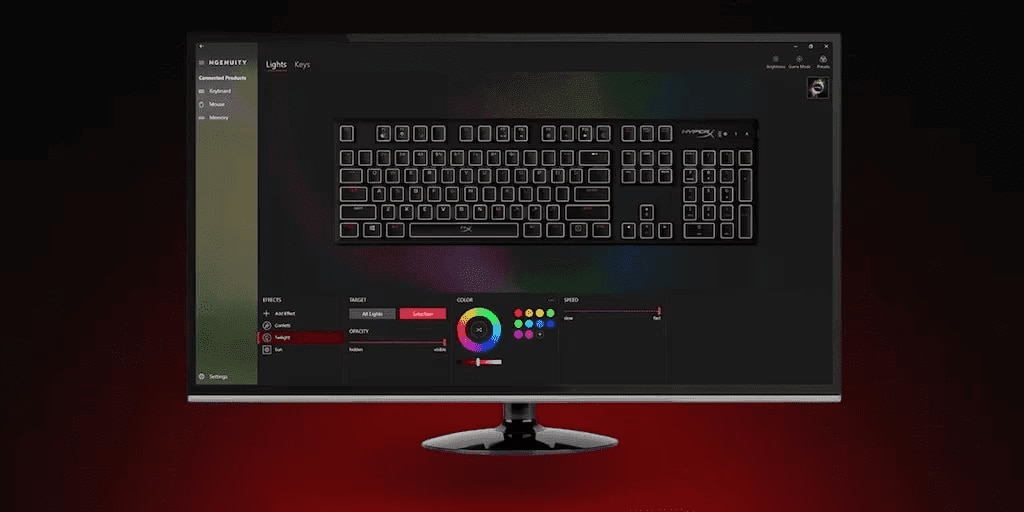
Lighting
Where you configure RGB effects for supported devices. Options include:
- Solid colour
- Wave (rolling colour across keys or LEDs)
- Breathing (fade in and out)
- Cycle (through multiple colours)
- Reactive typing (light responds to key presses)
- Custom layered effects for advanced setups
Buttons or Keys
Where you remap functions, create macros, and adjust DPI on supported devices. You can also disable keys or buttons to prevent accidental presses during gameplay.
Audio
For supported HyperX headsets and microphones:
- Multi-band equaliser
- Preset EQ profiles (FPS, music, bass boost, communication)
- Microphone gain and sensitivity
- Sidetone monitoring
- Surround sound settings (on supported models)
Profiles
Where you create, save, and manage profile configurations. Set profiles to activate automatically for specific games or applications.
How to create your first custom profile
Profiles are the heart of NGENUITY. Here is how to create one:
Steps
- Select the device you want to configure
- Click the Profiles tab
- Click the + icon to add a new profile
- Give it a descriptive name (e.g., "FPS Gaming", "Streaming", "Music Production")
- Adjust lighting, macros, DPI, and audio settings as desired
- Save the profile
- Optionally, link it to a specific game or application for auto-switching
You can switch between profiles manually from the taskbar or set NGENUITY to switch automatically based on the active application.
Popular use cases and profile ideas
Competitive FPS gaming
- Higher DPI switching for scoped aiming
- Red or amber lighting to reduce distraction
- Macros for weapon swaps or ping commands
- EQ profile that emphasises footsteps
MMO and MOBA gaming
- Lower DPI for precision clicking
- Macros for ability rotations
- Multi-colour zone lighting to identify skill groups
- Balanced EQ for communication and ambient audio
Streaming and content creation
- Custom mic gain and noise reduction
- Consistent EQ for professional audio output
- Custom lighting that fits your stream branding
- Macros for stream controls (mute, scene switching)
Productivity and work
- Dimmed lighting for less distraction
- Macros for common shortcuts (copy, paste, screenshot)
- Audio profile optimised for calls
- Balanced DPI for spreadsheet and design work
Advanced tips
Use game-linked auto-switching
Set up profiles for your most-played games and link them. NGENUITY handles the switching automatically, so you always have the right setup without manual intervention.
Sync lighting across multiple HyperX devices
Owning multiple HyperX peripherals lets you create synchronised lighting effects across your entire setup, including keyboard, mouse, headset stand, and RAM modules.
Back up your profiles to the cloud
Enable cloud sync to protect your carefully tuned profiles. Useful if you upgrade your PC or add a laptop to your setup.
Keep NGENUITY and firmware updated
Regular updates add new features, improve stability, and support new devices. Check for updates monthly.
Explore the preset library
If you are unsure where to start, NGENUITY includes preset lighting effects, audio EQ profiles, and macro templates. These are a good starting point before creating custom setups.
Common issues and how to fix them
NGENUITY does not detect my device
- Ensure the device is directly connected (avoid USB hubs where possible)
- Try a different USB port
- Check for a firmware update via NGENUITY
- Confirm the device is compatible with your version of NGENUITY (current or Legacy)
Lighting effects lag or stutter
- Close other RGB software (Razer Synapse, Corsair iCUE) that might conflict
- Reduce the complexity of custom lighting layers
- Check for driver updates in Windows
Macros do not trigger correctly
- Verify the macro was saved to the correct profile
- Check for timing delays between actions in the macro
- Try recording the macro again in a slower sequence
Audio settings do not apply
- Confirm the headset is set as the default audio device in Windows
- Restart NGENUITY after making audio changes
- Check that the device is running the current firmware
Software crashes on startup
- Reinstall NGENUITY
- Update Windows to the latest version
- Uninstall NGENUITY Legacy if you no longer need it
FAQs
Is HyperX NGENUITY free?
Yes. NGENUITY and NGENUITY Legacy are both free downloads from HyperX.
Does NGENUITY work on macOS or Linux?
No. NGENUITY is Windows-only. Users on macOS or Linux cannot access the full customisation features.
Do I need NGENUITY to use my HyperX peripherals?
No. HyperX devices work as standard peripherals without NGENUITY. However, features like custom RGB, macros, DPI adjustment, and profile switching require the software.
Can I use NGENUITY with non-HyperX devices?
No. NGENUITY only supports HyperX products.
What is the difference between NGENUITY and NGENUITY Legacy?
NGENUITY is the current, rebuilt version with a modern interface and support for newer devices. NGENUITY Legacy supports older HyperX peripherals that have not been ported to the current version.
Does NGENUITY affect gaming performance?
The impact is minimal. NGENUITY runs in the background and uses a few resources. Very complex lighting effects across multiple devices may have a minor impact on system resources.
Can I share my profiles with other users?
Yes. NGENUITY allows exporting and importing profiles, so you can share configurations with friends or the community.
Are new HyperX devices always supported in the current NGENUITY?
Yes. New HyperX devices released in 2024 and later, including the HyperX Clutch Talon Controller and Cloud Stinger 3 series, are supported in the current version of NGENUITY.
Explore HP gaming and HyperX peripherals
HyperX is part of HP's gaming ecosystem alongside the OMEN and Victus laptop and desktop ranges. For a complete gaming setup, HP offers hardware and peripherals designed to work together across the full range of PC gaming needs.
Visit HP Gaming New Zealand to explore gaming laptops, desktops, and accessories.
Final thoughts
HyperX NGENUITY turns already capable HyperX peripherals into fully customisable tools that adapt to how you actually play and work. The current version is significantly refined compared to earlier releases, with improved audio tools, cloud profile sync, and game-linked automatic switching.
Whether you use a HyperX mouse, keyboard, headset, or microphone, spending a few minutes setting up NGENUITY unlocks features that would otherwise sit dormant. And with two versions available (current and Legacy), HyperX supports both new and older peripherals within the same ecosystem.
Visit our HP Tech Takes Blog for more guides on gaming and productivity setup.


