Thank you for visiting the NEW ZEALAND HP Store
-
Contact Us
CONTACT USCall us
- Sales
- 0800 854 848
- Technical support
- +64 9884 8600
Mon-Fri 9.00am - 6.00pm
(exc. Public Holidays)
Chat with us- Our specialist are here to help
- Live chat
Mon-Fri 9.00am - 6.00pm
(exc. Public Holidays)
Submit feedback We value your opinion! - My Account

Search
Finding an Affordable AI Laptop that Handles Both Gaming and University Work

Posted:
July 04, 2025
Categories:
Laptops

Starting university in New Zealand is exciting, but finding the right laptop can feel overwhelming. Whether you’re heading to the University of Auckland, Victoria University of Wellington, or any of New Zealand’s other prestigious institutions, you need a device that can handle both your coursework and your gaming sessions without breaking the bank.
Contents
- The Dual-Purpose Challenge
- The Tangible Benefits of AI Laptops for Students Who Game
- Key Specifications for Dual-Purpose AI Laptops
- AI-Specific Features Worth Considering
- Connectivity: Staying Connected Anywhere
- Best HP AI Laptops for New Zealand Students
- How to Choose the Best Gaming and University Laptop
- Essential Accessories for Student Gamers
- Maximising Battery Life for All-Day Campus Use
- The Future of AI in Student Computing
- Display Technology: The Visual Advantage
- Performance Optimisation for Student Life
- Security and Privacy for Student Users
- Conclusion: Finding your Perfect Balance
The Dual-Purpose Challenge
One of the most significant challenges New Zealand students and parents face when searching for a laptop is finding one that excels at both academics and gaming without exceeding their budget. Premium AI-enhanced gaming laptops often come with intimidating price tags, whilst budget options frequently lack the power and versatility needed for both demanding games and academic tasks.
This guide will help you navigate the world of affordable AI-capable laptops available in New Zealand that successfully balance:
-
Powerful performance for modern games
-
Capabilities for academic requirements
-
AI features that enhance both experiences
-
Value that respects your budget constraints
Let’s explore what makes a laptop “AI-capable” and how these features directly benefit both your studies and gaming sessions.
The Tangible Benefits of AI Laptops for Students Who Game
| BENEFIT | FOR SCHOOLWORK | FOR GAMING |
|---|---|---|
| Enhanced Productivity | Automatic document summarization, transcription of lectures, intelligent email management | Game loading optimization, performance tuning, streaming enhancements |
| Creative Capabilities | AI-assisted image/video editing, presentation creation, content generation | Enhanced graphics rendering, real-time visual effects, custom content creation |
| Performance Improvements | Resource allocation for research applications and multiple browser tabs | Adaptive graphics settings, frame rate stabilization, smoother gameplay |
| Power Efficiency | Extended battery life for all-day classes | Optimized performance-to-power ratio for gaming on battery |
| Personalized Experience | Learning adaptation based on study habits | Dynamic difficulty adjustment, personalized in-game challenges |
Key Specifications for Dual-Purpose AI Laptops
Processors: The AI-Capable Brain
Modern AI laptops feature processors specifically designed to handle artificial intelligence workloads alongside traditional computing tasks. When shopping for HP laptops in New Zealand, look for these processor types:
Intel Core Ultra Processors
-
Include dedicated Neural Processing Unit (NPU)
-
Efficiently handle AI-driven tasks with minimal battery impact
-
Provide excellent balance between performance and power efficiency
-
Ideal for students who prioritise battery life for long study sessions
AMD Ryzen AI Processors
-
Feature integrated NPU similar to Intel’s approach
-
Strong performance for AI workloads with good power management
-
Often offer excellent value for budget-conscious students
-
Well-suited for balanced gaming and academic use
Qualcomm Snapdragon X Processors
-
Contains powerful NPU capabilities
-
Exceptional battery life for all-day use
-
Consistent AI performance across applications
-
Perfect for students who rarely have access to power outlets
Graphics: Balancing Visuals and AI
Whilst the NPU handles dedicated AI tasks, graphics processing remains crucial for both gaming and creative academic work. Gaming laptops typically offer:
Integrated Options: Intel Arc Graphics, AMD Radeon Graphics, or Qualcomm Adreno provide sufficient performance for casual gaming and AI-accelerated creative applications
Dedicated GPUs: Necessary for serious gaming or demanding creative coursework like 3D modelling or video production
AI Enhancement: Many modern GPUs include AI-based features that improve gaming performance and creative applications
Memory and Storage: The Foundation of Smooth Performance
AI workloads are particularly demanding on system memory and require fast storage access:
RAM Recommendations
-
16GB: Minimum for comfortable multitasking between games, browser tabs, and productivity apps
-
32GB: Ideal for students in technical fields or those who game whilst running background applications
Storage Considerations
-
SSD Type: PCIe NVMe SSDs provide essential speed for both game loading and AI application responsiveness
-
Capacity: 512GB minimum for balancing game installations with academic files
-
1TB Option: Worth considering for creative majors working with large media files or extensive game libraries
Display: Where Work and Play Converge
The right display enhances both gaming immersion and academic productivity:
-
Resolution: Minimum 1080p (Full HD), with 2K (1440p) offering the sweet spot for text clarity and gaming detail
-
Panel Type: IPS panels provide better colour accuracy for creative work, whilst fast refresh rate panels (120Hz+) benefit gaming
-
Touch Capability: Valuable for note-taking, drawing, and certain educational applications
-
Size Consideration: 14" for maximum portability, 15-16" for balanced use
AI-Specific Features Worth Considering
Beyond core specifications, look for these AI-enhanced capabilities in Intel laptops and AMD Ryzen laptops:
-
Windows Copilot: Microsoft’s AI assistant integrated into the operating system
-
Advanced Webcams: High-resolution cameras with AI features like background blur and automatic framing
-
Enhanced Audio: AI-powered noise cancellation and voice clarity for better virtual classroom experiences
-
Intelligent Performance: Automatic optimisation based on usage patterns
Connectivity: Staying Connected Anywhere
Modern connectivity ensures reliable performance for both online gaming and academic collaboration:
-
Wi-Fi 6/6E: Provides fast, stable connections crucial for online gaming and virtual learning
-
Thunderbolt 4: Enables high-speed data transfer and external display connectivity
-
USB-C: Essential for modern peripherals and future-proof connectivity
-
HDMI: Useful for connecting to external displays for presentations or extended gaming
Best HP AI Laptops for New Zealand Students
Budget-Friendly AI Performance
HP OmniBook X 14 inch Next Gen AI PC
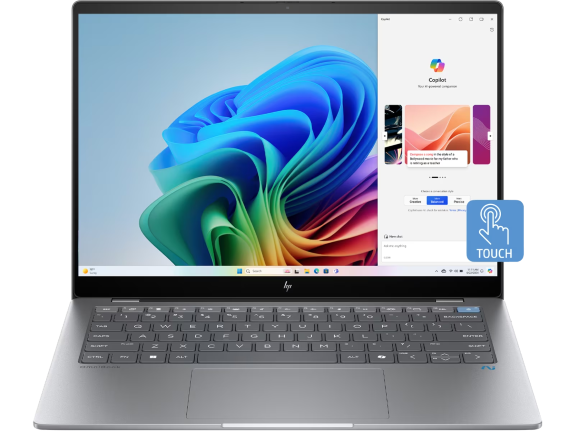
Perfect for New Zealand students who prioritise portability and exceptional battery life whilst needing next-generation AI capabilities for productivity and light gaming.
-
Snapdragon® X Plus X1P-42-100 processor (up to 3.4 GHz, 8 cores)
-
Qualcomm® Adreno™ GPU for efficient graphics processing
-
14" diagonal 2.2K touch display with 16:10 aspect ratio
-
512GB SSD storage for essential applications and files
The Snapdragon processor delivers remarkable battery life for all-day campus use, whilst the integrated NPU accelerates AI tasks with minimal power consumption. The 2.2K touchscreen provides excellent clarity for both academic work and multimedia consumption.
Mid-Range Gaming and AI Excellence
Victus Gaming Laptop 15-fa1114TX
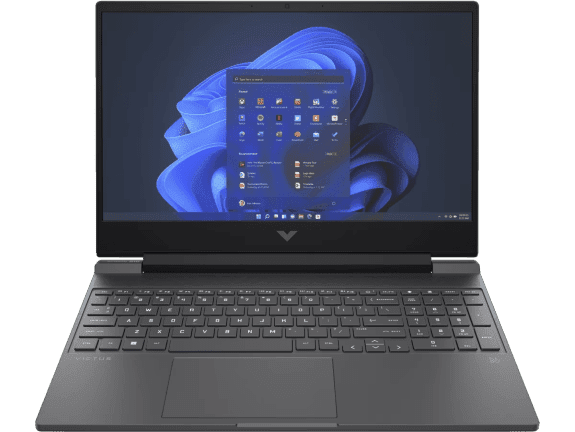
Ideal for students who need dedicated gaming performance without sacrificing academic productivity. This laptop offers excellent value with proven gaming capabilities and reliable performance.
-
Intel® Core™ i7-12650H processor (up to 4.7 GHz, 10 cores, 16 threads)
-
NVIDIA® GeForce RTX™ 2050 Laptop GPU (4GB GDDR6 dedicated)
-
39.6 cm (15.6") diagonal FHD display with 144Hz refresh rate
-
16GB memory with 512GB SSD storage
The 144Hz display ensures smooth gameplay in competitive titles, whilst the dedicated RTX 2050 graphics provide reliable performance for both gaming and creative applications. The generous 16GB RAM handles multitasking between games and productivity software.
Premium AI Convertible Performance
HP OmniBook Ultra Flip 14 inch Next Gen AI PC

Perfect for creative students who value versatility and premium display quality. The 2-in-1 design and stunning OLED display make this ideal for both academic work and entertainment.
-
Intel® Core™ Ultra 5 226V processor (up to 4.5 GHz, 8 cores, 8 threads)
-
Intel® Arc™ Graphics for capable gaming and creative performance
-
14" diagonal 2.8K OLED touch display with vibrant colours
-
1TB SSD storage for extensive file storage
The convertible design transforms from laptop to tablet, making it perfect for digital note-taking and creative projects. The OLED display provides exceptional colour accuracy for creative work and stunning visuals for entertainment.
HP OmniBook Ultra 14 inch Next Gen AI PC
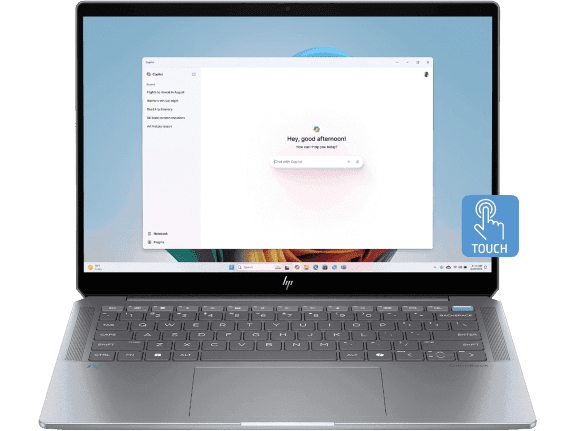
Excellent for students who want cutting-edge AI performance with AMD’s latest technology. This laptop delivers exceptional processing power for both demanding applications and gaming.
-
AMD Ryzen™ AI 9 365 processor (up to 5.0 GHz, 10 cores, 20 threads)
-
AMD Radeon™ Graphics for reliable gaming performance
-
35.6 cm (14") diagonal 2.2K touch display
-
1TB SSD storage for comprehensive file management
The latest AMD Ryzen AI processor includes advanced NPU capabilities for accelerated AI tasks, whilst the integrated Radeon graphics provide solid performance for both gaming and creative applications.
Ultimate Gaming Performance
OMEN Gaming Laptop 16-wf0256TX
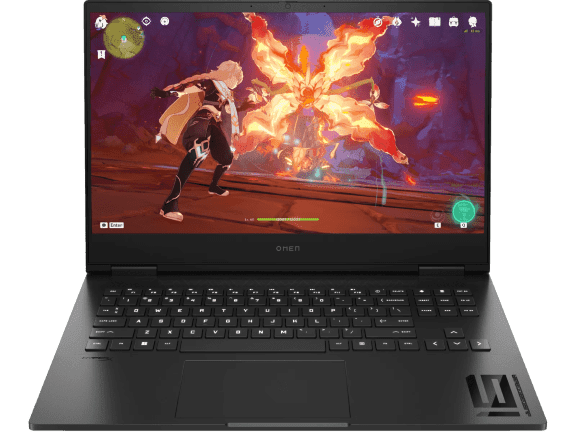
The ultimate choice for students who demand the highest gaming performance without compromising on academic capabilities. This premium gaming laptop delivers exceptional power for both entertainment and professional applications.
-
Intel® Core™ i7-13700HX processor (up to 5.0 GHz, 16 cores, 24 threads)
-
NVIDIA® GeForce RTX™ 4070 Laptop GPU (8GB GDDR6 dedicated)
-
40.9 cm (16.1") diagonal QHD display with 240Hz refresh rate
-
32GB memory with 1TB SSD storage
The high-performance RTX 4070 graphics ensure smooth gameplay at maximum settings, whilst the 240Hz display provides ultra-responsive gaming experiences. The generous 32GB RAM handles the most demanding applications and extensive multitasking scenarios.
How to Choose the Best Gaming and University Laptop
When selecting your ideal AI-capable laptop for New Zealand university life, consider these key factors:
1. Assess your Academic Requirements First
Course Load: Engineering and computer science majors typically need more processing power than humanities students
Software Requirements: Check if your courses require specific applications with minimum specifications
Research Needs: Data science or research-heavy majors benefit from additional RAM and storage
2. Be Honest About your Gaming Habits
Casual Gaming: Integrated graphics may be sufficient for popular titles like Valorant or League of Legends
Competitive Gaming: Consider higher refresh rates and dedicated graphics for competitive advantages
Game Types: Different genres have vastly different hardware requirements
3. Prioritise Future-Proof Specifications
CPU: Multi-core performance matters more than maximum clock speed for both gaming and productivity
RAM: 16GB minimum, with 32GB providing longer-term viability
Storage: NVMe SSDs are essential; consider expandability options
4. Consider Practical Factors for New Zealand Students
Portability: Will you carry this between campuses or study locations?
Battery Life: How often will you be away from power outlets during the day?
Build Quality: University laptops face more physical stress than typical home computers
Climate: New Zealand’s varying climate conditions may affect performance
5. Balance your Budget Realistically
Total Cost of Ownership: Consider warranty, potential upgrades, and accessories
Student Discounts: Look for student laptop promotions and educational pricing
Financing Options: Many retailers offer student-specific payment plans
Essential Accessories for Student Gamers
Complete your setup with these accessories from HP’s accessories range:
For Academic Use:
-
External mouse and keyboard for extended typing sessions
-
Laptop stand for ergonomic positioning during long study sessions
-
External storage for backing up important assignments
-
Quality headphones for online lectures and video calls
For Gaming:
-
Gaming accessories including precision mice and mechanical keyboards
-
External monitor for extended gaming sessions
-
Cooling pad for sustained gaming performance
-
Gaming headset for multiplayer communication
Maximising Battery Life for All-Day Campus Use
Whether you’re attending lectures or gaming between classes, battery management is crucial:
Power-Saving Tips:
-
Adjust screen brightness based on ambient lighting
-
Use balanced power profiles for academic work
-
Switch to performance mode only when gaming
-
Close unnecessary background applications
AI-Enhanced Battery Management:
-
Modern laptops learn your usage patterns
-
Automatic power optimisation based on tasks
-
Predictive charging for battery longevity
-
Intelligent thermal management
The Future of AI in Student Computing
As AI technology continues to evolve, New Zealand students can expect even more benefits from their premium laptops:
Emerging AI Features:
-
Enhanced voice recognition for hands-free note-taking
-
AI-powered research assistance and citation generation
-
Automatic scheduling and time management
-
Intelligent collaboration tools for group projects
Gaming AI Advancements:
-
Real-time performance optimisation
-
AI-enhanced graphics upscaling
-
Predictive frame rate management
-
Intelligent cooling system control
Display Technology: The Visual Advantage
Modern displays significantly impact both gaming and academic experiences:
OLED Technology:
-
Superior colour accuracy for creative work
-
Deeper blacks and vibrant colours for gaming
-
Better contrast ratios for multimedia consumption
-
Energy efficiency for extended battery life
High Refresh Rates:
-
144Hz minimum for competitive gaming
-
240Hz for professional esports performance
-
Smoother scrolling for academic research
-
Reduced eye strain during extended use
Performance Optimisation for Student Life
Getting the most from your AI laptop requires understanding performance management:
Academic Optimisation:
-
Use AI-powered research tools for efficient information gathering
-
Leverage cloud synchronisation for seamless file access
-
Utilise AI writing assistants for improved academic writing
-
Optimise multitasking with intelligent window management
Gaming Optimisation:
-
Enable AI-powered graphics optimisation
-
Use intelligent cooling profiles for sustained performance
-
Leverage AI-enhanced audio for competitive advantages
-
Optimise network performance for online gaming
Security and Privacy for Student Users
Protecting your academic work and personal data is crucial:
Built-in Security Features:
-
Windows Hello biometric authentication
-
TPM 2.0 encryption for data protection
-
Secure boot technology for system integrity
-
AI-powered threat detection and prevention
Privacy Considerations:
-
Webcam privacy shutters for secure video calls
-
Microphone muting for private study sessions
-
Secure cloud storage for academic files
-
VPN support for safe public Wi-Fi usage
Conclusion: Finding your Perfect Balance
Finding an AI-capable laptop that balances gaming performance with academic requirements doesn’t have to be overwhelming for New Zealand students. By understanding the key specifications and how they impact both gaming and coursework, you can make an informed decision that serves all your needs without exceeding your budget.
For students seeking excellent AI capabilities with exceptional portability, the HP OmniBook X 14 inch next gen AI PC offers remarkable battery life and next-generation AI features. Those needing dedicated gaming performance should consider the Victus gaming laptop 15-fa1114TX for its excellent balance of gaming capability and academic productivity.
Students who value versatility and premium features will appreciate the HP OmniBook Ultra Flip 14 inch next gen AI PC with its stunning OLED display and convertible design. For cutting-edge AMD AI performance, the HP OmniBook Ultra 14 inch next gen AI PC delivers exceptional processing power and AI capabilities.
For students who demand the ultimate gaming experience, the OMEN gaming laptop 16-wf0243TX provides desktop-class performance with advanced AI features, making it perfect for both intensive gaming and demanding academic applications.
Remember that the most expensive option isn’t always the best for your specific needs. Focus on the features that matter most for your particular academic programme and gaming preferences, and you’ll find the perfect balance between performance, portability, and price.
HP’s commitment to student support in New Zealand adds additional value through specialised warranty options, technical assistance, and educational discounts—ensuring your investment remains protected throughout your academic journey. Whether you’re studying at university campuses in Auckland, Wellington, Christchurch, or anywhere else in New Zealand, the right AI-capable laptop will enhance both your academic success and gaming enjoyment.
Explore HP’s complete range of laptops and tablets to find the perfect device for your New Zealand university experience, or browse business laptops for professional-grade features that benefit both academic and career development.
Recent Posts

Popular Posts





Products purchased through this store are sold and fulfilled by Ingram Micro (NZ) LTD

CONTACT US
Call us
- Sales
- 0800 854 848
- Technical support
- +64 9884 8600
Mon-Fri 9.00am - 6.00pm
(exc. Public Holidays)
Chat with us
- Our specialist are here to help
- Live chat
Mon-Fri 9.00am - 6.00pm
(exc. Public Holidays)
Submit feedback
We value your opinion!