Thank you for visiting the NEW ZEALAND HP Store
-
Contact Us
CONTACT USCall us
- Sales
- 0800 854 848
- Technical support
- +64 9884 8600
Mon-Fri 9.00am - 6.00pm
(exc. Public Holidays)
Chat with us- Our specialist are here to help
- Live chat
Mon-Fri 9.00am - 6.00pm
(exc. Public Holidays)
Submit feedback We value your opinion! - My Account

Search

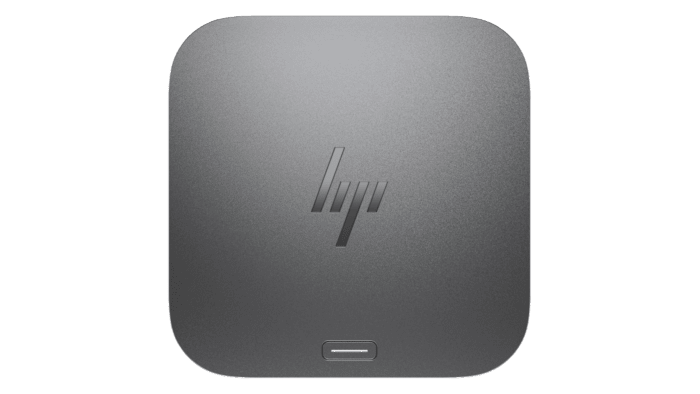
HP Thunderbolt 4 Ultra 180W G6 Dock



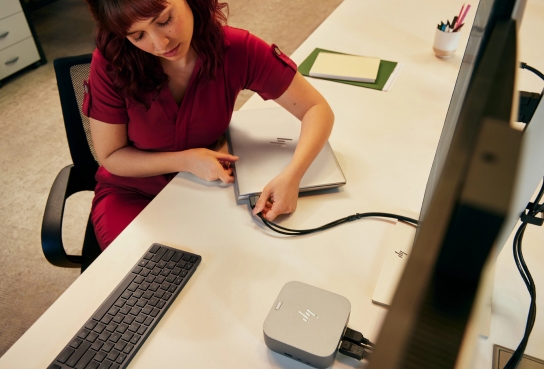
Minimise clutter from your workspace
Charge your PC and connect to your peripherals through just one USB-C® connection. [I] [II]
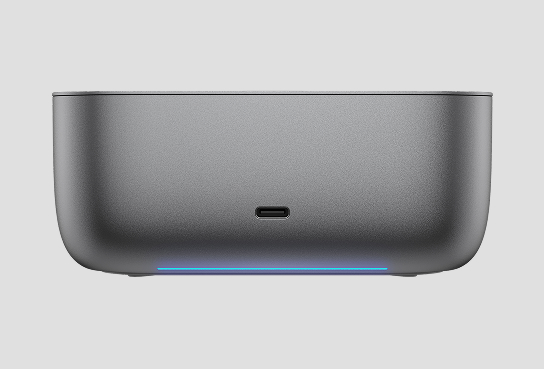
Connect quickly
Get to work faster with HP Quick Connect [III] —an ecosystem that wakes as you approach.
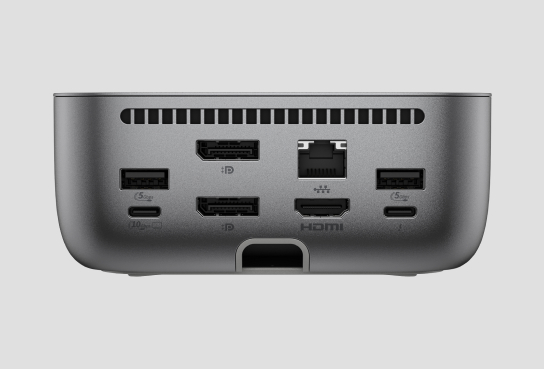
More ports means more capabilities
Connect to all your devices with TBT4™, USB-C® DP Alt. Mode, HDMI, RJ-45, two USB-C®, two DisplayPorts™, and five USB-A ports. [VIII]

Expand your canvas
Supports up to four 4K displays for maximum productivity. [II]
Optimise workspaces and user workflows remotely while ensuring everything remains secure.

Disclaimers
[I] Up to 280W power delivery through the Thunderbolt™ 4 cable available on PC's that support PD 3.1.
[II] For full data and video capability, the PC must support either: DisplayPort™ alt mode, Thunderbolt™ 3 alt mode, or USB4 through its USB-C® port. Charging and port replication are supported on notebooks that have implemented the USB-C® Power Delivery specifications. HP Quick Connect, Wake-on LAN from warm and cold dock, Wake-on LAN from S4/S5, and MAC Address Pass-Through, S0, S3, S4, S5 when connecting an on or off notebook to the dock features only function on HP or HP supported notebooks. HP does not provide ethernet and audio drivers on Mac PCs. Power button to turn off or to wake the system depends on implementation of the related and optional Power Delivery specification.
[III] HP Quick Connect must be enabled on the PC's BIOs and on the dock. HP Quick Connect is available on select HP G11 Intel and G12 Intel and AMD PCs. Bluetooth® required. Not available on TAA versions. Contact your local sales representative to learn more.
[IV] Poly Lens is a cloud-based device management solution that provides actionable insights and analytics around unified communications endpoints like Poly voice, video, headset devices, and select HP docking stations and can be sold as a stand-alone service. Internet access is required. Not available on TAA versions. Visit lens.poly.com to set-up an account.
[V] HP Wolf Security for Business requires Windows 10 or 11 Pro and higher, includes various HP security features and is available on HP Pro, Elite, RPOS and Workstation products. See product details for included security features.
[VI] Based on HP’s internal analysis of docking stations that are Thunderbolt™ 4, have auto validating & self healing firmware, Meet NIST 800-173 requirements, the ability to disable the RJ-45 and a BIOS MAPT authorized list. HP Sure Start on HP Thunderbolt G6 dock supports firmware integrity verification and recovery during dock start-up and disconnect. It does not include real-time and runtime protections or Microsoft SCCM integration typically found on HP Sure Start in HP notebooks.
[VII] HP Total Test Process testing is not a guarantee of future performance under these test conditions. Damage under the HP Total Test Process test conditions or any accidental damage requires an optional HP Accidental Damage Protection Care Pack.
[VIII] Comes with power cord.
Hardware compatibility
Tested and supported on select HP commercial PCs. For HP notebook compatibility please visit - https://pcb.inc.hp.com/webapp/#!/us-en and search by notebook. Tested and supported on select 3rd party PCs. Contact your local sales representative to learn more.
Features
More Ports. More Flexibility.
More ports means more capabilities. With a TBT4™, USB-C® DP Alt. Mode, HDMI, RJ-45, two USB-C®, two DisplayPorts™, and five USB-A ports, you can connect all your devices.
Intuitive, compact design
Stay in the know about device status updates with intuitive LED lighting and on-screen-display. Easily connect to your ports and declutter your desk with rear-facing USB-C® cable connectivity, all in a compact design.
A full suite of manageability tools
Empower your IT to manage and track your docks by product name, serial number, and MAC Address from anywhere with the time-saving, easy-to-use Electronic Tag (eTag) and HP CMSL management tools.
Wired Intel® vPro®
With Intel® vPro® Active Management Technology, authorized administrators can remotely access notebooks using wired connections, even if turned off, to make updates.
3-year limited warranty
Get added peace of mind with a 3-year limited warranty that includes technical support, diagnostic services, and hardware replacement.
Compatible with myHP
Enable hardware and software innovations from HP with the myHP application. This single dashboard houses access to settings for your docking station and other devices.
Specs
Specifications
HP ELITE DRAGONFLY DC1015 (PDF 6MB)
Category
-
Series
-
HP
Usage
-
RECOMMENDED USAGE
-
Business
Connectivity and Communications
-
I/O Port location
-
Front
-
I/O Port location
-
Right side
-
Ports
-
1 USB Type-A 10Gbps signaling rate (charging); 1 nano security lock slot; 1 USB Type-C® 10Gbps signaling rate (up to 15 W USB Power Delivery)
-
External Ports Location 04
-
Rear
-
External Ports 04
-
1 Thunderbolt™ 4 with USB Type-C® 40Gbps signaling rate; 1 USB Type-C® 10Gbps signaling rate (USB Power Delivery, DisplayPort™ 1.4); 2 USB Type-A 5Gbps signaling rate (charging); 1 HDMI 2.1; 2 DisplayPort™ 1.4; 1 RJ-45 (2.5 GbE)
-
Ports
-
1 USB Type-C® 10Gbps signaling rate (up to 15 W USB Power Delivery)
Battery and Power
-
Power Delivery
-
12V/5A; 15V/5A; 20V/5A; 5V/3A; 9V/3A
-
Power to Host
-
Up to 180 W via Thunderbolt™ 4 (both HP and non-HP host devices that support Power Delivery 3.1)
-
Power
-
230 W external power adapter
Multimedia and Input Devices
-
Power Button
-
Mechanical power button with RGB LED indicator to power or wake host system
Supported Operating Systems
-
Compatible Operating Systems
-
Windows 10; Windows 11; macOS; Linux; ThinPro; ChromeOS
System Requirements
-
Minimum System Requirements
-
USB Type-C® (USB Power Delivery, Alt Mode DisplayPort™); Thunderbolt™ 4 port
Dimensions
-
Minimum dimensions (W x D x H)
-
4.76 x 4.76 x 1.95 in
-
Dimensions without stand (W x D x H)
-
12.1 x 12.1 x 4.95 cm
Weights
-
Weight
-
790 g
Warranty
-
Warranty
-
HP three-year limited warranty
Compatibility
-
Hardware compatibility
-
Tested and supported on select HP commercial PCs. For HP notebook compatibility please visit - https://pcb.inc.hp.com/webapp/#!/us-en and search by notebook. Tested and supported on select 3rd party PCs. Contact your local sales representative to learn more.
Box contents
-
What's in the box
-
HP Thunderbolt 4 Ultra 180W G6 Dock; 230 W power adapter; Thunderbolt™ 4 cable (1 m); Power cord; Product notice; Warranty card
Geographic
-
Country of origin
-
Made in China or Thailand
Offers
Special offers
BACK TO BUSINESS
SEE MORE
Reviews
Questions and Answers
Drivers, Manuals & Support
Looking for software, drivers, firmware, warranty status, or manuals for this device?
Click here


Products purchased through this store are sold and fulfilled by Ingram Micro (NZ) LTD

CONTACT US
Call us
- Sales
- 0800 854 848
- Technical support
- +64 9884 8600
Mon-Fri 9.00am - 6.00pm
(exc. Public Holidays)
Chat with us
- Our specialist are here to help
- Live chat
Mon-Fri 9.00am - 6.00pm
(exc. Public Holidays)
Submit feedback
We value your opinion!