Thank you for visiting the AUSTRALIA HP Store
-
Contact Us
CONTACT USCall us
- Sales
- 1300 540 516
- Technical support
- 13 23 47
Exc. public holidays
Chat with us- Our specialist are here to help
- Live Product Demo
- Sales
- 61288061500 (WhatsApp)
-

- Post Sales
- 61288061700(WhatsApp)
Exc. public holidays
Live product demo
Submit feedback We value your opinion! - My Account

Search

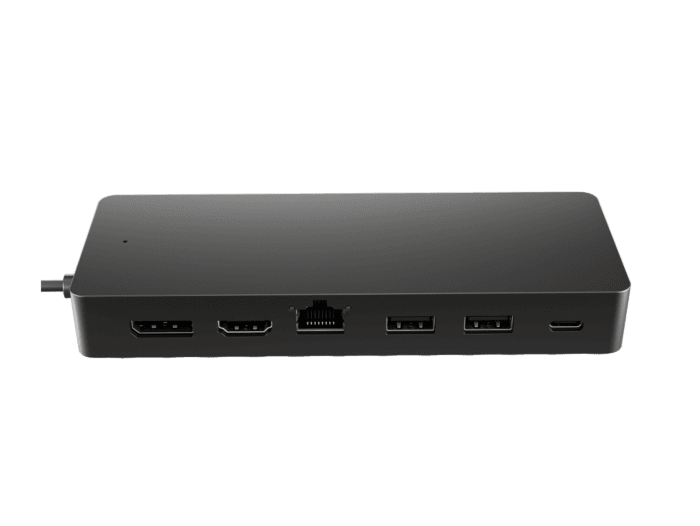
HP Universal USB-C Multiport Hub
HP Universal USB-C Multiport Hub is rated
out of
5 by
8.
HP Universal USB-C Multiport Hub Reviews
- A Hub That Does it All
- Universal USB-C®. Every OS
- Powers Dual 4K Displays & Your PC
- Comes with 1 HDMI 2.0, 1 DisplayPort™ 1.2, 2 USB-A ports, 1 USBC®[1] port, 1 USB-C®[1] passthrough port, and 1 ethernet port.
- Designed to Travel
- With 1 Year Limited Warranty
RATINGS & REVIEWS
REVIEWS
QUESTIONS & ANSWERS
QUESTIONS
Reviews
Rated 4 out of
5
by
Anonymous from
Works well - happy days
Wasn't obvious to me that it came with no power adapter but thankfully the HP Laptop came with 2, so all good.
More compact than earlier versions and stable
Date published: 2024-12-15
Rated 5 out of
5
by
EmRav from
Great
This hub is great. Easy to use and pretty self explanatory.
Date published: 2024-10-07
Questions and Answers
I recently purchased a HP Universal USB-C Multiport Hub. I also purchased a pass through charging cable which is max 90w. The cable is not powering the hub , Why not?
Hey Laza, we request you to connect with our technical support team at 1300 635 787 to get a compatible charger and for the issue that you are facing with the multiport hub.
Date published: 2024-04-29
Can this dock be used with the HP USB-C 65W Laptop Charger? If not, which usb-c laptop charger is compatible? I have an Elitebook 840 G8 Notebook PC.
Hey, Please connect with our technical support team at 1300 754 703 with complete model number of your laptop to get the compatible docking.
Date published: 2023-09-18
I have a HP laptop 15s-fq5070TU and need to connect 2 external (Dell) monitors using display ports. Can you please advise what equipment I need to do this. I have tried using HDMI connectors/adaptors but it has not worked. Thanks in advance
Hey Samzeda, Please connect with our technical support team at 1300 621 416.
Date published: 2023-09-25
Does this Universal hub support external displays when plugged into the USB-C port on an HP 15s laptop?
Thank you for reaching out to HP!
The external displays support will depend on the specific model variation of the laptop it is configured with. If you are interested in external displays supported HP laptop options you may reach out to our Sales team for recommendation and available promotions:
Sale
1300 462 370
+61 288 061 500 (WhatsApp)
shop@hp.com
Date published: 2025-03-12
What is max refresh rate if connecting 2 x 4K monitors?
Hi Pal337,
Thank you for reaching out to HP! This dock is capable of supporting dual 4K display at operating rates @ 30 Hz. If you are interested in more docking options you may reach out to our Sales team for recommendation and available promotions:
Sale
1300 462 370
+61 288 061 500 (WhatsApp)
shop@hp.com
Date published: 2025-01-22
Is there a way I can extend the USB-C laptop connection which is very short (i.e. can you recommend an extension cable that will allow me to move the hub further away from the laptop)?
Hey, Please connect with our technical support team at 1300 820 732 to get the details.
Date published: 2024-05-28
Would the HP Universal USB-C® Multiport Hub allow me to connect an additional monitor to my 31.5" Pavillion AIO that has no hdmi out connections (but 3 hdmi in connections)?
Hey Jules, Please connect with our technical support team at 1300 308 231.
Date published: 2023-09-05





Products purchased through this store are sold and fulfilled by Ingram Micro Pty Limited

CONTACT US
Call us
- Sales
- 1300 540 516
- Technical support
- 13 23 47
Exc. public holidays
Chat with us
- Our specialist are here to help
- Live Product Demo
- Sales
- 61288061500 (WhatsApp)
-
- Post Sales
- 61288061700(WhatsApp)
Exc. public holidays
Live product demo
Submit feedback
We value your opinion!