Thank you for visiting the AUSTRALIA HP Store
-
Contact Us
CONTACT USCall us
- Sales (Home, Students, Gamers)
- 1300 540 516
- Sales (Small Business Customers)
- 1800 891 209
- Post-Sales
- 13 23 47
- Technical support
- 13 10 47
Exc. public holidays
Chat with us- Our specialist are here to help
- Live Product Demo
- Sales
- 61288061500 (WhatsApp)
-

- Post Sales
- 61288061700(WhatsApp)
- Technical Support
- 61341594000(WhatsApp)
Exc. public holidays
Live product demo
Submit feedback We value your opinion! - My Account

Search

HP Gaming Mouse Pad
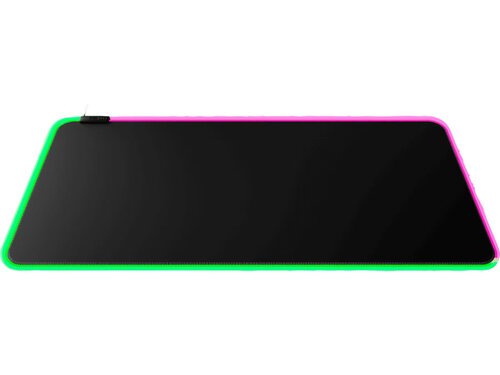
Precision Tracking
HP gaming mouse pads feature specially engineered surfaces that offer precise tracking, allowing your mouse sensor to accurately detect every movement. Whether you're making precise aiming adjustments or executing rapid flick shots, HP mouse pads ensure that your movements are translated into the game with accuracy.
Smooth Gliding Surface
The surface of HP gaming mouse pads is optimized for smooth gliding, minimizing friction and allowing for effortless mouse movements. This ensures that your mouse cursor responds smoothly to your actions, enabling you to maintain control and react quickly in fast-paced gaming scenarios.
Anti-Skid Base
To prevent unwanted movement during intense gaming sessions, HP gaming mouse pads are equipped with anti-skid rubber bases that grip firmly to your desktop surface. This ensures that your mouse pad stays in place, even during the most frantic gaming moments, providing a stable platform for precision gameplay.
Durability and Quality
Constructed from high-quality materials, HP gaming mouse pads are built to withstand the rigors of gaming. The durable fabric surface and reinforced edges ensure long-lasting performance, even with prolonged use. This means you can rely on your HP gaming mouse pad to provide consistent performance for countless gaming sessions to come.
HP gaming mouse pads feature specially engineered surfaces that offer precise tracking, allowing your mouse sensor to accurately detect every movement. Whether you're making precise aiming adjustments or executing rapid flick shots, HP mouse pads ensure that your movements are translated into the game with accuracy.
Smooth Gliding Surface
The surface of HP gaming mouse pads is optimized for smooth gliding, minimizing friction and allowing for effortless mouse movements. This ensures that your mouse cursor responds smoothly to your actions, enabling you to maintain control and react quickly in fast-paced gaming scenarios.
Anti-Skid Base
To prevent unwanted movement during intense gaming sessions, HP gaming mouse pads are equipped with anti-skid rubber bases that grip firmly to your desktop surface. This ensures that your mouse pad stays in place, even during the most frantic gaming moments, providing a stable platform for precision gameplay.
Durability and Quality
Constructed from high-quality materials, HP gaming mouse pads are built to withstand the rigors of gaming. The durable fabric surface and reinforced edges ensure long-lasting performance, even with prolonged use. This means you can rely on your HP gaming mouse pad to provide consistent performance for countless gaming sessions to come.
Shop HP Gaming Mouse Pads
- Ships Next Business Day*20% Off with PC/Monitor Purchase
- Out of Stock: Call - 1300 207 34420% Off with PC/Monitor Purchase

Frequently Asked Questions (FAQs): HP Gaming Mouse Pad
1. What are the benefits of using an HP gaming mouse pad?
HP gaming mouse pads offer several benefits, including precise tracking, smooth gliding surfaces, anti-skid bases, extended size options, and durability. These features enhance your gaming experience by providing optimal control and performance.
2. Are HP gaming mouse pads compatible with all types of gaming mice?
Yes, HP gaming mouse pads are designed to be compatible with a wide range of gaming mice, including optical and laser mice. The smooth and consistent surface of HP mouse pads ensures accurate tracking and responsiveness for various types of gaming mice.
3. How do I clean and maintain my HP gaming mouse pad?
To clean your HP gaming mouse pad, simply wipe the surface with a damp cloth or sponge using mild soap or detergent. Avoid using harsh chemicals or abrasive cleaners, as they may damage the fabric surface. Allow the mouse pad to air dry completely before using it again.
4. Can I use an HP gaming mouse pad for tasks other than gaming?
Absolutely, HP gaming mouse pads are versatile and can be used for various tasks beyond gaming. Whether you're working on graphic design projects, browsing the web, or performing everyday computing tasks, an HP gaming mouse pad provides a smooth and comfortable surface for your mouse.
5. Are there different sizes of HP gaming mouse pads available?
Yes, HP offers gaming mouse pads in a variety of sizes, including standard, extended, and extra-large options. Whether you prefer a compact mouse pad for a minimalist setup or an extended mouse pad for ample space to maneuver, HP has options to suit your preferences and gaming style.





Products purchased through this store are sold and fulfilled by Ingram Micro Pty Limited

CONTACT US
Call us
- Sales (Home, Students, Gamers)
- 1300 540 516
- Sales (Small Business Customers)
- 1800 891 209
- Post-Sales
- 13 23 47
- Technical support
- 13 10 47
Exc. public holidays
Chat with us
- Our specialist are here to help
- Live Product Demo
- Sales
- 61288061500 (WhatsApp)
-
- Post Sales
- 61288061700(WhatsApp)
- Technical Support
- 61341594000(WhatsApp)
Exc. public holidays
Live product demo
Submit feedback
We value your opinion!