Thank you for visiting the THAILAND HP Store
-
Contact Us
CONTACT USCall us
- Sales
- 1800-012-214
- Technical support
- 1800 294 207
- 6627873344
Mon-Fri 9.00am - 6.00pm
(exc. Public Holidays)
Chat with us- Our specialist are here to help
- Live chat
- Sales
- 6623284555(WhatsApp)
-

- @hpthailand (Line)
-

Mon-Fri 9.00am - 6.00pm
(exc. Public Holidays)
Store finder Locate our storesSubmit feedback We value your opinion! - Location
- My Account

Search
HP Online Store

-
Posted: December 15, 2023Categories: Accessories
 Read more »
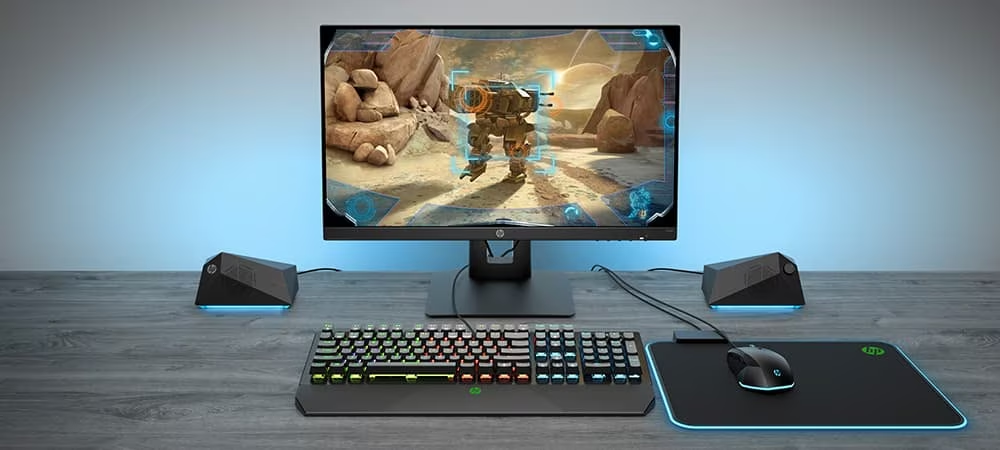
While it’s possible to game with a stock-standard keyboard and mouse combo, purpose-built PC gaming accessories improve the overall experience by enhancing ergonomics and facilitating faster response times. With the right peripherals, an avid gamer can comfortably indulge in a lengthy play session and gain a competitive edge over their foes.
A wide range of accessories improve ergonomics and in-game skills, from headsets to mechanical keyboards and ultra-precise mice. In this post, we’re covering the key benefits and outlining the top HP gaming accessories from HyperX.
The benefits of PC gaming accessories
Pro gamers and casual players alike can benefit from quality PC gaming accessories.
Ergonomics
The first major advantage is comfort. Unlike run-of-the-mill
-
Posted: December 15, 2023Categories: Laptops
 Read more »
Laptops are powerful tools that help with a wide range of tasks, while they are also excellent entertainment platforms. You will find numerous varieties available, each designed to meet particular needs.
However, with so many options on the market, it can be difficult to know which is the best laptop for business and personal use for you. We’ve created this brief business laptop vs home laptop guide to help you decide.
What to Expect From a Business Laptop?
As the name suggests, business laptops are made with professionals in mind. Not only does a business laptop need to make the right impression aesthetically, but it also needs to be powerful enough to run business-related software quickly.
As such, you can expect to find the following features in the best laptop computers for business.
-
Posted: October 30, 2023Categories: Printer
 Read more »If you regularly print documents from your home printer, you know how important it is to have a dependable one. After all, nobody wants to deal with the issues that arise from a subpar printer: smudged ink, paper jams and failed print jobs just to name a few of the frustrations.
 -
Posted: October 30, 2023Categories: Laptops
 Read more »
Mobile workstations are perfect for power users and creators. They are especially suited to creative pros and technical professionals of all kinds, across multiple industries, who are engaged in resource-intensive tasks, activities, and applications.
-
Posted: October 30, 2023Categories: Monitor
 Read more »
Whether you’re a PC or console gamer, gaming monitors can dramatically enhance your gaming experience. With richer colours, higher refresh rates, and generally more sophisticated image detail and fidelity, the right gaming monitor can make or break your gaming sessions. We’ve narrowed down the options to the best PC gaming monitors that you can get from HP.
-
Posted: October 30, 2023Categories: Monitor
 Read more »
When you’re facing long hours, loads of open tabs, and a constant flow of complex information, it’s easy to see why the best monitor for programming should minimize eye strain and prioritize your comfort.
-
Posted: October 30, 2023Categories: Miscellaneous
 Read more »Starting October 5, 2021, Microsoft began to roll out updates for eligible PC owners to start using the new Windows 11 operating system. For many, this is a long-awaited upgrade full of features that appeal to business professionals, gamers, and creators.
But what can you expect from this newest OS? And is your computer eligible? Here’s what you need to know about the free upgrade, as well as a list of our favorite features in this Windows 11 review.What is Windows 11?
Windows 11 is the latest version of the Microsoft Windows operating system. It follows Microsoft Windows 10 and is available to select users and those buying new PCs.
Microsoft routinely releases updates to its operating systems, but every few years, it starts fresh with a completely new one. For reference, Windows 10 was released in July 2015. -
Posted: October 30, 2023Categories: Accessories
 Read more »There’s much more to a laptop bag than getting from Point A to Point B. Students and professionals alike need a solution that offers protection on their bumpy bicycle commutes to class or the dash through the airport, but they’d also would like to show up with a bit of style.
 -
Posted: October 30, 2023
 Read more »If you’ve ever worked in the retail or service industry, and most of us have put in our dues in one of these two industries, you probably used to daydream about having a computer-based job. How nice it would be!
 -
Posted: October 30, 2023Categories: Gaming
 Read more »HP® has a full lineup of power-packed gaming PCs primed to handle even the most demanding games on the market. Whether you’re looking for a gaming desktop or laptop, here are our five best gaming PCs for you. But first, let’s do a quick overview of what you should be looking for in your gaming computer.
Recent Posts
Popular Posts


CONTACT US
Call us
- Sales
- 1800-012-214
- Technical support
- 1800 294 207
- 6627873344
Mon-Fri 9.00am - 6.00pm
(exc. Public Holidays)
Chat with us
- Our specialist are here to help
- Live chat
- Sales
- 6623284555(WhatsApp)
-
- @hpthailand (Line)
-
Mon-Fri 9.00am - 6.00pm
(exc. Public Holidays)
Store finder
Locate our stores
Submit feedback
We value your opinion!