SAR 779.00
SAVE SAR 170
SAR 609.00
  • bvseo_sdk, p_sdk, 3.2.1
  • CLOUD, getAggregateRating, 8.53ms
  • REVIEWS, PRODUCT

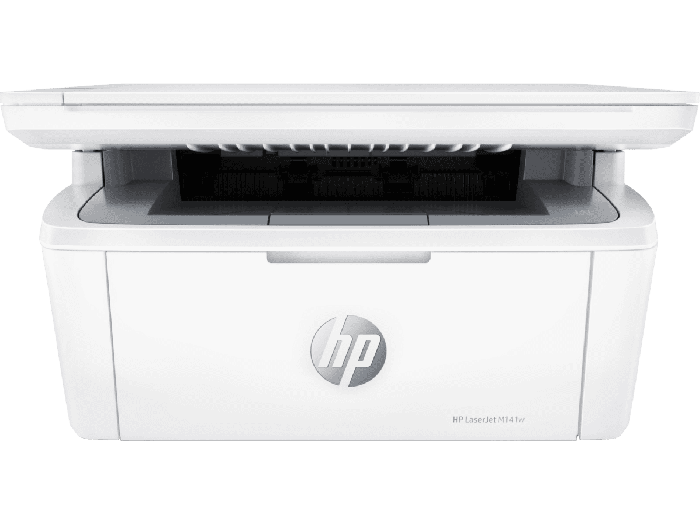
HP LaserJet MFP M141w Printer

Efficient performance from HP's smallest multifunction laser.
  • Functions: Print, copy, scan
  • USB; Wireless (Wi-Fi®)
  • (See more Specifications)
Don't find what you're looking for?
SAR 779.00 SAVESAR 170 (21%)
SAR 609.00
loading
loading
In Stock
Shipping Availability
Please select
In Stock
loading
Compare Products
0/4

Overview

Efficient performance from HP's smallest LaserJet MFP. Quickly print, scan, and copy, and easily copy ID cards.

Efficient performance from HP's smallest multifunction laser.

Stay on top of business. Get seamless setup from your desktop using HP Smart app.[1] Help save time with Shortcuts – you can organise documents 50% faster.[1,2]

Get high-quality scanning, and share to Dropbox, Google Drive or cloud – from your phone with HP Smart app.[1]

Get the quality and convenience you expect from a laser printer. Count on HP quality and reliability page after page, and get seamless setup and easy printing.[2]

Count on getting consistently superb prints from a small laser, using Original HP Toner Cartridges.

This printer is intended to work only with cartridges that have a new or reused HP chip, and it uses dynamic security measures to block cartridges using a non-HP chip. Periodic firmware updates will maintain the effectiveness of these measures and block cartridges that previously worked. A reused HP chip enables the use of reused, remanufactured, and refilled cartridges. More at:

More at:http://www.hp.com/learn/ds

Features

Small size. Big performance.

A LaserJet MFP so small it can fit almost anywhere.

Fast printing

Get print speeds up to 21/20ppm.[3]

Tackle the essentials – print, scan, copy

Easily handle tasks and get a lot from one device – print, scan, and copy.

Seamless setup

Get started fast with simple setup that guides you through each step, with HP Smart app.[1]

Legendary laser quality

This surprisingly small laser delivers exceptional quality, page after page.

Amazing scanning, now on your smartphone

Get high-quality scanning, and share to Dropbox, Google Drive, email, or the cloud - with HP Smart app.[1]

Printing just got more productive

Quickly access and print documents and images on your smartphone, from Dropbox and Google Drive.[1]

Extend your printing reach

Get wireless with self-reset to help you stay connected.[7]

Connect your printer with USB

Easily connect your printer to your computer with the built-in USB port.[4]

On when you need it, off when you don’t

Help save energy with HP Auto-On/Auto-Off Technology.[5]

Easy ID copying

Easily copy both sides of identification cards onto one side of paper.

Specifications

Functions

Multifunction / All-in-One

Color output

Black and white

Print technology

Laser

Duplex printing

No

Wireless capability

Yes

Recommended monthly page volume

100 to 1000

Product Info

Title

HP LaserJet MFP M141w Printer - (7MD74A#B13)

Sku

7MD74A#B13

?

Series

LaserJet

Features
?

Functions

Multifunction / All-in-One

Printer Specifications
?

Functions

Multifunction / All-in-One

Duty cycle (monthly, letter)

Up to 8,000 pages

Duty cycle note

Duty cycle is defined as the maximum number of pages per month of imaged output. This value provides a comparison of product robustness in relation to other HP LaserJet or HP Color LaserJet devices, and enables appropriate deployment of printers and MFPs to satisfy the demands of connected individuals or groups.

Duty cycle (monthly, A4)

Up to 8,000 pages

Recommended monthly page volume

100 to 1000

Target user and print volume

For teams up to 3 users

Paper trays, standard

1 input tray

Paper trays, maximum

1 input tray

Print colours

No

Top key features

Scan to email; Scan to PDF; Compact Size

Print technology

Laser

Duplex printing

No

Automatic paper sensor

Yes

Print Speed

Print speed

Up to 20 ppm

Connectivity And Communications

Mobile printing capability

HP Smart App; Apple AirPrint™; Mopria™ Certified; Wi-Fi® Direct Printing

Wireless capability

Yes

Connectivity, standard

1 Hi-Speed USB (compatible with USB 2.0 specifications); 802.11b/g/n (2.4 GHz) Wi-Fi radio + BLE

Cartridges And Printheads

Number of print cartridges

1 (black)

Replacement cartridges

HP 150A Black LaserJet Toner Cartridge (~975), W1500A

Number of print cartridges

1 (black)

Printing Media Handling

Maximum input capacity (sheets)

Up to 150 sheets

Input capacity

Up to 150 sheets

Maximum output capacity (sheets)

Up to 100 sheets

Output capacity

Up to 100 sheets

Standard output capacity (envelopes)

Up to 10 envelopes

Paper handling input, standard

150-sheet input tray

Paper handling output, standard

100-sheet output bin

Print Area

Top margin (A4)

2 mm

Left margin (A4)

2 mm

Right margin (A4)

2 mm

Bottom margin (A4)

2 mm

Print Resolution

Print quality black (best)

Up to 600 x 600 dpi

Supported Printing Media

Media sizes supported, key

A4; Envelopes

Media sizes supported

A4; A5; A6; envelopes (C5, DL); custom

Media sizes, custom

105 x 148 to 216 to 355.6mm

Media types

Plain paper, envelope, postcard, label

Media weight, supported

65 to 120 g/m²

Copier Specifications

Copies, maximum

Up to 99 copies

Copier settings

Number of Copies; Lighter/Darker; Optimize; Paper

Copy reduce / enlarge settings

25 to 400%

Copy Speed

Copy speed note

[10] First Copy Out from Ready and Simplex Copy Speed measured using ISO/IEC 29183, Duplex Copy Speed measured using ISO/IEC 24735, excludes first set of test documents. For more information see http://www.hp.com/go/printerclaims. Exact speed varies depending on the system configuration, software application and document complexity.

Scanner Specifications

Scan technology

CIS

Color scanning

Yes

Scan input modes

Scanning via HP LaserJet Software Scan or TWAIN-compliant or WIA-compliant software

Scan size, maximum

216 to 297 mm

Bit Depth

24 bit

Levels of grayscale

256

Twain version

Version 2.1 (Windows 7 or higher)

Scan file format

JPG, RAW (BMP), PNG, TIFF, PDF

Recommended monthly scan volume note

HP recommends that the number of pages per month of imaged output be within the stated range for optimum device performance, based on factors including supplies replacement intervals and device life over an extended warranty period.

Scan Resolution

Scan Resolution, Hardware

Up to 600 ppi

Scan Resolution, Optical

Up to 600 ppi

Supported Operating Systems

Compatible network operating systems

Windows 11; Windows Server; macOS 15 Sequoia; Linux

Compatible Operating Systems

Windows 11; Windows 10; macOS 10.14 Mojave; macOS 10.15 Catalina; macOS 15 Sequoia; Linux

Memory

Memory

64 MB

System Components

Control panel

8 buttons (Power, Cancel, Copy, ID Copy, Wireless, Copy setting, Up, Down), 4 LEDs (Ready/Power, Error, Toner, Wireless)

Dimensions

Maximum dimensions (W x D x H)

360 x 427 x 347 mm

Dimensions without stand (W x D x H)

360 x 264 x 197 mm

System Requirements

Minimum System Requirements

Microsoft® Windows® 11, 10, 2 GB available hard disk space, Internet connection, Microsoft® Internet Explorer or Edge.

Minimum System Requirements for Macintosh

Apple® macOS Catalina (v10.15) macOS Big Sur (v11.0) macOS Monterey (v12.0); 2 GB HD; Internet required

Rack And Power Specifications

Number of users

1-3 Users

Typical electricity consumption (TEC) number

0.255 kWh/Week (Energy Star 3.0);0.259 kWh/Week (Blue Angel)

Battery And Power

Power supply type

Power requirements are based on the country/region where the printer is sold. Do not convert operating voltages. This will damage the printer and void the product warranty.

ENERGY STAR® certified

No

Software And Applications

Software included

No CD in box.Downloadsoftware from hp.com or 123.hp.com

Mac compatible

Yes

Warranty

Warranty

Two-year limited warranty. For more info, please visit us at http://support.hp.com.For full terms and conditions, visit: www.hp.com/go/orderdocuments.Warranty and support options vary by product, country, and local legal requirements

Box Contents

What's in the box

HP LaserJet MFP M141w Printer; Power cord; HP Black LaserJet Toner Cartridge (yield: 500 pages); Setup Poster; Reference Guide; Warranty Guide; Flyer

Cable included

No, please purchase USB cable separately

Manufacturing, Packaging and Import Info

Country of origin

Make in Vietnam

Special offers

Reviews

  • bvseo_sdk, p_sdk, 3.2.1
  • CLOUD, getReviews, 7.48ms
  • REVIEWS, PRODUCT
  • bvseo-msg: HTTP status code of 404 was returned;

FEATURES

  • [1] Requires the HP Smart app download. For details on local printing requirements see http://www.hp.com/go/mobileprinting . Certain features/software are available in English language only, and differ between desktop and mobile applications. Subscription may be required; subscription may not be available in all countries. See details at www.hpsmart.com . Internet access required and must be purchased separately. HP account required for full functionality. List of supported operating systems available in app stores.
  • [2] Based on internal HP testing. Average timing estimate based on: 1) downloaded HP Smart app on mobile or desktop device, 2) setting up Shortcut, 3) scanning jobs which have more than 2-3 tasks associated with them (scan to email, save and rename, store to cloud, etc.). Average timing savings comparison based on using printer and desktop scan software to complete similar scanning tasks. Requires the HP Smart app download and supported HP printer. For details on local printing requirements see http://www.hp.com/go/mobileprinting
CONTACT US
Chat with us
Our specialist are here to help
Live chat

Sun-Thurs 8.30am - 5.30pm

(exc. Public Holidays)

Live product demo

Live Expert

Store finder Locate our stores
Submit feedback We value your opinion!