Figure 3: Release the cyan print cartridge  |
3. Grasp the blue handle of the cyan print cartridge and pull it towards yourself to release the cartridge from its slot. |
Figure 4: Pull the cyan print cartridge out 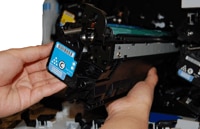
|
4. With one hand, slowly continue to pull the cyan print cartridge out of the printer, while supporting the
cyan print cartridge with your other hand.
CAUTION: Do not touch the green roller on top of the cartridge. Doing so can damage the cartridge. |
Figure 5: Align the cyan print cartridge |
5. Make sure the cyan print cartridge is correctly aligned before trying to insert it into the slot. |
Figure 6: Insert the cyan print cartridge |
6. Gently push the cyan print cartridge into its slot until it clicks into place. |
Figure 7: Close the front door
|
7. Lift up the front door until it clicks into place. |


 Printable version