
Fig. Diagnostics

Description
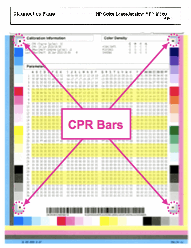
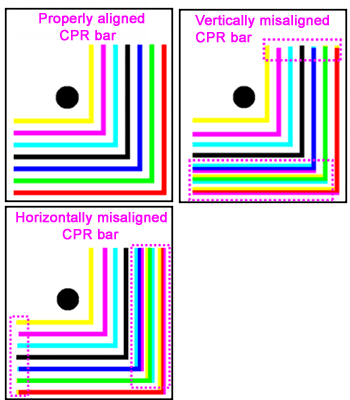
The CPR bars  are misaligned . Users usually describe this issue as text with shadows or halos.
Most likely causes
- This issue is caused by misalignment of different colors.
Troubleshooting and suggestions
- Before performing the diagnostic procedures below, check to be sure that printer is not installed in a area where abrupt change in temperature and humidity are experienced.
- Check to be sure that the consumables (ITB, Toner and Drum Cartridges) have good remaining life. Show me how.
- Print the two Diagnostics pages. Show me how.
- Look carefully at the CPR bars on the first Diagnostics page to check whether the CPR bars are misaligned .
- If the CPR bars are misaligned, calibrate the printer. Show me how.
- Print another set of the two Diagnostics pages. Show me how.
- Repeat the precedure No. 5 and No. 6 up to four times..
- Look at the diagnostics page you just printed. The CPR should improve after the 3rd or 4th time to a very acceptable state.
- If the issue is not resolved, Contact HP.
Recommended parts
None. Performing the troubleshooting procedure should resolve the issue.
Please let HP know if this helped you to resolve your issue, and help HP improve service.