Follow the steps listed below to check the supplies of your printer.
Note: It may be helpful to print out these instructions before you start to check the supplies of the printer.
| Figure | Step |
|---|---|
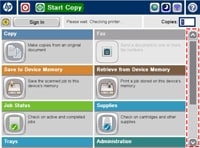
Figure 1: Home screen.
|
1. Go to the home screen on the touchscreen, then locate the scroll bar on the right as shown in Figure 1. |
Figure 2: Touch Supplies.
|
2. Touch the down arrow on the scroll bar to find SUPPLIES. Then touch SUPPLIES. |
Figure 3: Check Supplies.
|
3. Verify weather the "Very Low" message is present in any supply. Note: Figure 3 is showing an example of black cartridge that is in low level. The "Very Low" message may be shown in any other supply. |



Please let HP know if this helped you to resolve your issue, and help HP improve service.