Thank you for visiting the THAILAND HP Store
-
Contact Us
CONTACT USCall us
- Sales
- 02-3536020
- Technical support
- 1800014493
- 024450601
Mon-Fri 9.00am - 6.00pm
(exc. Public Holidays)
Chat with us- Our specialist are here to help
- Live chat
- Sales
- 6623284555(WhatsApp)
-

- @hpthailand (Line)
-

Mon-Fri 9.00am - 6.00pm
(exc. Public Holidays)
Store finder Locate our storesSubmit feedback We value your opinion! - Location
- My Account

Search

HP MECHANICAL KEYBOARDS
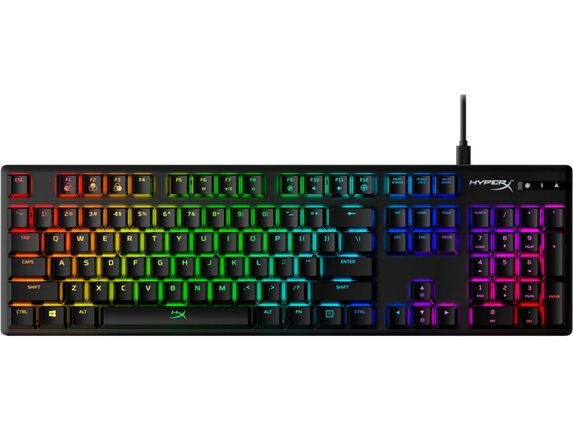
Mechanical Switches: HP mechanical keyboards are equipped with high-quality mechanical switches, providing tactile feedback and rapid actuation. Whether you prefer clicky, tactile, or linear switches, HP offers options to suit your typing or gaming style.
Customizable RGB Lighting: Elevate your gaming setup with customizable RGB lighting on HP mechanical keyboards. Choose from a spectrum of colors and dynamic lighting effects to personalize your gaming environment and create an immersive experience.
Durable Construction: Crafted with durability in mind, HP mechanical keyboards feature a sturdy construction and premium materials. They're built to withstand the demands of intense gaming sessions and prolonged typing tasks, ensuring long-lasting performance.
Ergonomic Design: Engineered for comfort, HP mechanical keyboards boast an ergonomic design with features like wrist rests, adjustable tilt angles, and optimized key spacing. Say goodbye to discomfort and hello to ergonomic excellence.
SHOP HP MECHANICAL KEYBOARDS
Frequently Asked Questions
1. What are mechanical keyboards, and why choose an HP mechanical keyboard?
Mechanical keyboards use individual mechanical switches for each key, providing a tactile response and durability. HP mechanical keyboards offer superior typing feel, longevity, and customization options, making them ideal for gamers, typists, and professionals seeking enhanced performance.
2. How do HP mechanical keyboards differ from membrane keyboards?
HP mechanical keyboards use mechanical switches, while membrane keyboards use rubber domes under the keys. Mechanical keyboards offer better tactile feedback, faster response times, and greater durability compared to membrane keyboards. HP mechanical keyboards provide a more satisfying typing experience and are better suited for intensive typing or gaming tasks.
3. What types of mechanical switches are available in HP mechanical keyboards?
HP offers a range of mechanical switches, including Blue, Red, Brown, and more. Each switch type has its characteristics, such as clicky feedback (Blue), linear response (Red), or tactile bump (Brown). Users can choose the switch type that best suits their typing or gaming preferences.
4. Can I customize the RGB lighting on HP mechanical keyboards?
Yes, HP mechanical keyboards typically come with customizable RGB lighting options. Users can personalize the lighting effects, colors, and brightness levels to match their preferences and gaming setup using HP's customization software.
5. How do I clean and maintain my HP mechanical keyboard?
To clean your HP mechanical keyboard, use a soft brush or compressed air to remove dust and debris from between the keys. You can also use a damp cloth with mild soap to wipe down the keycaps and keyboard surface. Avoid using harsh chemicals or abrasive materials, as they may damage the keyboard.
6. Are HP mechanical keyboards compatible with Windows operating systems?
Yes, HP mechanical keyboards are compatible with Windows operating systems, offering versatility for users across different platforms. Simply plug in the keyboard via USB, and it should work seamlessly with your preferred operating system.


CONTACT US
Call us
- Sales
- 02-3536020
- Technical support
- 1800014493
- 024450601
Mon-Fri 9.00am - 6.00pm
(exc. Public Holidays)
Chat with us
- Our specialist are here to help
- Live chat
- Sales
- 6623284555(WhatsApp)
-
- @hpthailand (Line)
-
Mon-Fri 9.00am - 6.00pm
(exc. Public Holidays)
Store finder
Locate our stores
Submit feedback
We value your opinion!