Color Definition: Black: 
Note: It may be helpful to print out these instructions before you start to replace the black print cartridge.
| Figure | Step |
|---|---|
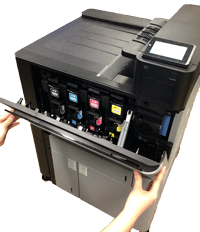
Figure 1: Open the front door
|
1. Open the front door. Make sure that the door is completely open. |
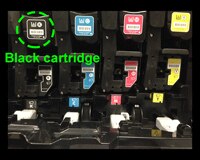
Figure 2: Locate the black print cartridge
|
2. Locate the black print cartridge. |
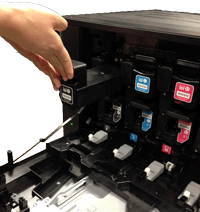
Figure 3: Release the black print cartridge
|
3. Grasp the handle of the black print cartridge and pull it toward yourself to release the cartridge from its slot. |
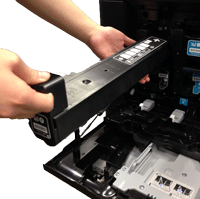
Figure 4: Pull the black print cartridge out
|
4. With one hand, slowly continue to pull the black print cartridge out of the printer, while supporting the black print cartridge with your other hand. Then put it on a clean level surface. CAUTION: Do not touch the green roller on top of the cartridge. Doing so can damage the cartridge. |
Please let HP know if this helped you to resolve your issue, and help HP improve service.