Color Definition: Yellow: 
Note:This instruction is illustrated using magenta toner cartridge. The procedure is the same as for yellow toner cartridge, except for the color. It may be helpful to print out these instructions before you start to check the pins on the yellow toner cartridge.
| Figure | Step |
|---|---|
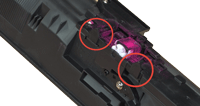
Figure 1: Locate the pins
|
1. Locate the pins on the toner cartridge as shown in Figure 1. |
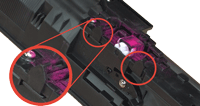
Figure 2: Check the pins
|
2. Ensure the plastic pins are not broken. Figure 2 shows an example of a pin that is not broken. |
Please let HP know if this helped you to resolve your issue, and help HP improve service.