Note:It may be helpful to print out these instructions before you start to check bushings of the ITB unit.
| Figure | Step |
|---|---|
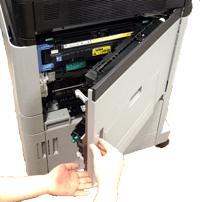
Figure 1: Open the right door
|
1. Open the right door. |
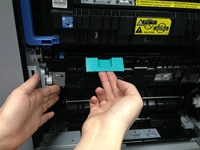
Figure 2: Open the panel
|
2. Lift the green handle on the transfer assembly to release it, and grasp the green handle and pull the transfer assembly directly toward yourself to open the panel. |
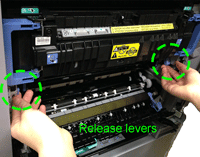
Figure 3: Unlock the ITB unit
|
3. Unlock the ITB unit by lifting the release levers as shown in the callout of Figure 3. |
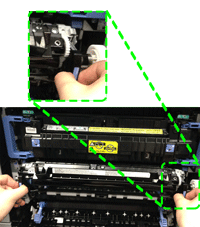
Figure 4: Grasp the handles and pull the ITB unit out 6 inches
|
4. Grasp the ITB handles as shown in the Figure 4 callout and then pull the ITB unit straight toward yourself about 6inches.
CAUTION: Be careful not to pull the ITB unit out too far. It is heavy and may fall suddenly when it comes free from the ITB slot. |
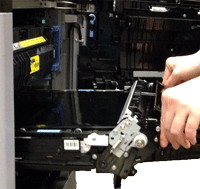
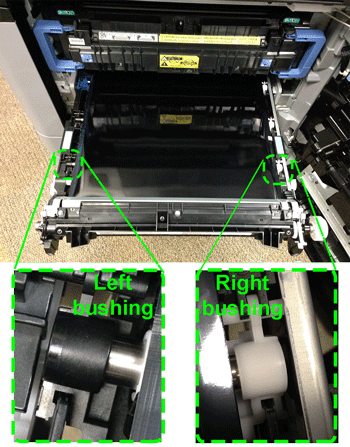
Figure 5: Locate the bushing
|
5. Locate the left and right bushing, as shown in the callout of Figure 2. |
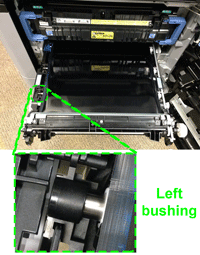
Figure 6: Check the left bushing
|
6. Check the position of the left bushing. It should be snap down in the white holder as shown in Figure 6. |
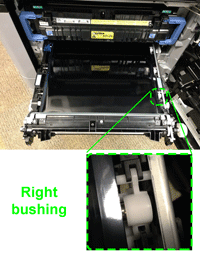
Figure 7: Check the right bushing
|
7. Check the position of the right bushing. It should be snap down in the white holder as shown in Figure 6. |

Please let HP know if this helped you to resolve your issue, and help HP improve service.