Note: It may be helpful to print out these instructions before you start the swap cartridge procedure.
| Figure | Step |
|---|---|
Figure 1: Touch Back Arrow
|
1. Touch BACK arrow on top of the screen to go back to the menu of Troubleshooting. CAUTION: The tab DISABLE CARTRIDGE CHECK has disappeared on the touchscreen. |
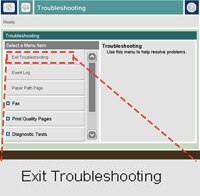
Figure 2: Touch Exit Troubleshooting
|
2. Touch EXIT TROUBLESHOOTING. The message WAIT FOR PRINTER TO REINITIALIZE displays on the control panel, then the printer starts initializing. Note that this will take several minutes. The printer then returns to READY. |