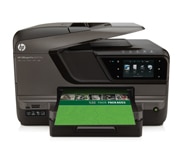
| Introduction: When it comes to wireless printing, it's important to make sure your office network is secure. Learn about encrypting your wireless network, plus find tips for securing your ePrint account and sharing your wireless network with visitors. |
 |
 |
| Wireless technologies that provide long-range connectivity can't be contained within an office. |
|
 |
| When you use a network that's not secure, hackers could potentially "capture" the information you're sending back and forth. This means passwords, records, and more. |
|
|
| When you have a wireless network, you need to make sure it's kept secure. An unencrypted network presents the potential for security breaches. |
|
|
| Isn't my network already secure? |
| With some older wireless technologies, like Bluetooth, access is limited by physical proximity to the corporate network. However, wireless technologies that provide long-range connectivity, such as 802.11n, can't be contained within an office space. That means anyone within range of a non-secure network can gain access. |
|
| What happens if I don't secure my network? It may seem harmless to offer your network's access to outside users, but it's more than just letting people surf the Internet for free or accidentally send print jobs to your printer. There are actual hazards: |
|
|
• |
Breach of privacy: When you use the Internet, you are sending "packets" of information back and forth. Hackers could potentially capture and open these packets. This means access to passwords, financial records, customer information, private data, and more. |
|
|
• |
Slower access: Additional users on your network, especially those who may be downloading and uploading content, will slow down Internet access for all users. |
|
|
• |
Illegal traffic: Unwanted users may access your network for illegal Internet activity. If this happens, you may be caught up in any legal action taken. |
|
|
• |
Data usage overages: Many ISPs limit your monthly data usage. Unwanted users can cause your account to be in violation of those limits. |
|
|
|
|
|
|
 |
| Whether sending confidential documents to the Internet or to your printer, encryption will scramble this information to outsiders. |
|
|
|
| When it comes to wireless security, encrypting your network is the most important security measure—it also may be the only measure you need. |
|
|
What is encryption?
All of your wireless devices, including wireless printers, connect to your computer through your wireless router. When you encrypt your network, the information transmitted to and from your router is scrambled, making your network's information unreadable to outsiders. |
|
How do I encrypt my network?
Encryption means creating a difficult network password, also known as an encryption code or passphrase. Note that there are many methods of encryption, though not all of them are secure. |
|
|
| Read on to learn which encryption methods are secure and how to create a strong password. |
|
 |
| Don't use short, easily guessable text-based passwords. There are many online sites that can generate random passwords for you. |
|
 |
| While both WPA and WPA2 are stronger than WEP, the strength of your encryption is directly linked to the length of your password or passphrase—the longer, the better. |
|
 |
| It's important to have a wireless printer with the latest encryption methods! Many new printers, such as the LaserJet Pro CM1415 Color MFP, support both WPA and WPA2. |
|
|
| There are many methods of encryption, though not all of them are secure. HP wireless printers support: |
|
|
WEP (Wired Equivalency Privacy)
This basic level of encryption isn't considered secure. Because some older wireless printers only support WEP, you may have to choose between lowering the level of security for your entire network to WEP and connecting your printer using an Ethernet or USB cable. |
|
| You might also consider upgrading your printer. Remember, though, while using WEP is not encouraged, WEP encryption is better than no encryption. |
|
|
• |
To create a WEP password: Make a case-sensitive password using 10-58 digits (use the numbers 0-9 and the letters A-F). |
|
WPA and WPA2 (Wi-Fi Protected Access)
Created in response to WEP's weaknesses, WPA and WPA2 are the preferred methods of encryption. Most HP wireless printers support these methods, which uses both passwords and passphrases. What's the difference? |
|
|
• |
A password is generally one grouping of letters, numbers, and/or punctuation without spaces. Example: p@ssw0rrd |
|
|
• |
A passphrase is a string of grouped letters, numbers, and/or punctuation (almost like a sentence), including spaces, longer than anyone could reasonably remember. Example: +hI$ 1s An 3xAmpLe 0F @ Ba$iC pa$sPhRa$3! |
|
| To create a WPA or WPA2 password or passphrase: Make a case-sensitive password using at least 13 characters, including upper- and lowercase letters, punctuation, and numbers. If using a passphrase, include spaces. |
|
|
| Tip: By including spaces, a passphrase is much harder to break than a password. There are many online sites that can generate random passwords for you. |
|
|
|
|
|
 |
| Want to give clients access to your printer or the Web without access to your server? Consider purchasing a router with a guest network. |
|
 |
| Printers with HP ePrint allow you or clients to print from any device with e-mail capabilities—that means laptops and smartphones!1 |
|
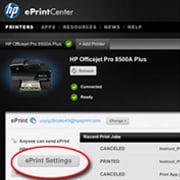 |
| To secure your ePrint account, visit the HP ePrintCenter, sign in, and click ePrint Settings. |
|
|
| In addition to creating a difficult passphrase, it's also important to: |
|
|
|
• |
Work behind a firewall. A firewall is a barrier that checks both data and requests for data that are sent to your network and discards any suspicious items. Firewalls are available in many varieties, both software and hardware. Some networks use a combination of both types. Learn how to protect your PC with firewalls. |
|
|
• |
Safely allow wireless access for visitors. If clients or colleagues often access your printer or the Internet, consider buying a router with a guest network. This will give your guests access to the Web but not your main network or its devices. |
|
|
|
If your guest simply needs to print, find a wireless printer with HP ePrint. E-mail office documents, presentations, and photos directly to an HP ePrint-enabled printer using any device with e-mail capabilities–including smartphones.1 |
|
|
• |
Secure your HP ePrint account. Many businesses already have printers with HP ePrint but aren't sure how to secure their printer from unwanted spam. Luckily, HP ePrint is set up to be as broad or as secure as you'd like—and you're able to easily change your e-mail address. |
|
|
|
At the HP ePrintCenter, you can control various settings, including who is allowed to send materials to your printer. To manage your allowed senders: |
|
|
|
| 1. |
Sign in and click on ePrint Settings to determine who can send print jobs to your printer. |
|
| 2. |
Under the Allowed Senders tab, you'll have two options for who can send print jobs to your HP ePrint-enabled printer: Everyone or Allowed Senders Only. |
|
| 3. |
If you choose the Allowed Senders Only option, you can then enter the e-mail addresses that are allowed to print to your printer. You can specify up to 500 e-mail addresses. |
|
|
|
|
|
|
|
|
|
|
|
|