Color Definition: Magenta: 
Note:It may be helpful to print out these instructions before you start to check bushings of the ITB unit.
| Figure | Step |
|---|---|
Figure 1: Locate the gate
|
1. Locate the gate on the toner cartridge as shown in Figure 1. |
Figure 2: Check the gate
|
2. The gate should be in closed position as as shown in Figure 2. Here are examples of a toner gate that is partially open, and one that is completely open.
|
Figure 3: Push and hold the black lever
|
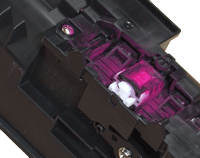
2. If the gate is not in closed position, push and hold the black lever in the up position, as shown in Figure 3. |
Figure 4: Rotate the whie gear
|
2.Rotate the white knob, or gear, clockwise, until the toner gate becomes completely closed. |
Figure 5: Release the black lever.
|
2.Release the black lever. This action will keep the gate locked in the closed position when the cartridge is out of the printer. |
Figure 5: Return the cartridge to the flat surface.
|
2.Return the cartridge to the flat surface. |



Please let HP know if this helped you to resolve your issue, and help HP improve service.