Note: It may be helpful to print out these instructions before you start to clean the ADF rollers and the ADF separation pad.
| Figure | Step |
|---|---|
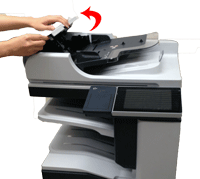
Figure 1: Open the ADF cover.
|
1. Pull the release lever to open the ADF cover, as shown in Figure 1 |
Figure 2: Clean the ADF rollers.
|
2. Locate the ADF rollers as shown in Figure 2, then wipe the rollers with a clean, water-dampened, lint-free cloth. CAUTION: Do not pour water directly onto the ADF rollers. Doing so might damage the device. NOTE: If you continue to have a problem with paper jams or misfeeds, Contact HP. |
Figure 3: Clean the ADF separation pad.
|
3. Locate the ADF separation pad as shown in Figure 3, then wipe the pad with a clean, water-dampened, lint-free cloth. CAUTION: Do not pour water directly onto the ADF separation pad. Doing so might damage the device. NOTE: If you continue to have a problem with paper jams or misfeeds, Contact HP. |
Figure 4: Close the ADF cover.
|
4. Close the ADF cover. |


Please let HP know if this helped you to resolve your issue, and help HP improve service.