Jump to content United States-English
HP.com Home Products and Services Support and Drivers Solutions How to Buy
» contact hp
search:
more options
 
HP invent - logo
business support center  >  technical support -HP Color LaserJet 3600  >  print quality troubleshooting tool

Print Quality Troubleshooting Tool for HP Color LaserJet 3600

Checking transfer unit
» 

Print Quality Home

» site map
» other resources
» frequently asked questions
Printing Procedures
» print PQ troubleshooting pages
» print diagnostics page
» print solid color test pages
Issues on
» cyan test page
» magenta test page
» yellow test page
» black test page
» blank test page
» solid color test pages
» diagnostics page
» order supplies
» technical support -HP Color LaserJet 3600
Bookmark this Web site
Content starts here

Figure

Step

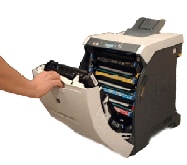
Figure 1: Open front doorexample

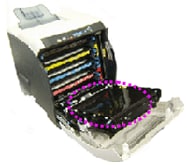
Figure 2: Transfer unitexample

Figure 3: Closed shutter example

Figure 4: Open shutterexample

1. Pull down the front door.

CAUTION: Do not place anything on the transfer unit, and do not touch the transfer unit while it is open. If the transfer unit is punctured, print quality problems could result.

2. Check whether the cartridge shutters are closing as you are pulling down the front door.

Figure 5: Close front doorexample

3. Push the front door back to up-position.

4. Check whether the cartridge shutters are opening as you are pulling back the front door.


» Was this helpful?

Please let HP know if this helped you to resolve your issue and help HP improve service.

Printable version
Privacy statement Using this site means you accept its terms
© 2004 Hewlett-Packard Development Company, L.P.